0:00
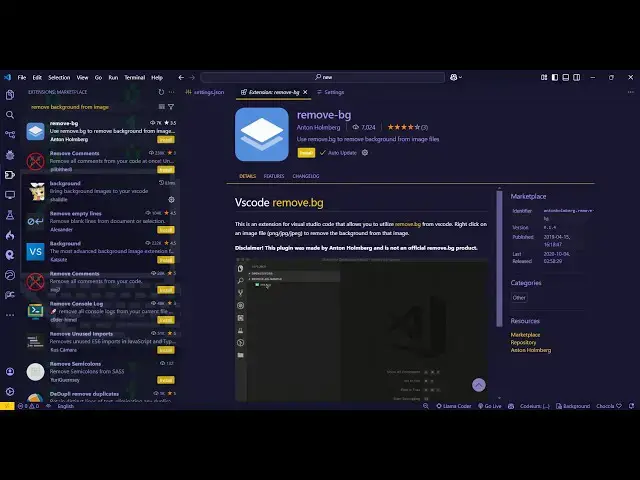
uh hello guys welcome to this video so
0:02
in this video I will show you a vs code
0:04
extension which can directly remove
0:07
background from images right inside your
0:10
vs code IDE so if you go to the
0:12
extensions tab just type remove dbg
0:16
remove DPG this extension will come
0:20
here and it having almost 7,000 installs
0:24
so it is actually using the remove BG
0:26
website here very popular website for
0:29
removing back for images so they are
0:33
using its API so you just need to log in
0:35
with your here in this
0:37
website if you don't have an account you
0:40
can sign up totally for free I've
0:42
already have an account here so once you
0:44
sign up it gives you some credits so per
0:49
50 credits which you can use you can
0:52
directly remove 50 background from
0:54
images come to the dashboard and WR in
0:57
the API key section just select this
1:00
and here you need to create a new API
1:02
key so you can give it a name here and
1:05
it will generate this API key for you so
1:08
just click the copy button to copy this
1:10
API key and just install this
1:13
extension so once the in extension has
1:16
been activated and then you need to go
1:20
to the settings here and here you just
1:23
need to put the API key right here so
1:26
just paste your API key
1:30
and then if you come to the we uh any
1:32
image here which is present so now let's
1:35
suppose I take this example of this
1:36
image and I right click and there will
1:39
be this option available for removing
1:44
here so there will be this option
1:47
present right here remove background so
1:49
if you just select this option so what
1:52
it will do it will actually use its API
1:55
and you will see the background is
1:57
successfully removed if you open this
1:59
image you will see the image is totally
2:01
transparent all the background is
2:04
successfully removed using this API here
2:07
so you can see the quality looks quite
2:09
good and if you see in the dashboard
2:14
credit if you go to the dashboard
2:18
here so one credit has been used here so
2:23
free credits you get per month so if you
2:27
are interested you can even upgrade to
2:30
their plan so if you so this is actually
2:33
the vs code extension it uses that API
2:36
to directly remove background from the
2:40
images so you can start using this
2:42
extension so also visit my website free
2:46
which contains thousands of tools
2:49
regarding audio video and
2:51
image and I will be seeing you in the