0:00
uh hello guys welcome to this video so
0:02
in this video I will show you a vs code
0:04
extension which lets you turn your vs
0:06
code into a search engine so you can
0:09
actually highlight anything and Google
0:13
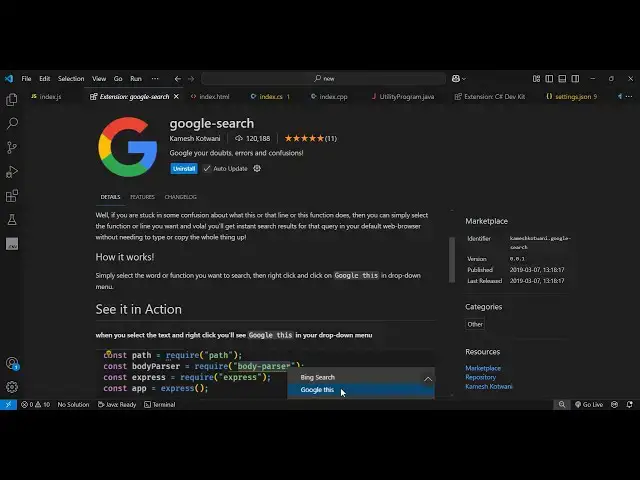
search so this is actually the extension
0:16
if you go to extensions just type here
0:18
Google search and this extension which
0:20
comes right here simply it is having
0:25
120,000 installs so you just need to
0:28
click the install button and activate
0:30
this extension so once you activated
0:32
this extension the whole VSS code is
0:35
turned into a search engine so now what
0:38
we need to do if you have problem with
0:40
something you can highlight the code
0:42
here and right click and this option
0:45
will appear which is Google
0:48
this so once this option appears you can
0:52
directly it will add this option into
0:54
the context menu right click menu so you
0:56
can directly Google this and simply open
1:01
it will open your Google search engine
1:03
it will automatically type this
1:06
automatically for you and now you can
1:09
troubleshoot your problem going to stack
1:13
Overflow so this will save you a lot of
1:15
time because you don't need to manually
1:17
write the code here you simply select
1:19
whatever code that is creating problem
1:22
right click Google this and then it will
1:26
automatically open google.com with with
1:28
this automatic typed so it will tell
1:32
you so personally I use this a lot
1:36
because it saves me a lot of time
1:38
because if I face any sort of error in
1:40
vs code I can highlight the code and
1:41
simply Google this so it will open this
1:44
and it I basically get whatever things
1:48
I'm looking forward to Let's suppose I
1:51
don't understand some code I can
1:54
simply highlight whichever code and then
1:58
Google this and and it will
2:03
google.com and you can fix your
2:07
problem so it's a very great extension
2:10
definitely use it install this Google
2:12
Search install and activate this and
2:16
just whatever thing that you are just
2:18
right click and this option will appear
2:25
this so Google is a very popular most
2:29
popular search engine so it will help
2:32
you a lot personally it saves me a lot
2:36
here so it works with any language all
2:39
the languages it works with JavaScript
2:41
PHP so it actually turns all your vs
2:44
code into a search engine so you can
2:49
anything so this was the extension guys
2:52
thank you very much for watching this
2:54
video and also check out my website free
2:56
mediat tools.com which contains
2:58
thousands of tools regarding audio video
2:59
video nhmh and I will be seeing you in