Up next in 10

This Warp Coding AI IDE & CLI is INSANE to Build & Deploy Full Stack Apps From Prompt For FREE
Apr 8, 2026

Watch My Visual Studio Code IDE Setup Video For Fonts,Themes & Extensions
https://youtu.be/Bon8Pm1gbX8
Hi Join the official discord server to resolve doubts here:
https://discord.gg/cRnjhk6nzW
Visit my Online Free Media Tool Website
https://freemediatools.com/
Buy Premium Scripts and Apps Here:
https://procodestore.com/
Show More Show Less View Video Transcript
0:02
Uh hello guys, welcome to this uh live
0:04
stream. So in this live stream I will
0:06
talk about a AI coding ID uh which is
0:09
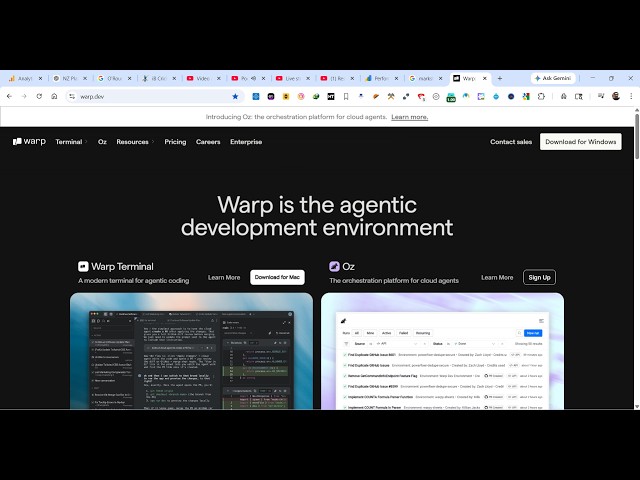
really popular. It's called as wp. If
0:12
you simply go to Google simply type var
0:16
it's called as
0:18
so it's similar to visual studio cla gpt
0:21
cursor where you can develop fullstack
0:23
coding applications directly by
0:25
installing this. So it comes with two
0:28
things. They it also have a CLI which is
0:32
similar to cloud code where you simply
0:34
install it inside your terminal and
0:36
directly build out applications
0:39
or debug your code. And the second one
0:41
is also it's uh completely free to
0:44
install. You can download this on
0:47
Windows. So it's a .exe file.
0:50
So I have already installed it. So it's
0:54
actually the setup file here. It will
0:56
simply
1:00
now after you install this.
1:04
So it's actually a setup file just 81
1:07
mgabytes. So you run the setup. Uh
1:12
so now it will simply install this. So
1:16
once it get installed you will be able
1:18
to make your application and uh it's
1:21
very free to try out. Uh if I show you
1:24
the pricing here, uh it's actually free
1:26
for developers who want to try out. It
1:30
gives you limited free AI credits to
1:32
actually try out the actual full stack
1:35
coding editor. And the paid plan start
1:38
with $18 per month. Uh $180 per month.
1:41
So once it get installed here, it will
1:44
automatically launch here.
1:50
So if you're using it for the very first
1:52
time, you click the sign up button and
1:54
automatically your browser will open.
1:56
You just need to continue with your
1:58
Google account here and simply grant the
2:01
permission.
2:10
So once you complete all the steps you
2:12
will be redirected you to the editor
2:14
right here. So click on open work. So
2:17
now the editor will directly open right
2:19
here.
2:21
So right here click on
2:24
complete all the step here. So
2:28
now you will have this simple.
2:33
So it's actually telling you what you
2:35
have the chat prompt here. So exactly
2:37
you simply tell the AI what sort of
2:39
application you want to generate. So I
2:41
will simply say build a image to PDF web
2:45
app.
2:47
So you exactly tell the agent what sort
2:50
of application you want to develop and
2:52
now the AI will start developing this
2:55
application. So you will see that you
2:58
can change the working directory as
3:00
well. So whatever working directory you
3:02
want from here you can control it.
3:09
So it will actually build out this step
3:11
by step containing all the files. It
3:13
will we need to grant the permission
3:15
here. So click on run. So it will
3:26
so it will generate a fully fledged uh
3:31
so click on run.
3:45
So it's in the meantime it's developing
3:48
the application. Let me also show you
3:50
it's also available on the terminal. If
3:52
you click on terminal [snorts] you can
3:55
install this.
3:58
You can download it for Mac. This is a
4:01
command here.
4:04
So this is W terminal install on
4:08
Windows.
4:10
Exactly. Tell it's uh
4:22
You can directly download as I showed
4:24
you this also comes with this terminal
4:26
as well. So it's actually generating all
4:28
the files for you on the terminal. So
4:32
the just this code editor is needed
4:34
right here. Automatically it's
4:37
generating out your application.
4:40
[snorts] So it's a very good editor.
4:45
AI coding editor. So from here you can
4:48
even share it with other people as well.
4:50
You can invite other people from here.
4:53
Just copy your link and invite other
4:56
people. So you can see it's actually
4:58
generated this files here. This is your
5:00
style dot CSS. This is your index html
5:04
file. This is script js.
5:08
So you can either accept click the
5:10
accept button. So,
5:20
so you can click the run button to
5:22
actually run the application.
5:27
Click on run.
5:30
So, it's actually checking all the files
5:33
if it is syntax is correct or not. After
5:36
that
5:38
you can see now it has successfully
5:40
created this project here. You can open
5:43
it directly in the browser. So it's
5:45
given you the short description what it
5:47
has created these three files uh image
5:50
to PDF editor. So
5:54
from here you can open it in V here. So
5:57
it actually showed you all the source
5:59
code that it has generated.
6:02
It cost you around 12
6:05
credits. So right here you can see that
6:08
you can also please run the app for me.
6:12
You can ask follow question as well. So
6:15
if you directly want to run the app, you
6:17
can ask the AI. It will start a server
6:20
for you automatically. It will run the
6:22
app as well. So
6:38
now it has successfully started a server
6:40
locally. So in this easy way you can
6:43
actually use this uh hub coding IDE to
6:48
actually create your applications
6:50
fullstack coding applications. just type
6:53
the prompt and it actually builds out a
6:55
full stack coding application. So
6:58
definitely install this and start using
7:00
it. It's completely free and