Up next in 10

This Nebius AI OpenSource Tool Generate Unlimited 3D Logos For Totally FREE For Youtube & Website
Mar 2, 2025

See the Tool here:
https://www.logoai.in/
Watch My Visual Studio Code IDE Setup Video For Fonts,Themes & Extensions
https://youtu.be/Bon8Pm1gbX8
Hi Join the official discord server to resolve doubts here:
https://discord.gg/cRnjhk6nzW
Visit my Online Free Media Tool Website
https://freemediatools.com/
Buy Premium Scripts and Apps Here:
https://procodestore.com/
Show More Show Less View Video Transcript
0:00
uh hello guys welcome to this video so
0:02
in this video I will show you a website
0:04
which creates awesome 3D logos for
0:07
totally free it's an open-source website
0:10
it will not charge you anything if you
0:12
are a developer or programmer wanting to
0:14
see a website which provides you
0:16
customize logos and it helps using AI
0:20
artificial intelligence it make use of
0:22
the website name is logo a.in I have
0:25
given the website link in the
0:27
description of the video and it's
0:29
totally free this is the website address
0:32
logo a.in and it's powered by this nabas
0:36
AI which can be the next AI join so if
0:40
you
0:41
have this is nabas AI this is a company
0:48
here which is nabs aai so basically this
0:52
company has developed this website which
0:54
is used to generate artificial logos so
0:57
once you come to the website just login
0:59
with your Google account I've already
1:01
logged
1:02
in so Gmail account and just see try for
1:06
free so now this editor will come right
1:09
here and let me show you the some logos
1:13
that I made right
1:15
here so you can see this is my website
1:17
name freem mediat tools.com the text and
1:20
then the shorted image this image is
1:22
generated by the AI I just written The
1:25
Prompt here I want a lady in Sardi so
1:27
you can see it basically put this lady
1:30
and also you can customize the
1:32
background color it gives you every time
1:34
whenever you generate it gives you
1:36
Unique Designs you can see
1:40
some these are all 3D HD logos and now
1:44
let me just uh show
1:48
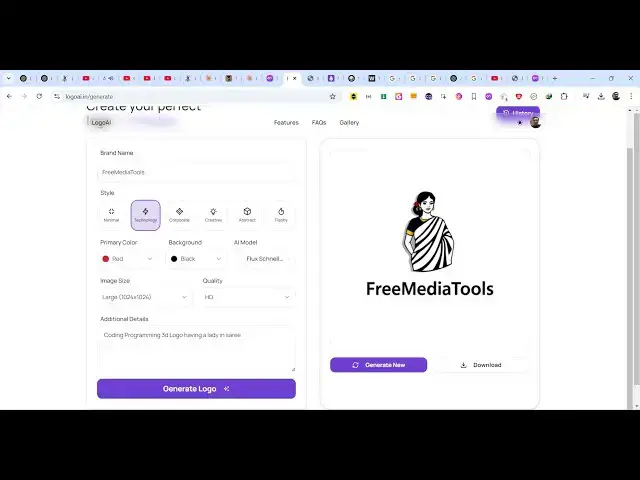
you so this is actually the editor here
1:51
the logo will appear and here you give
1:54
your brand name so whatever is your
1:56
brand name let me change it to my
1:58
YouTube channel which is coding so then
2:01
we have to provide the style here it can
2:04
be corporate creative depending upon
2:07
your how logo you want so let me want a
2:10
technology one so I will select
2:12
technology one and then here you can
2:14
select the primary color background
2:16
color which AI model to use so let me
2:19
select the primary color to be red and
2:22
the background color to be let me choose
2:25
the black colors so then you can select
2:28
the model as well by by default it is
2:32
selected you can select any model here
2:36
and then you can select if you want the
2:39
large one so I will say I want the large
2:42
logo I it also supports HD logos as well
2:46
standard HD I will select HD and now
2:49
here you will provide your logo so I
2:51
will simply say I want coding and
2:55
YouTube
3:06
development logo
3:10
having a guy
3:15
doing coding on a laptop so you must
3:18
write a descriptive prompt here
3:22
basically I saying I want coding and
3:23
development YouTube channel logo having
3:26
a guy doing coding on a laptop so in
3:29
with this uh technology you can generate
3:33
uh logos here you can see uh it
3:36
basically gives you the limit here you
3:38
have reached your logo generation limit
3:40
please try again later so what I will do
3:43
is that uh for this I will log in
3:49
into you can try this with a different
3:51
Google account if you reach a limit then
4:00
sorry
4:01
logo logo AI doin so if you basically
4:07
get that message just login with a
4:08
different Google account
4:26
so let me paste it
4:48
and click on generate logo
4:52
and now it will generate a logo for you
4:54
you'll see that this is your
4:58
logo and every time if you click
5:00
generate new it will generate a brand
5:02
new logo
5:04
here and also it will include your brand
5:07
name as well you can see that these are
5:10
some quality logos which are
5:12
generated you can see that you can open
5:14
this in a new tab and you can download
5:18
this for free just download this image
5:21
if you like the logo you will see that
5:23
webp image it will download this or
5:26
click the download button you will also
5:28
see the logo is success sucessfully
5:30
downloaded so let me change it to
5:32
corporate and then generate
5:36
this so now it will change the logo to
5:39
be copyright so it will now look like
5:41
this you'll see
5:43
that all these logos will be coming in
5:46
the history tab so as soon as you
5:47
generate this now let me say flashy so
5:51
you can generate a flashy
5:54
logo so you can see how beautiful this
5:56
logo looks you can see that I can use it
6:00
on my YouTube channel as well you can
6:02
see you can do it if you are developing
6:05
an app if you have a website YouTube
6:07
channel you can use this website
6:10
initially the logos will be generated
6:12
with no
6:13
fees so you can see how full HD logos
6:17
These are 3D logos generated so you can
6:19
see the color combination red black and
6:22
plus the uh brand name which is
6:25
appearing so you can see
6:28
that you can change the model as well
6:32
you can just try all these options which
6:35
one you basically like here you can
6:38
change the color combination green black
6:42
all that
6:54
stuff I think this model is not there
6:57
you need to select the second model by
6:59
default
7:01
which is
7:02
selected so the second model will give
7:04
you the best
7:06
logos so you can see that so see every
7:11
time you click generate new it will
7:12
generate a brand new logo using AI you
7:16
can see that so this one also looks
7:18
pretty
7:23
great so these are unique logos every
7:26
time you click the generate button you
7:28
will see every time it
7:30
will can
7:32
see and it's totally free no basically
7:36
don't no need to pay for anything it's a
7:38
complete free website logo
7:41
a.in come to your login with your Google
7:44
account and just use this service so
7:45
completely free recently and then you
7:48
will basically you you will get this
7:51
message you have reached your logo
7:52
generation limit so I think initially
7:55
for per day basis you can generate about
7:58
20 to 25 logos you will see once you
8:01
generate this much of logos you will get
8:03
this limit but I think it's a great
8:05
solution I generated these quality logos
8:09
So based upon your brand whichever
8:12
YouTube Channel website or app you are
8:15
making you can generate logos using this
8:18
website so thank you very much for
8:19
watching this video and also visit my
8:22
website as well free mediat tools.com
8:24
which contains thousands of tools
8:27
regarding audio video and image and I
8:29
will be seeing you in the next video
#Programming
#Online Goodies
#Skins, Themes & Wallpapers
#Open Source