0:00
uh hello guys uh welcome to this video
0:02
so in this video I will show you a vs
0:04
code extension which automates the
0:07
process of writing console log messages
0:10
using the key binding rather than
0:11
manually typing the console log message
0:14
messages you can automate this process
0:16
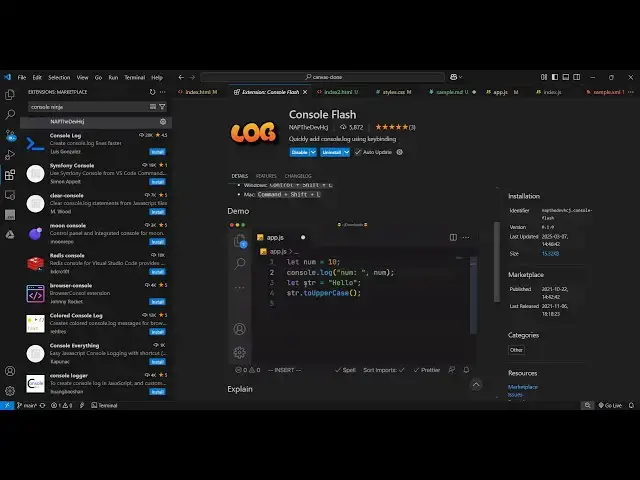
so there is an extension in vs code that
0:19
you can install which is called as
0:21
console flash if you go to extensions
0:24
just type this console Flash and this is
0:26
actually the extension which will write
0:31
so you just need to click the install
0:33
button and it's a fairly new extension
0:35
5,000 install so simply click the
0:37
install button and as soon as
0:41
you install this now what let me show
0:46
you so if you have any kind
0:49
of specifically let me show you the
0:51
Javascript file so if you are basically
0:54
recording a video so if you wanted you
0:58
declare a variable X is equal to 5 so
1:01
now if you want to print the value of x
1:03
in if you want to check it in the
1:05
console so we man will write this and it
1:08
is a very time consuming process of
1:11
manually writing this console log so you
1:13
can automate this simply by
1:16
selecting the variable name and then
1:19
just typing here control
1:24
control so there is a shortcut here if
1:27
you go to the extension setting
1:30
on Windows it is control shift L this is
1:34
a shortcut key here simply select the
1:36
variable name and then say control shift
1:39
l so now automatically the console lock
1:42
statement will be added you we I haven't
1:45
manually typed it so we just need to
1:50
variable so let's suppose we have
1:53
a lot of variables in our
1:56
application and we just need to add the
1:59
console l statement so simply select the
2:01
variable name and then the shortcut on
2:04
the Windows machine which is control
2:09
see and again you select the variable
2:15
l so as you can see we can add these
2:18
console loog statements using the key
2:21
binding using this extension console
2:23
flash I basically use this extension a
2:26
lot because I don't need to manually
2:28
write these console log messages just
2:30
rather than we can bind a key
2:33
binding simply select the variable name
2:35
and then control shift L on
2:40
windows so on Mac it is command shift L
2:44
on Windows it is control shift l so you
2:46
can use this extension console flash for
2:49
automating your console log messages
2:52
rather than saving a lot of typing speed
2:54
as well so you don't need to manually
2:57
type this and select the variable name
2:59
and just control shift
3:01
l so this was the extension and also
3:04
check out my website free mediat
3:06
tools.com which contains thousands of
3:09
tools regarding audio video and image
3:11
and I will be seeing you in the next