Up next in 10


Get the full source code of application here:
https://codingshiksha.com/python/python-3-web-scraping-script-to-get-current-temperature-of-any-city-in-terminal/
Show More Show Less View Video Transcript
0:00
uh hello guys welcome to this video So
0:02
in this video I will show you a Python
0:04
script for scraping the temperature of
0:08
any city in the world in Celsius or
0:10
Fahrenheit right in your terminal itself
0:13
So we written this Python script as we
0:17
provided this country Kazakistan You
0:19
will see you can provide any country or
0:22
city name as well So let me provide here
0:25
Melbour which is located inside
0:27
Australia
0:29
So we can provide multiple countries
0:31
here You can see New York Tokyo
0:35
London and then we provided Paris So we
0:39
need to get temperature of all these
0:41
five cities in the world at the same
0:44
time So when I run this Python script
0:46
you will see it will return us the
0:47
temperature of each city one by one We
0:51
will see current temperature in
0:52
Melbourne 15° C New York
0:56
22°C Both it will return both inside
0:59
Celsius and Fahrenheit So this Python
1:03
module you can use it unlimited number
1:05
of time There is no need to submit any
1:08
API key It is actually scraping this
1:12
information from an API Let me show you
1:18
So let me show you the API which is
1:21
completely free This is a website
1:26
wwtr.in So if you paste this
1:30
address So this is the website here
1:34
wtr.in This website provides you with
1:37
the temperature details of any city So
1:41
the format is simply you slash you
1:45
specify the country or
1:49
city slash So here we specify let's
1:52
suppose Delhi
1:54
and question mark format is equal to J1
1:58
So this will return you the JSON
2:00
response I think Yeah So you'll see this
2:03
URL will return you the JSON response
2:06
Here you will see all the details
2:09
humidity levels the Celsius Fahrenheit
2:12
everything
2:13
pressure You can even return the
2:15
population latitude longitude
2:21
everything So I think population is also
2:24
there Yeah So I think you can see all
2:28
this information is returned to you in a
2:30
JSON response So
2:33
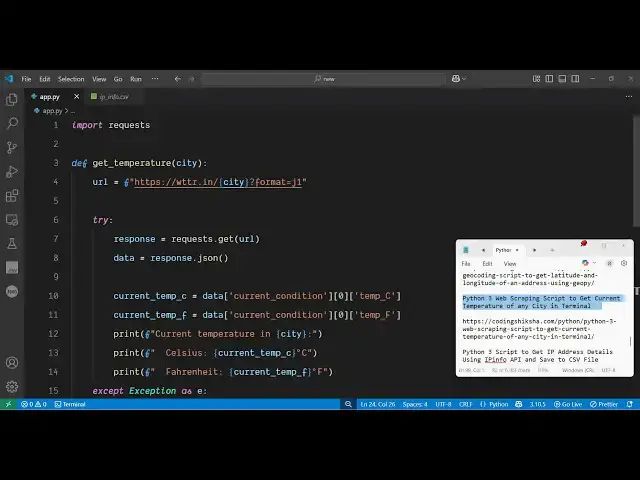
now let me show you the full script The
2:37
link is given in the
2:39
description So first of all you
2:42
actually import the request module for
2:45
making request to a rest API and then we
2:50
simply make a function right here get
2:53
temperature and we specify a city name
2:56
So now we define this function get
2:58
temperature passing the city name and we
3:01
just need to go to the URL right here
3:04
that I showed you which is
3:05
https
3:09
wtrin and then you specify the format
3:12
which is
3:14
J1 and then in a
3:16
try except
3:19
block we use the request module dot get
3:23
go to that URL and then fetch the data
3:27
convert this data convert this response
3:29
to
3:30
JSON Uh after that we extract the
3:35
temperature like this from this JSON
3:38
response So data what is your
3:43
current
3:46
condition so it will similarly it
3:50
will extract the temperature in
3:53
Fahrenheit
3:58
And then it will print out the current
4:06
temperature in Celsius and Fahrenheit
4:09
That's all So then if the city name is
4:12
not defined
4:14
then we will say that the city name is
4:18
not
4:22
correct So that's all So we can do this
4:25
unlimited number of time You can see
4:28
multiple uh
4:32
cities So if you run this now once again
4:35
it will print out the temperature of
4:38
each city one by
4:41
one So you can also build out a web
4:43
application using this module right in
4:46
the browser The user inputs the city
4:48
name then you return out the temperature
4:50
So the possibilities are endless the
4:53
module it's not a module it's a simple
4:56
API which you can directly make a rest
4:58
API call in any language so thank you
5:02
very much for watching this video and uh
5:05
also visit my website
5:07
freemediattools.com uh which contains
5:10
thousands of tools