Up next in 10


Get the full source code of application here:
https://codingshiksha.com/python/python-3-script-to-get-whois-info-of-domain-name-save-it-to-json-file/
Show More Show Less View Video Transcript
0:00
uh hello guys welcome to this video So
0:02
in this video I will show you a Python
0:04
package which will return the domain who
0:07
is info information about the specific
0:10
domain If you want to get uh when the
0:12
domain was purchased when the creation
0:14
date registration who is the person who
0:17
registered the domain uh every
0:20
information you can get for completely
0:21
free you don't need to use any API You
0:24
can use this Python package which is
0:26
domain validation So let me show you
0:29
this third party package here So first
0:31
of all you just need to install this
0:33
package So the package name is domain
0:36
validation So this is actually the
0:38
package Uh simply install this package
0:41
by executing this uh command here Uh
0:44
I've already installed it and this
0:46
actually returns you the creation date
0:48
and register of the domain the who is
0:51
data So let me show you a very simple
0:55
example
0:59
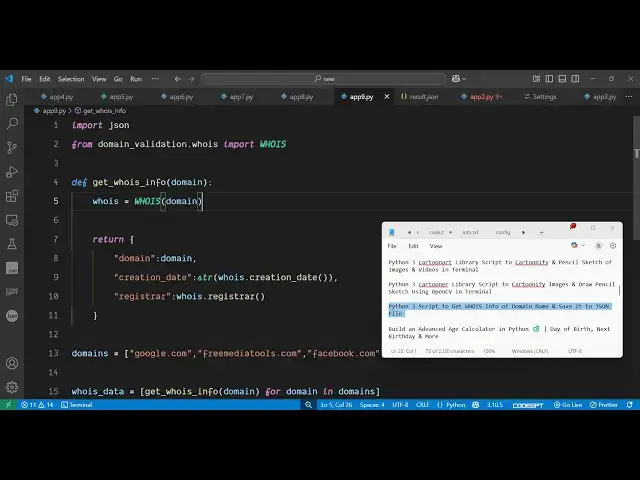
So let me just show you step by step
1:03
script right here So first of all just
1:05
make a simple app do py file and right
1:08
here we will import the JSON module and
1:11
then from this third party module domain
1:14
validation it contains this who is uh
1:17
method and from this we need to import
1:19
this class who is and after that we will
1:23
define a function uh which
1:26
will find this data So here we just need
1:28
to define an array of domains So here
1:31
you can provide your domain names for
1:34
which you need to get the data So you
1:38
can see I've defined google.com free
1:40
media tools.com In this way you can
1:43
define multiple domain
1:48
names So after defining the domain names
1:50
we will
1:53
simply call a simple custom function
1:56
which we will make
2:00
So get who is info and here we'll be
2:04
passing the
2:06
domain for domain in domain So we are
2:09
simply running a for loop to this array
2:13
For each domain name we are calling this
2:15
function get who is info and passing
2:17
this domain
2:18
name And uh then now we just need to
2:22
define this custom function which will
2:24
be returning this data to us So we'll
2:27
just define this function get who is
2:30
info and we'll receiving this domain
2:32
name as an argument and right here we'll
2:35
be getting this who is and passing this
2:39
domain and after that we will be
2:41
returning this object JSON object which
2:44
will contain three properties First of
2:46
all the domain name Secondly we'll be
2:48
getting the creation date when the
2:51
domain name was registered So you can
2:53
easily get this by using this function
2:56
creation date The third property will be
2:59
the person who registered this domain
3:02
registister and you can easily get this
3:04
by this function which is
3:07
register So we can get all these three
3:10
details You can even get the expiration
3:12
detail expiration date as well So all
3:16
these four properties we can store it
3:17
inside this JSON object After
3:21
that we are simply returning this as you
3:23
can see this JSON object So now we just
3:27
need to store this information in a JSON
3:29
file So we will open this result dot
3:32
JSON file So here you'll be storing all
3:34
this information and uh defining this
3:38
encoding which will be
3:43
UTF8 and then we'll be dumping all this
3:47
data and then printing out a statement
3:50
which
3:51
is
3:54
done So that's all Uh let me execute the
3:58
Python script So if I execute this you
4:00
will see on the left hand side a JSON
4:02
file will get
4:08
created So it is saying that uh who is
4:11
object has no attribute expiration date
4:14
Sorry this expiration date is not
4:16
available So just I think this we are
4:21
calling it expiration no expiration date
4:24
is not available So this attribute is
4:27
not available So let me run the script
4:30
once again You will see it will create
4:33
this JSON file here result.json And if I
4:36
try to open this you will see for each
4:38
domain name this will be the domain name
4:40
creation which when the domain name was
4:43
firstly purchased So you can see for
4:45
google.com it was 15 September 1997 Who
4:49
was the register this is a company who
4:52
purchased it Secondly we come to this
4:55
domain name free media tools This is
4:57
your creation date registister and then
5:00
we have got the Facebook creation
5:03
date Then we got
5:06
reddit.com So in this easy way you can
5:08
get all this useful information the who
5:10
is info of any specific domain using
5:13
this P python package for completely
5:16
free You don't need any sort of API key
5:19
So this is a great thing about this
5:21
package You can do this for completely
5:24
free So thank you very much for watching
5:26
this video and also check out my website
5:28
freemediatools.com
5:30
uh which contains thousands of tools