Up next in 10

Python 3 Script to Extract YouTube Video Metadata and Tags Using yt-dlp Library in Terminal
Jun 3, 2025

Get the full source code of application here:
https://codingshiksha.com/python/python-3-script-to-extract-youtube-video-metadata-and-tags-using-yt-dlp-library-in-terminal/
Show More Show Less View Video Transcript
0:00
uh hello guys welcome to this video so
0:02
in this video I will show you a Python
0:04
script which will return the metadata
0:07
about a certain YouTube video and it
0:10
will also return the tags which are used
0:13
inside YouTube videos so this is
0:14
actually the Python script uh you can
0:17
actually take any video from YouTube so
0:19
let me paste this YouTube video URL
0:22
inside the script so it will return the
0:26
metadata information regarding the
0:28
script so if I run this script now you
0:31
will see on the left hand side it will
0:32
create a JSON
0:34
file it will extract all the metadata
0:38
from this YouTube video and save this
0:41
inside this JSON file so on the left
0:44
hand side you will see it has created
0:46
this JSON file if I try to open this you
0:49
will see the title of the video then we
0:52
also get all the tags which are used in
0:54
the video you will see array of
0:58
tags then we get the channel name and
1:02
date of the upload we also get the
1:05
description as well and we also get how
1:09
much long is the video duration in
1:12
seconds so this we are all getting
1:14
without using any sort of API you don't
1:17
need to replace any API key so it's a
1:20
free package inside Python you can use
1:22
it unlimited number of time you will see
1:25
it can web scrape all this information
1:27
such as the title descriptions the tags
1:30
which are used right here and all this
1:33
information uh there is a free package
1:35
here let me show you yt DLP so this is
1:39
actually the name of the package here uh
1:42
so the command is very simple you simply
1:44
execute this pip command i've already
1:47
installed
1:48
it so once you install this uh let me
1:52
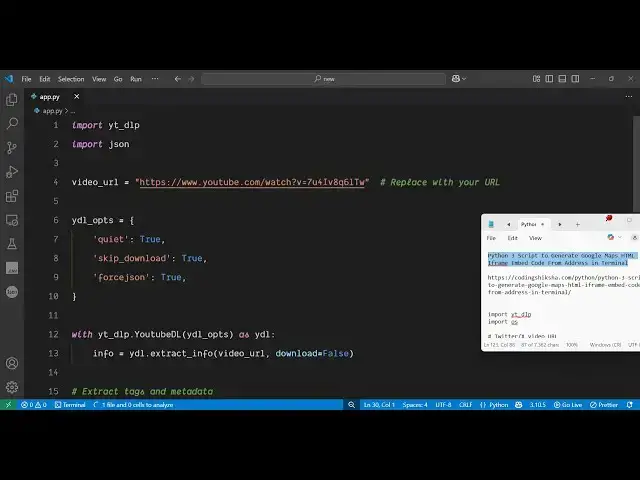
show you the script here i've given the
1:54
script in the description of this video
1:56
so if you need you
1:59
can go to the description and uh
2:04
just get the full script so first of all
2:07
what you need to do you need to import
2:10
this module so import
2:13
ytlp and then we also need to import the
2:16
JSON
2:17
module and then here you need to specify
2:20
which you YouTube video you need to get
2:22
the metadata so you can just paste any
2:26
video let me take a different video let
2:29
me take this video copy link address and
2:31
simply paste it so after that you will
2:34
specify the options right here
2:38
so here you will
2:41
specify these are the options
2:45
quite and skip
2:48
download to true so you just need to set
2:51
these options first of all and
2:53
force JSON so you need to force this
2:57
application to return the data in a JSON
2:59
format so we are applying these three
3:01
options so after that we just need to
3:04
use this module so we simply say with
3:08
yt dlp and it contains this function
3:12
YouTubedl ytdl
3:16
options
3:18
as and then it contains this function
3:21
which
3:22
is extract info so this is actually by
3:28
which you can extract the metadata of
3:30
the video here you pass the video URL as
3:34
the first argument
3:36
and then we also pass the second one
3:40
download is equal to
3:44
false so once you get this
3:47
info now we need to extract the
3:50
information from this because this let
3:52
me let me print it out and uh execute
3:55
this application so you will see the
3:58
data will be returned to you so we now
4:00
need to extract the data so this JSON
4:03
will be returned to you in the command
4:05
line but we need to uh extract the
4:08
necessary data that is there so it
4:11
basically returns all this garbage of
4:13
data we need to extract the useful
4:15
information so now for extracting the
4:18
useful information we will simply create
4:20
an
4:21
object data object and here we specify
4:25
the properties first information we need
4:27
to get the title of the window the title
4:30
of the video so
4:32
info.get title then we also need to get
4:35
the
4:36
tags which are helpful for search engine
4:38
optimization so we will get all the tags
4:41
which are used in that
4:48
video uh then we also can get the
4:51
channel name which channel name has
4:54
uploaded this video so info.get
5:00
uploader then we also can get
5:02
description of the video and uh you can
5:05
even get the thumbnail as well duration
5:08
as well number of views as well the
5:11
number of likes dislike so everything
5:14
you can get guys using this approach so
5:17
we actually get all these things title
5:20
tags uploaded description thumbnail
5:23
duration view count like count dislike
5:26
count everything so after that we can
5:29
save this information in a JSON file so
5:31
we simply say with
5:33
open and then we can create a brand new
5:37
file metadata.json
5:43
JSON and then we simply dump this J uh J
5:46
JSON data
5:50
inside and then we can print out a
5:52
simple line
5:54
here video metadata has been saved so
5:57
that's all this is actually the script
5:59
here and if I execute the script you
6:02
will see all this data will be saved
6:04
inside a JSON file
6:09
so you will see it has saved the data
6:12
inside this JSON file uh if I try to
6:14
open this you will see this is actually
6:17
the title all the tags have been
6:20
extracted we get the channel name
6:23
description thumbnail the duration
6:26
number of views which is number of
6:30
likes so everything has been scraped
6:33
guys if you see uh the video
6:39
page you can see everything has been
6:42
scraped number of likes description
6:44
title channel name everything so in this
6:46
easy way inside Python you can extract
6:49
the metadata of any YouTube video and
6:52
for this we haven't used the API key at
6:55
all it's a web scraping module which uh
6:59
actually interacts with the YouTube API
7:01
behind the scenes and it returns all
7:03
this information in a JSON file so the
7:07
script is given guys in the description
7:08
of this video you can get the full
7:10
script so thank you very much for
7:13
watching this video uh please hit that
7:14
like button subscribe the channel and
7:16
also check out my website uh
7:20
freemediattools.com uh which contains
7:22
thousands of