Up next in 10

Python 3 qrcode Library Script to Generate QRCode From Text and Save it as PNG Image
Jun 3, 2025

Get the full source code of application here:
https://codingshiksha.com/python/python-3-qrcode-library-script-to-generate-qrcode-from-text-and-save-it-as-png-image/
Show More Show Less View Video Transcript
0:00
uh hello guys welcome to this video so
0:02
in this video I will show you a Python
0:04
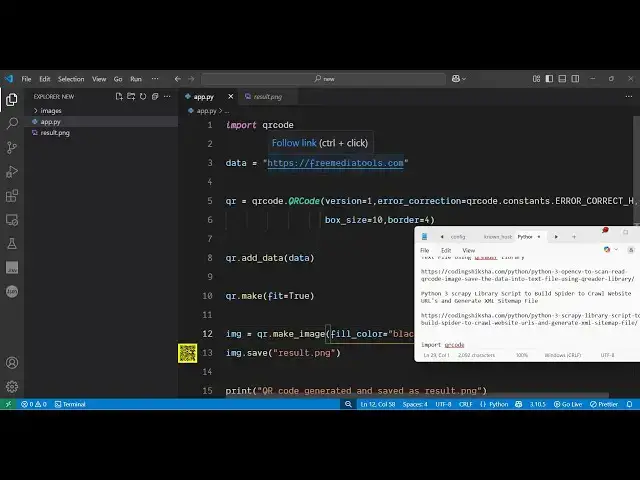
module which will generate a QR code and
0:07
save that QR code as a PNG image so this
0:12
QR code is generated you will see we
0:14
have given this URL
0:16
freetools.com and if I run this Python
0:19
script it will create this QR code and
0:22
save it as a image file QR code.png so
0:26
if I try to open this you will see you
0:28
can customize the color the background
0:30
color the color of the QR code as well
0:33
so you have all these options so fill
0:35
color let's suppose I say
0:39
white or
0:41
black the standard color which is
0:43
background color you can even change it
0:45
let's suppose I set it to
0:47
white
0:49
so so this is the standard QR code color
0:53
scheme so there is this package here
0:56
open-source package just search for this
0:58
package which is QR code and the very
1:01
first package which comes simply install
1:04
this package uh this is used to uh
1:07
generate QR codes inside Python so let
1:12
me just show you a very simple example
1:14
such just make a simple app py file and
1:17
here you just need to import the QR code
1:20
library and here we specify the data it
1:24
can be text it can be URL anything so I
1:28
put the URL and then
1:30
I generate this QR code by this module
1:34
it contains this function which is QR
1:36
code and this takes a series of options
1:40
what is the version and then the error
1:43
correction
1:44
level error correction so here you can
1:49
specify constants which
1:53
are you can select any of this LH let me
1:57
select this
2:00
one and then we also need to specify the
2:04
box
2:06
size which I will set it to 10 and the
2:09
border of the QR code set to four so you
2:12
can customize all these options and then
2:14
after that we need to add this data to
2:18
the QR code by this add data function
2:22
and then we make this QR code by the
2:25
make function and fit is equal to
2:29
true and then we simply save this as a
2:32
image file for saving it as a image file
2:35
we use this uh function make image and
2:39
here you can control the color of the QR
2:42
code i say white sorry black and the
2:47
background color as well you can control
2:49
it white and then we save this image by
2:53
the same
2:58
function and then we simply
3:01
say QR code
3:04
generated so that's all that we need to
3:06
do a very simple module very easy to
3:10
create after that we
3:13
simply
3:20
execute so as I execute you will see the
3:24
QR code will generate and
3:27
uh in this way you can customize the
3:31
background color let's suppose I change
3:33
it to yellow color
3:36
so you can customize everything right
3:39
here you'll see so in this easy way in
3:42
Python you can use this module to
3:44
generate QR codes and uh thank you very
3:47
much for watching this video and also
3:49
check out my website
3:51
freemediatools.com which contains
3:53
thousands of tools
#Software
#Multimedia Software
#Skins, Themes & Wallpapers