0:00
uh hello guys welcome to this video so
0:02
in this video I will show you a new AI
0:04
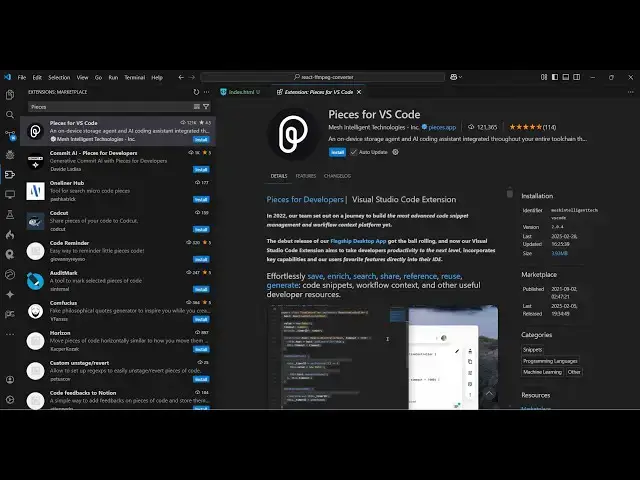
code assistant extension for vs code
0:06
which is called as pieces for vs code
0:09
it's similar to GitHub co-pilot but it's
0:11
completely free just open extensions and
0:15
just try pieces and this is actually the
0:17
extension which will come right here uh
0:19
but before installing this extension we
0:21
just need to actually install a special
0:24
software which is mentioned inside the
0:26
website so visit your visit this website
0:29
which is pieces . apppp and just select
0:32
the operating system if you are on
0:34
Windows just select and then there will
0:37
be this alternative installation methods
0:39
which will be if you are on Windows and
0:42
simply select this and it will download
0:45
this file I've already activated just
0:48
open this and it will look like this
0:50
install the pieces operating system
0:53
inside your system so just click the
0:54
install button so it is now installing
0:58
the pces operating system which which is
1:00
required for this extension
1:05
so so just wait for here 5 to 10 seconds
1:09
and then it will install
1:16
the so it will automatically launch
1:18
whenever it's installed so just wait for
1:28
finish so you can see SE is installing
1:46
it so just wait here and when it reaches
1:50
100% I will be back guys whenever it's
1:53
finished so now guys you can see pieces
1:56
operating system is installed so you
1:59
just need to activate this after you
2:01
reach 100% it will automatically close
2:04
click the install button and activate
2:06
this extension it will automatically
2:09
detect once it it will appear in the
2:12
sidebar just open this piece Co pilot
2:18
this and from here it will automatically
2:22
detect PS cop pilot will start right
2:25
here and click to activate long-term
2:28
memory and you will see it is verifying
2:48
it so just send actually prompt here
3:01
so now you can actually ask you can see
3:03
your just access your first long-term
3:05
memory and now it is now ready so now it
3:09
is completely free guys you can see
3:11
there is no such message of uh upgrading
3:14
or there is no such limit you can
3:16
directly use it for completely free and
3:19
here you need to write the prompt here
3:20
let's suppose whatever thing that you
3:22
want to develop so let's suppose I say
3:24
build react calculator using
3:27
CDN in browser using HTML so if you just
3:31
provide this prompt here just send this
3:34
so now it will generate the code here
3:37
you can see it is generating this code
3:40
here so with syntax highlighting and
3:44
numbers so the speed is also very good
3:47
and here you can actually copy this code
3:51
and go to your file here so whichever
3:53
file let me just open this file here so
4:05
it so this is actually the code it
4:08
generates open with live server
4:27
so so just wait it is running the the
4:35
uh sometimes it can get hang here
4:38
because the pretty large software so
4:41
just close the extensions which you are
4:52
it you can see also it
4:55
will come as autopilot as well you can
5:01
and here you can also write direct
5:21
here so just wait I I think my memory
5:25
has crashed here so let me just open it
5:27
once again you should have at least some
5:30
memory here you can see I am having 76.5
5:34
megabytes let me relaunch it
6:21
so this is actually the extension guys
6:24
just make sure that you have enough
6:37
so here you can just say build a
6:39
calculator in HTML provide
7:05
so you can see that it has provided the
7:08
code here and just you can paste it