Up next in 10

Make Your Code Talk : Add Colorful & Styled Comments to Annotate & Highlight in VS Code
Mar 7, 2025

Get the full source code of application here:
Watch My Visual Studio Code IDE Setup Video For Fonts,Themes & Extensions
https://youtu.be/Bon8Pm1gbX8
Hi Join the official discord server to resolve doubts here:
https://discord.gg/cRnjhk6nzW
Visit my Online Free Media Tool Website
https://freemediatools.com/
Buy Premium Scripts and Apps Here:
https://procodestore.com/
Show More Show Less View Video Transcript
0:00
uh hello guys welcome to this video so
0:02
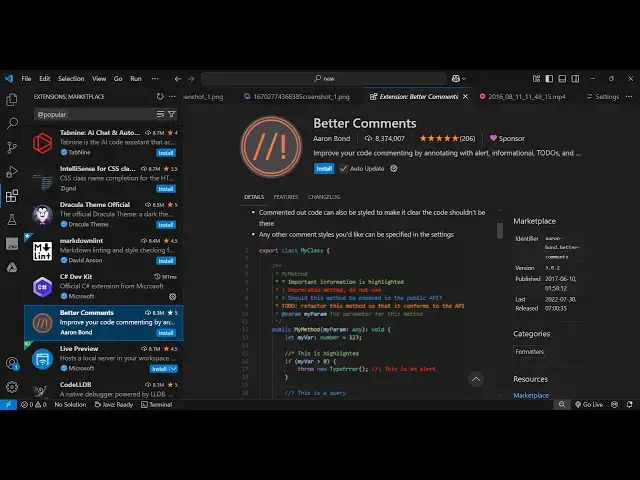
in this video I'll show you a vs code
0:04
extension which is very much popular if
0:07
you want to have colorful comments
0:09
inside your code this is actually the
0:11
extension better comments if you just
0:13
write in the com extension section the
0:15
very first extension which comes right
0:17
here it's got almost 8 million installs
0:20
it's a very popular extension so if you
0:23
want to improve the highlighting of your
0:25
code so that the code looks very elegant
0:28
in terms of com s it has various types
0:31
of comments you will see alerts which
0:34
appear in red queries to-dos highlights
0:37
so this is actually the example right
0:39
here so it has various types of
0:42
comments in different colors as well so
0:46
highlighting alert green
0:49
color so
0:51
now just click the install to activate
0:54
this extension so as soon as it
0:56
activates now you can
1:00
once it is enabled right here globally
1:02
you come to your file
1:05
here so wherever let me create a simple
1:09
comment right
1:15
here so this is a very basic comment
1:18
which appears in the green color and now
1:22
if you want
1:23
to customize this you can
1:33
so yeah for the alert commment we put SL
1:37
slash and then this one this is a red
1:41
comment which appears in the alert so
1:44
this you put slash slash and then you
1:47
put explanation mark right here and this
1:50
will change the comment color to Red so
1:54
if you just want to highlight something
1:56
you can highlight with this red color so
1:59
then
2:03
we have multi-line comments as well so
2:05
if you just write
2:06
here slash star star so this is actually
2:13
a multi-line
2:22
comment so these are three types of
2:25
comments here this is a very basic one
2:27
then we have the multi-line comment
2:30
where you can
2:32
write multiple lines of comment so as
2:34
soon as you press enter this asri sign
2:37
will
2:38
automatically get
2:41
added so at any location if you want to
2:44
add this you just write slash asri asri
2:48
and then you will be able to write
2:49
multi-line comment right here so this
2:53
is a basic
2:55
comment then this one is the exploration
2:59
Mark if you write this is a alert
3:02
comment which appears in red
3:06
color so with this extension guys to
3:10
comment your code it becomes very much
3:12
easy and uh same goes with the too
3:16
comment as well so which appears in
3:18
Orange so if you just write
3:26
star so if you just
3:34
so it works in the multi-line one
3:39
so you can see so this
3:42
is an orange color if you see if you
3:46
just write to-do here this is actually
3:48
the to-do comment which appears in
3:51
orange
3:54
color and same goes with if you want to
3:57
highlight something let's suppose a
3:59
parameter so param so this
4:05
is so string so this is a string so you
4:09
can see if you just write add the rate
4:11
params so if you're writing a definition
4:14
for a function so what parameters are
4:16
pass so here you can add add the rate
4:18
param so this will highlight in a
4:20
different
4:24
color so this is all coming because of
4:27
this extension so once you activate this
4:29
extension so all these comments will be
4:33
highlighted
4:36
so if you want to create an orange color
4:39
you just write to-do and this
4:42
is a to-do
4:45
comment so this if you write explanation
4:48
onek this will change to red color if
4:50
you write this one it will change to
4:52
Orange so it supports multi-line
4:55
comments so this was the extension guys
4:58
simply install this I person use it to
5:00
annotate something in my code to improve
5:03
the readability of the code so also
5:05
check out my website free media
5:07
tools.com which contains thousands of
5:10
tools regarding audio video and MH and I
5:12
will be seeing you in the next video
#Programming
#Software