Up next in 10

LM Studio IDE is INSANE Run Unlimited AI Models Locally on Computer Without Internet (100%)
Apr 5, 2026

Watch My Visual Studio Code IDE Setup Video For Fonts,Themes & Extensions
https://youtu.be/Bon8Pm1gbX8
Hi Join the official discord server to resolve doubts here:
https://discord.gg/cRnjhk6nzW
Visit my Online Free Media Tool Website
https://freemediatools.com/
Buy Premium Scripts and Apps Here:
https://procodestore.com/
Show More Show Less View Video Transcript
0:02
Uh hello guys in this uh live stream I
0:04
will show you one other software
0:07
by which you can directly explore
0:10
download AI models directly inside your
0:12
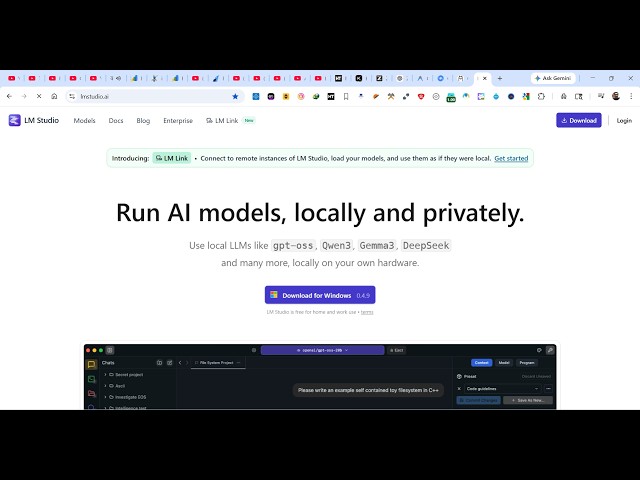
machine. This software is called as LM
0:15
studio. It's very popular software if
0:17
you simply search LM studio the very
0:20
first website which comes. So it's
0:22
similar to Olama where you simply
0:25
download the software inside your
0:26
machine and then you can run AI models
0:28
locally and privately. So all the AI
0:31
models which are released you can search
0:34
inside this software. So it you can
0:38
directly deploy your own AI models
0:42
directly locally inside your machine. So
0:45
for Windows you simply click download
0:47
and uh this software is completely free.
0:51
uh the size is 575 mgabytes.
0:55
So once the installation completes it's
0:59
kind of a very userfriendly software by
1:02
which you search the models.
1:06
So right here in the website also you
1:09
simply search for whatever model is
1:12
there. So click on that model and then
1:15
it shows you the size right here of the
1:18
model.
1:19
So you can see that this is the actual
1:21
model name and these are the sizes which
1:23
are there. So if you want to download
1:26
you click get download this model in the
1:29
app or use the CLI as well. So they also
1:33
have their CLI tool as well. So you can
1:35
copy this command. If you don't want to
1:37
install that simply paste this terminal.
1:46
So once you simply run the setup file
1:49
for actually installing this. So it
1:52
hardly take uh
1:55
just click next next uh for installing
1:58
it.
2:02
So once it completes basically
2:20
so the size
2:23
1.9 GB. So this is the size of it. So
2:26
once it get installed it's easy for you
2:29
to download and host any AI model which
2:32
are released in the market.
2:35
So the user interface is quite simple as
2:38
compared to hugging face which is simply
2:41
adv hugging face hola. So these are all
2:44
the websites which are there where can
2:45
search the models.
2:48
So you also find some description about
2:50
this models capabilities everything in
2:53
this site.
3:01
So it's kind of a desktop software where
3:05
you can actually search for any model.
3:09
So you can just see right here
3:14
3 next.
3:16
So this is also very required. You do
3:18
need to have a powerful machine for
3:20
actually running these AI models because
3:23
you can just see the memory
3:24
requirements. You need at least 42 GB of
3:28
RAM.
3:30
So you should have at least 42 GB of RAM
3:34
for actually running this AI models in
3:36
your in your local machine. So
3:40
majority of the time these models will
3:42
not be able to run on your machine. So
3:44
just first of all read the requirements
3:47
before you download the model because
3:50
majority of the time these models will
3:52
be very powerful and uh it also requires
3:57
powerful machines as well. So so once it
4:00
installs automatically you can run this
4:05
LM studio.
4:07
So,
4:11
so you can see the interface of the app
4:13
right here.
4:20
So, from here you select a model.
4:24
Simply search the model.
4:38
So from here you simply search.
4:47
So all your models will show something
4:49
right here.
4:55
So from here you simply type whatever
4:58
model you want to install. So you can
5:00
see there
5:04
this is a download button. From here you
5:06
download this model if you want to or
5:09
you can search for a different model.
5:20
So if you search it you will see all the
5:23
models will come with the name of co.
5:26
So for every model you will have the
5:29
download button and you can actually see
5:31
the requirements.
5:39
You can just see here all the models
5:41
will show their sizes. This makes it
5:45
easy for you to run any AI model. Simply
5:48
download locally inside your machine and
5:51
then run this.
5:53
So it shows you the description, the
5:55
size, everything it shows you at a
5:57
matter of time. So if any new model is
5:59
released, you can directly download that
6:02
model directly inside your machine
6:10
can see that. So for every model we have
6:13
this. So if you click download now the
6:16
downloading will start here. You will
6:17
see of the model at any moment of time
6:20
if you want to stop this
6:23
you will see
6:27
click the cross button to action. So in
6:30
this easy way as you see it's
6:34
easy for you to download any AI model
6:37
using LM studio.
#Jobs & Education