Up next in 10

This Aura.Build AI Coding Builder & Agent Builds Full Stack Apps & Deploys it LIVE For FREE (100%)
Apr 9, 2026

Watch My Visual Studio Code IDE Setup Video For Fonts,Themes & Extensions
https://youtu.be/Bon8Pm1gbX8
Hi Join the official discord server to resolve doubts here:
https://discord.gg/cRnjhk6nzW
Visit my Online Free Media Tool Website
https://freemediatools.com/
Buy Premium Scripts and Apps Here:
https://procodestore.com/
Show More Show Less View Video Transcript
0:02
Uh hello guys in this uh live stream I
0:04
will show you yet another AI coding
0:06
platform for building fullstack coding
0:08
applications from a single prompt. This
0:12
is the AI platform.build.
0:15
If you simply go to the Google simply
0:17
type this the very first website which
0:21
come this is the website aura build. So
0:24
it's a really popular AI platform for
0:27
creating coding applications from single
0:29
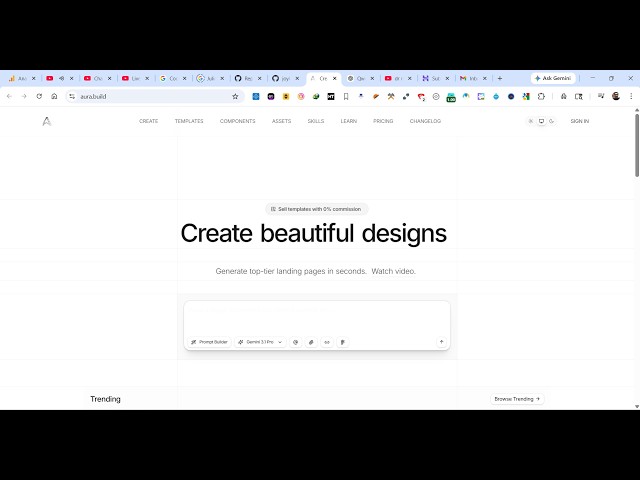
prompts. So the landing page looks
0:32
something like this. So from here inside
0:34
the chat prompt you specifically type
0:36
what sort of landing page or application
0:40
you want to generate. So now to get
0:42
started you can actually sign up using
0:45
your Google account.
0:55
So once you sign up uh you will be
0:57
redirected to the dashboard area. So
1:00
from here you specifically tell from
1:03
here you can select all the popular AI
1:05
models which are available. Uh it's
1:08
completely free to try. So I simply tell
1:12
I want a landing page image to PDF web
1:15
app in browser.
1:21
You can from here you can change it
1:24
to also react project as well or HTML
1:27
JS.
1:29
So just submit out and it has its own
1:33
code editor as you see if you submit out
1:35
the request. It's similar to cla Gemini
1:38
GPT where it has its own editor. So once
1:42
it finishes you will see the live
1:43
preview and you also get the publish
1:46
button as well. Once it finishes, you
1:48
can publish the app or export the code
1:50
as well.
1:53
So I really like this platform. This is
1:56
the design part. This is the code. All
1:59
the code will be written right here.
2:10
So now you can see the AI is starting
2:13
developing this application step by
2:15
step. in live review as well. So this I
2:19
really find it very interesting guys.
2:21
Just look at how the application is
2:24
being created and I really like it. You
2:27
can just see here in the background it's
2:30
step by step creating the user interface
2:33
in a very clean manner.
2:36
It's writing out the code for you.
2:42
So if you are just not a developer of
2:44
programming not a problem just use this
2:47
platform simply submit your prompt and
2:50
in a
2:52
it is just seconds it will create this
2:55
user interface for you a fully fledged
2:58
application. From here you select a
3:00
bunch of images.
3:03
So from here we selected the images.
3:07
You select these options. Click on
3:10
generate PDF.
3:13
So now the interface is ready to be
3:15
connected to a JavaScript PDF library.
3:19
So this is just an interface. This is
3:22
not actual application. So what I will
3:24
do? Please also make it
3:32
please also write
3:34
the JS code. So we are telling that
3:38
please also make the application
3:40
interactive and also write the
3:42
JavaScript code. So now once again it's
3:46
actually analyzing it.
4:07
So now you can see it's actually
4:12
also creating the JavaScript file as
4:15
well.
4:18
So, I really found this to be really
4:21
interesting. It's completely free to try
4:24
and it has its own code editor as well.
4:26
So,
4:35
so definitely check this out. Aura dot
4:40
build.
4:45
So now you can see it's completely
4:47
responsive as well.
4:50
You can actually see it in mobile
4:53
device.
4:55
Completely responsive application.
5:00
From here you select a bunch of images.
5:17
So once it is published
5:19
this is all the code which is generated.
5:21
If you see
5:29
almost uh 600 lines of code,
5:33
500 lines of code. Click on publish or
5:36
export. You can download the convert to
5:39
React, copy to Figma. All these options
5:43
are there. You can publish it to a
5:44
custom domain as well.
5:47
And yes, click on publish. it will
5:51
instantly publish your app and you can
5:54
open this. So now your application is
5:57
also published.
6:02
So it's really a nice platform guys.
6:04
Definitely try this. Uh
6:14
so it's automatically the download file
6:17
is automatically working.
6:19
Definitely try out this platform guys.
6:22
Aura.build