Up next in 10

JS JSX Snippets in VS Code – The Ultimate Shortcut to Faster React Development! 🚀
Mar 7, 2025

Get the full source code of application here:
Watch My Visual Studio Code IDE Setup Video For Fonts,Themes & Extensions
https://youtu.be/Bon8Pm1gbX8
Hi Join the official discord server to resolve doubts here:
https://discord.gg/cRnjhk6nzW
Visit my Online Free Media Tool Website
https://freemediatools.com/
Buy Premium Scripts and Apps Here:
https://procodestore.com/
Show More Show Less View Video Transcript
0:00
uh hello guys welcome to this video so
0:02
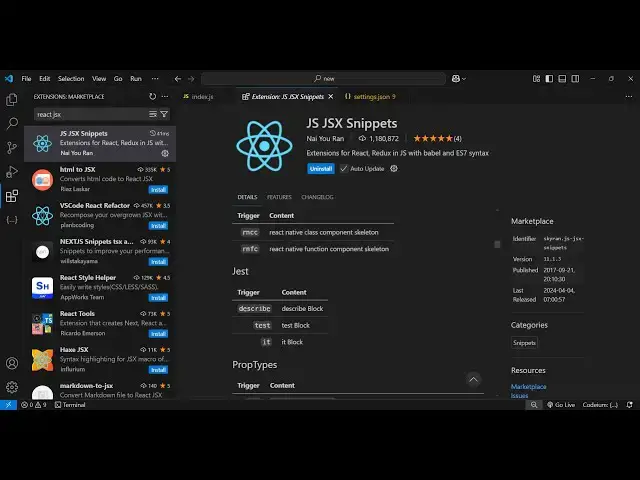
in this video I will showing you a vs
0:04
code extension which you can install
0:07
for coding faster with react CH uh
0:11
JavaScript snippits are also there so
0:13
this is actually the extension and if
0:16
you just go to extension just type here
0:18
JS and jsx
0:22
Snippets so this extension will come
0:25
right here and it's almost got 1 million
0:27
installs so it's a fairly popular
0:29
extension
0:31
and it will save you a lot of time and
0:33
it will allow you to code faster if you
0:36
are working with react CH simply
0:38
activate install and activate this so
0:40
once you activate this you if you create
0:43
a functional component you don't need to
0:45
write everything from scratch so now
0:48
inside my index.js file there are some
0:51
shortcut keys that this extension
0:53
provides you let me show you one by one
0:56
the very first shortcut if you just type
0:58
here r c c c so it will actually
1:01
generate after you type RCC you'll see
1:04
the suggestion coming just you need to
1:06
press the tab keyboard Tab Key on the
1:09
keyboard just press it and it will
1:10
actually generate this class component
1:13
and it will place this inside right here
1:16
so it will save you a lot of time here
1:19
so as soon just write RCC and just press
1:22
the Tab Key and it will generate this
1:24
functional or sorry class level
1:26
component and now if you also want the
1:28
prop type as well so there is a shortcut
1:32
rccp and it will also import this prop
1:34
type here and it will add this you'll
1:39
see that now if you are working with
1:41
functional component then instead of RCC
1:44
you write here
1:45
RFC which stands for react functional
1:48
component and it's very easy to remember
1:51
because the shortcut is react functional
1:54
component RFC so I use it daily because
1:57
I work with react CH so it will save a
2:00
lot of time for me because I need not
2:02
have to write it from scratch I can use
2:05
this shortcut key to generate a
2:06
functional
2:08
component and same goes if you want the
2:10
prop type you simply add rfcp so it will
2:13
also add the prop type here with
2:17
C so apart from that uh it also have
2:21
some more
2:23
shortcuts let's suppose if you are
2:25
generating some
2:27
State there is a shortcut here EST
2:30
so this is for class level component so
2:33
you can just write the shortcut
2:36
EST and tap so it will declare empty
2:40
State and same goes for life cycle
2:44
method so there are quite a number of
2:46
life cycle methods which are there
2:47
inside react first of all is component
2:50
did Mount so there is a shortcut key for
2:53
that CDM and it will component it mount
2:56
it will generate this secondly we have a
3:01
CW o this is component will Mount this
3:05
is the another one then we have
3:08
component did Mount
3:10
CDC component did cat sorry so these are
3:13
the three life cycle methods for react
3:16
CHS application so we can generate this
3:18
using the shortcut keys and then
3:22
this this do set State you can
3:26
actually SST is the shortcut you can and
3:30
just do this
3:32
like then we
3:35
have
3:37
ssf if you want to set this using a
3:41
function you can generate this function
3:44
shortcut is ssf then Tab Key it will
3:47
generate and now if you're working with
3:49
hooks in react CH you can just use press
3:53
the use itate and tab and you will see
3:56
it will place the tab right here you can
3:59
see
4:01
same goes with use effect just write use
4:04
effect and just press the tab keyboard
4:07
it will generate the hook complete
4:09
hook so you can see
4:14
that same goes with use context Just Tab
4:18
and it will generate so these are some
4:21
of the shortcuts the very popular
4:22
shortcut I use daily this was RFC this
4:26
will generate the functional component
4:28
RCC this will generate the class level
4:30
component so these two shortcuts save me
4:33
a lot of time so it definitely enable
4:35
this extension it's
4:36
recommended and it's very popular
4:39
extension for specifically for reactj
4:41
developments so thank you very much for
4:43
watching this video and also check out
4:45
my website free mediat tools.com which
4:48
contains thousands of tools regarding
4:50
audio video and image and I will be
4:53
seeing you in the next uh video