Up next in 10

🚀 “INSANE Canva AI Code Editor – Replace Claude & Gemini, Build & Run Web Apps Instantly”
Jul 21, 2025

Get the full source code of application here:
Show More Show Less View Video Transcript
0:00
Uh hello guys, welcome to this video. So
0:02
in this video I'll show you uh Canva AI
0:05
code generator. So Canva also has a AI
0:09
generator tool where you can actually
0:11
generate any sort of things.
0:14
So it can be a source code as well. So
0:16
if you just write here Canva AI code
0:19
generator on Google, the very first
0:23
application which comes this is by Canva
0:25
right here AI code generator. So similar
0:29
to chat, GPT, cloud and Gemini, they do
0:31
have their own AI code generator.
0:34
So simply click code for me and right
0:38
inside the prompt here, you will write
0:40
what sort of application you want to
0:42
generate. So you simply say build a
0:45
scientific calculator with a premium
0:50
looking UI in HTML,
0:54
CSS and JavaScript and also run the app.
0:58
So we simply write the prompt here and
1:00
based upon the prompt it will try to
1:02
write the code for you. So as you can
1:05
see it will start writing the code.
1:12
So it will tell you the exact number of
1:14
lines which are generated.
1:21
So the speed is also very good
1:25
and you can just try this for completely
1:27
free. So there is no kind of restriction
1:29
which are there to actually you need to
1:32
pay something.
1:34
It's completely free. Just login with
1:36
your Google account and uh it's
1:39
completely free to try.
1:43
You can simply
1:45
generate apps instantly using this Canva
1:48
AI code generator.
1:58
And you can even ask follow-up questions
2:01
as well if any sort of error take place.
2:16
So,
2:20
so once it finishes, it will show you
2:22
the app here.
2:27
So, I personally like the speed as well
2:29
because of generating the code here.
2:31
Some AI tools generate code at a very
2:35
low pace, but this Canva AI code is
2:38
generated is generating code at a very
2:41
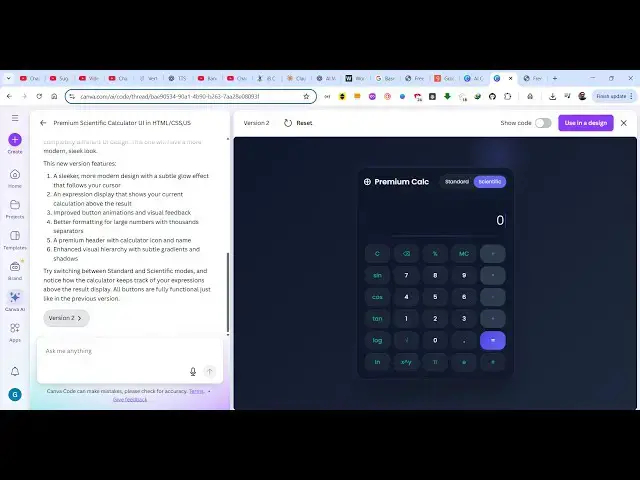
high space. So now it generated this uh
2:46
instantly scientific calculator. This is
2:50
your standard calculator and this is
2:52
your scientific calculator with all
2:54
these options which are there sine
2:57
alpha. You can also try this
3:00
can see that this is your standard
3:02
calculator
3:05
with a premium looking user interface.
3:08
As you can see guys, it can generate any
3:10
sort of application
3:12
and also run the application instantly
3:14
in the editor itself and you can toggle
3:18
the toe and this is
3:22
click the copy to clipboard button as
3:24
well. So there is if you want to copy
3:26
the code simply copy and just paste it
3:30
in the file
3:33
in VS code or whichever editor you are
3:36
using and simply run this locally as
3:39
well.
3:42
So it's very simple guys to actually
3:44
create applications with this Canva AI
3:47
code generator. uh recently I figured it
3:49
out. They also have their own AI code
3:52
generator
3:53
and similarly
3:55
you can actually make any sort of
3:57
application instantly. It will show you
4:00
the live preview as well.
4:10
So
4:15
definitely try this. You can even have
4:19
uh voice feature as well. So you can
4:22
also chat using your own voice rather
4:24
than typing it. You can simply toggle
4:27
this.
4:29
Can I just allow the permission?
4:35
Great stuff. Just build another version
4:38
of this calculator with an another
4:41
premium looking user interface.
4:44
So as you can see I'm not typing.
4:49
So just stop this
4:52
and simply enter. So you basically just
4:56
speak using your microphone and then
4:59
automatically the AI will start
5:01
generating another version of this
5:03
calculator with a another user
5:06
interface.
5:08
So definitely check out this Canva AI
5:11
code generator guys. you can easily make
5:13
applications, deploy them as well. So,
5:15
it's a great alternative to Chad, GPT,
5:18
Claude and Gemini.
5:20
And also check out my website
5:23
freemediattools.com
5:25
uh which contains thousands of tools.
#Programming
#Scripting Languages