Up next in 10


Get the full source code of application here:
Show More Show Less View Video Transcript
0:00
Uh hello guys, welcome to this video. So
0:02
Uh hello guys, welcome to this video. So
0:02
Uh hello guys, welcome to this video. So in this video, I'll show you a VS code
0:04
in this video, I'll show you a VS code
0:04
in this video, I'll show you a VS code extension to automatically detect the
0:07
extension to automatically detect the
0:07
extension to automatically detect the blade files inside your Laravel project
0:09
blade files inside your Laravel project
0:09
blade files inside your Laravel project in VS Code. So by default, if you create
0:11
in VS Code. So by default, if you create
0:12
in VS Code. So by default, if you create a blade file inside your Laravel
0:14
a blade file inside your Laravel
0:14
a blade file inside your Laravel project, the VS code will not detect it
0:17
project, the VS code will not detect it
0:17
project, the VS code will not detect it as this file and it will not give you
0:19
as this file and it will not give you
0:19
as this file and it will not give you the syntax highlighting rather than it
0:22
the syntax highlighting rather than it
0:22
the syntax highlighting rather than it will show you a simple enormal file. So
0:25
will show you a simple enormal file. So
0:25
will show you a simple enormal file. So there is an extension that you can
0:27
there is an extension that you can
0:27
there is an extension that you can install which is Laravel's blade. It's
0:30
install which is Laravel's blade. It's
0:30
install which is Laravel's blade. It's got almost 635,000
0:32
got almost 635,000
0:32
got almost 635,000 installs. It provides you with Laravel
0:36
installs. It provides you with Laravel
0:36
installs. It provides you with Laravel blade syntax highlighting. So as soon as
0:39
blade syntax highlighting. So as soon as
0:39
blade syntax highlighting. So as soon as you click the install button and just
0:41
you click the install button and just
0:41
you click the install button and just activate this extension you will see
0:43
activate this extension you will see
0:43
activate this extension you will see automatically your blade file will be
0:45
automatically your blade file will be
0:45
automatically your blade file will be syntax highlighting and all the
0:47
syntax highlighting and all the
0:47
syntax highlighting and all the highlighting you can see it is provided
0:50
highlighting you can see it is provided
0:50
highlighting you can see it is provided by
0:52
by
0:52
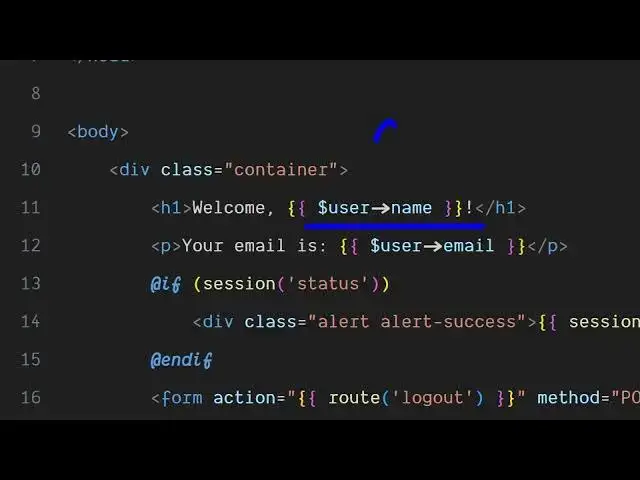
by like this all the dynamic PHP code that
0:55
like this all the dynamic PHP code that
0:55
like this all the dynamic PHP code that you are adding is also highlighted after
0:58
you are adding is also highlighted after
0:58
you are adding is also highlighted after you simply go to the extensions and
1:00
you simply go to the extensions and
1:00
you simply go to the extensions and simply type this
1:03
simply type this
1:03
simply type this Laravel dash plate. So just search for
1:07
Laravel dash plate. So just search for
1:07
Laravel dash plate. So just search for this extension. This will come right
1:09
this extension. This will come right
1:09
this extension. This will come right here. And simply install this. And after
1:12
here. And simply install this. And after
1:12
here. And simply install this. And after activating this, you will see your blade
1:16
activating this, you will see your blade
1:16
activating this, you will see your blade files will get syntax highlighting. And
1:18
files will get syntax highlighting. And
1:18
files will get syntax highlighting. And if you just uninstall this, you will
1:21
if you just uninstall this, you will
1:21
if you just uninstall this, you will once again see the blade files will
1:24
once again see the blade files will
1:24
once again see the blade files will again go
1:27
again go
1:27
again go not syntax highlighting. So this is the
1:29
not syntax highlighting. So this is the
1:29
not syntax highlighting. So this is the extension. Simply click the install
1:31
extension. Simply click the install
1:31
extension. Simply click the install button. And after activating it, you
1:34
button. And after activating it, you
1:34
button. And after activating it, you will see your Laravel blade files will
1:36
will see your Laravel blade files will
1:36
will see your Laravel blade files will automatically get syntax highlighting.
1:40
automatically get syntax highlighting.
1:40
automatically get syntax highlighting. So this is a very useful VS code
1:42
So this is a very useful VS code
1:42
So this is a very useful VS code extension. Definitely install it and I
1:44
extension. Definitely install it and I
1:44
extension. Definitely install it and I will be seeing you in the next video.