Up next in 10



IBM Developer Drone Giveaway - https://ibm.biz/drone-drop
Razer Blade 15 (2019) USA Link - https://amzn.to/2JOvp7V
Razer Blade 15 (2019) International - https://geni.us/TL20J
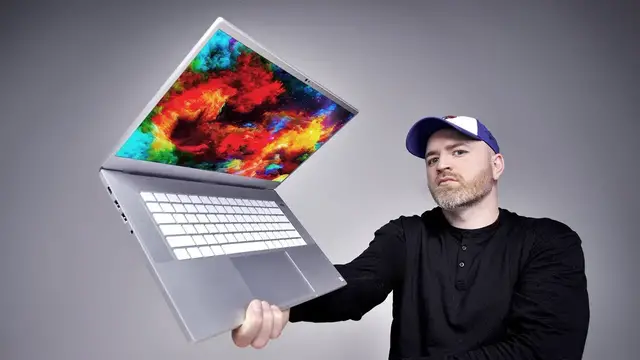
The new Razer Blade 15 for 2019 aims to improve on Razer's gaming laptop offering. This new model is available in the original matte black or Mercury White (as featured in this video). There will also be a 17-inch Razer Blade Pro.
FOLLOW ME IN THESE PLACES FOR UPDATES
Twitter - http://twitter.com/unboxtherapy
Facebook - http://facebook.com/lewis.hilsenteger
Instagram - http://instagram.com/unboxtherapy
Show More Show Less View Video Transcript
0:00
So I got one of the new Razer laptops here
0:04
They revamped the gaming lineup as well. And I saw one particular model that was of interest to me
0:09
which was in this new finish. They're calling it Mercury. Not the typical black, matte black type of finish
0:17
that you've seen on Razer gaming laptops in the past. So I was like, you know what
0:22
I haven't checked out one of these in a while. So maybe I should start with this new color
0:26
especially since these studio laptops that they're putting out very shortly are gonna have a similar color to this one
0:34
I'm like, all right, let's see what that feels like and looks like in a Razer package. And of course, the specs have been upgraded big time here as well
0:41
We've got an i7-9750H processor. There's a 240Hz display. Now, this unit is available with a couple different display options
0:50
You got the 240Hz, 1080p for the gaming-centric audience. There's also a 4k display available on the 15 inch. This one has 512 gigs of SSD storage and the RTX 2070 processor inside
1:03
These guys have made a name for themselves and they're branching out
1:07
Will's been in touch with Razer as soon as we're done with this one and those ones are available
1:11
I'll showcase that one also because you have the graphics card the high-powered graphics card
1:18
You're gonna need some juice for it. So you have this braided cable and this proprietary connector, which I have to say is a little bit better than your typical barrel style connector in my opinion
1:28
It's a 230 watt unit. So actually fairly compact when you consider the amount of horsepower in that guy right there
1:36
Got the razor green on the bottom of the box. What a package they've put together here
1:41
Ooh, all right. So it's got a metallic look to it. It's like a bright silver, in fact
1:47
Willie Do is going to give us a quick space gray comparison. This is lighter for sure than Space Gray
1:52
There we go, that's Space Gray versus Razer Mercury. Lots of input, output over here
1:58
Couple of traditional USB ports, headphone jack. This is the proprietary power connector
2:04
One more traditional USB, a Type-C, probably in the form of a Thunderbolt
2:08
Then you have DisplayPort and HDMI, and it looks like Kensington lock is also there
2:13
I like this, I like that look. A light keyboard as well, some people are gonna love it
2:19
Some people maybe not so much. If you were to see this from a distance
2:22
you don't really feel like that's any kind of special gaming laptop at all. It is an option
2:26
You do not need to pick up this particular color One of the other things I should mention with the lighter color it no fingerprint potential at all that what fingerprints look like on this surface i like that that appealing
2:38
to me now as i mentioned this one has the crazy 240 hertz refresh rate on the display full hd 1920
2:45
by 1080 15.6 so that's going to be appealing to gamers specifically couple of speakers front facing
2:53
which I like. The display also matte finish. Big fan of that as well. So this this laptop has a lot
2:58
going for it right now. So we get the backlight on the keycaps and right away it's this kind of cool
3:04
blue color. It's cycling through the RGB as it would. It's a Razer product still. This is the
3:10
first look at the display. I'm pretty happy with it. You've always got one of these very colorful
3:14
Razer backdrops. There's two ways to look at the 15 inch display option. You can go to 4k
3:22
get the extra pixels maybe you're into some sort of design work or video editing or you just like
3:28
a lot of pixels but the downside there is you're driving all those pixels even when you don't
3:32
really need them we're having the lower resolution actually might give you slightly better battery
3:37
life and of course a different cost i'm kind of split on this as far as which one i would go for
3:42
this one looks plenty good for me if at one end of the spectrum you have like the acer predator
3:50
Remember that thing? That's one end of the spectrum. It's really one functionality first and then everything else
3:55
And then on the other end of the spectrum, you have something like this. This also has the Windows Hello, the infrared camera
3:59
So it has face unlock, which is nice. Don't worry, I'm actually going to do some gaming too
4:03
How long will it take me to download like Overwatch or something, Will? Ready
4:09
Alright, so I have a game loaded. I have a gaming mouse hooked up
4:14
I'll take my horse too. Hello? See that's how you know. Is that the world famous samurai
4:22
I've got Overwatch installed and I have it at 240Hz. It's like, it's crazy smooth obviously
4:29
The game is playing at 1080p right now. And I'm gonna go get killed for you now
4:34
Couple dudes dead. Couple dudes dead there. It might seem like I know what I'm doing
4:44
I promise you I do not. I just know... Big gun, lots of bullets
4:51
That's all I know. Whoa! What did I get hit with there
5:04
I mean I got somebody I don know Did we lose We lost Okay That a fun experience Like could I get into gaming
5:13
Is that possible? Maybe. You can do the thing with the whole rig and the lights
5:19
And you could swap graphics cards and you could build a gaming PC, obviously
5:24
I've done that in the past. When I was younger, I had more time. I'm starting to come around to the idea of the gaming laptop
5:30
because it's like you make the case to own it as your computer
5:34
And then it's like, and it can game. And the experience you can have on this 15-inch blade with the 20
5:41
was it the 2070 that's in here, Will? Yeah, RTX 2070. It's like, man, that's all you need
5:47
Guys, do you need more than that, Will? Maybe you would prefer to have a mechanical keyboard or something
5:54
I guess you could add that. The 240 hertz display, 1080p is plenty
5:58
and it's got a nice matte finish. And then you kick out of this
6:02
you exit the desktop like that, you unplug this guy, and look at you. I mean, what do you do
6:07
You go to the meeting now. Look at you, Jeff. You go to the meeting. They don't know what you've been doing
6:11
They don't know what you've really been up to. Gold medals and whatever it was I was up to
6:18
They don't know. And here's the face unlock. Boom. You didn't see that
6:23
Did you catch that? The speaker sounded good in-game, But what about like music
6:29
What about YouTube? I know our audio is pretty good on the Lou later channel
6:33
So obviously it's been left out of the smartphone conversation a little bit lately
6:37
There's been so much going on. I'd say they're pretty good. The MacBook is a bit better
6:43
Given the entry point of their products, the price point. Way more base for their products
6:48
Like what it costs to potentially some sort of shots at companies like relative to the rest of the technology marketplace
6:57
When they're side by side, you notice it for sure. The audio is much louder on the MacBook Pro
7:02
but there are a lot of laptops with terrible sound. This is not one of them
7:06
Should I play a tune? It's good enough. A lot of people can be using headphones
7:15
So let's just keep that in mind. What can I say about this laptop? I like it
7:19
I guess you can probably tell. I like it. It's a powerful computer, let's say. It's a powerful laptop without your typical powerful form factor
7:27
What's the weight of this, Will? I'm gonna say it's like 5 pounds. 4.8. Man, I..
7:31
See, Jack? Come on, man. I didn't... I wasn't born yesterday In this game This might be my favorite Razer laptop willie do just informs me uh this guy starts around 1500 goes to three grand 3300 bucks okay not cheap nope not cheap by any
7:51
stretch of the imagination let's get will's opinion will come on in you're a guy you're known to have
7:57
tried video games before i'm a fan of overwatch yeah they're doing some pretty cool stuff it's a fun
8:03
game man. Yeah it's a teamwork kind of situation. I love that. You can dominate on your own too
8:09
Really? Yeah. But ultimately the goal is a team victory. It is yeah. Yeah. What do you think about
8:14
this guy right here? I've always liked Razer products. The look. The laptop game their designs
8:20
are really really sleek. It's a slab. Yeah it's kind of like a Microsoft Surface laptop kind of
8:28
There you go. Anything over like 100 hertz is amazing for games
8:34
Bananas. I guarantee you, like, it can really help with your game. Like, you're aiming
8:38
It's just so much. More tight. It's just so much more intuitive
8:43
Yeah. You know? The feel. Yeah. Yeah. Willy do, ladies and gentlemen
8:47
So you're a fan of this? I'm a fan. Definitely. A little pricey or it's okay
8:52
It starts at $1,500, which is not bad. You're okay. Yeah. Yeah, it's fine
8:58
He loves Razer. There he is. That's him. A man in the world playing games
9:03
Willie D. This episode is brought to you by IBM. For all you programmers out there or anyone starting to program
9:09
IBM developed a few lessons to help you get started on this. A drone
9:13
Now it's called IBM Developer. It allows you to quickly and easily program your drone to do stuff like this
9:23
Like this. Now with little or no programming experience, I managed to build out this little UI with
9:37
simple controls. So you can see here, I have the acceleration both X, Y, and Z
9:43
You got the speed and you also got the battery life here
9:47
And you got simple controls for left, right, you can actually do a backflip or front flip
9:53
You can also connect the drone to IBM Watson, and he uses visual recognition to identify
10:01
objects that the drone sees. So all in all, this was pretty interesting
10:05
IBM's given out a couple drones. Check out their website on the link below and you can get more information about their giveaway
Computers & Electronics