0:00
Uh hello guys. Uh in this video I'll
0:02
show you I built out a fullyfledged
0:04
image background removal editor similar
0:06
to Canva. It's directly run directly in
0:09
the browser using AI models. We directly
0:12
using AI models inside our ReactJS
0:14
application. So this is actually the
0:17
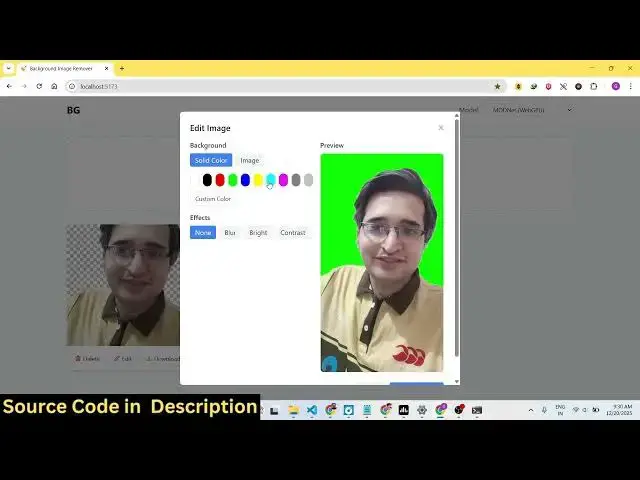
demo right here. You will see I selected
0:19
a bunch of images and it actually
0:21
removed the background of the image and
0:23
you can even put a background color
0:27
inside your image or you can even put a
0:30
customize the background image of the
0:34
you can just see here the background is
0:35
successfully removed and this is a
0:38
complete ReactJS application. If you see
0:40
we are using the latest version of React
0:42
and for building this we are using some
0:44
AI models such as NX runtime web
0:50
hugging face transformer.js. So we are
0:53
using this. So the application is
0:55
divided into its components. So we are
0:58
running this application in the browser
1:02
It's also very easy for you to deploy
1:04
this as well. And if you're interested
1:06
in this the link is given in the
1:08
description. and you can directly
1:09
purchase this application. Let me show
1:11
you the demo and start from scratch. So
1:14
here you actually select a bunch of
1:17
images that you want to remove the
1:21
select these two images and now the
1:24
models will load and it will process
1:26
each image and remove the background.
1:35
And this will just take small amount of
1:38
time to process each image. And uh it
1:41
doesn't have a back end. All the code is
1:44
directly executing it directly in the
1:49
And instantly it will remove the
1:51
background of the images.
2:05
And after that you can customize this
2:07
image once it process successfully.
2:19
So now you can see the background is
2:21
successfully removed. You can actually
2:23
put a background color.
2:27
It's a fully fleshed editor. You can
2:29
even blur out the image as well.
2:55
different image as a background here as
3:00
you can just see the background is
3:01
successfully removed here
3:05
and then you can click save changes and
3:08
you can download your image. So in this
3:11
easy way uh you can actually remove
3:14
background from images. So it's a bulk
3:17
image background removal application
3:23
You can just see here the background is
3:25
successfully removed and it has been
3:31
So we are using this AI models here. ONX
3:35
runtime web uh hugging face transformer.
3:40
So it's a fully fledged application.
3:43
So it's fully customizable as well. So
3:45
once you purchase the source code, you
3:47
will be able to run this application and
3:50
also customize the source code as well.
3:56
So now it takes some time but uh
3:59
ultimately the application works. Some
4:02
for some images it takes larger time to
4:05
actually for the AI model to detect the
4:08
background. You can just see the
4:10
background is fully removed
4:15
now you can customize it just change the
4:18
background image or you can put a
4:20
background image as well. So,
4:23
so the link is given in the description.
4:25
You can directly purchase this