Up next in 10

How to Run & Execute Any Node js npm Tasks & Scripts Automatically in VSCode IDE
Jul 12, 2025

Get the full source code of application here:
Show More Show Less View Video Transcript
0:00
Uh hello guys, welcome to this video. So
0:02
in this video, I'll show you yet another
0:04
VS code extension which allows you to
0:06
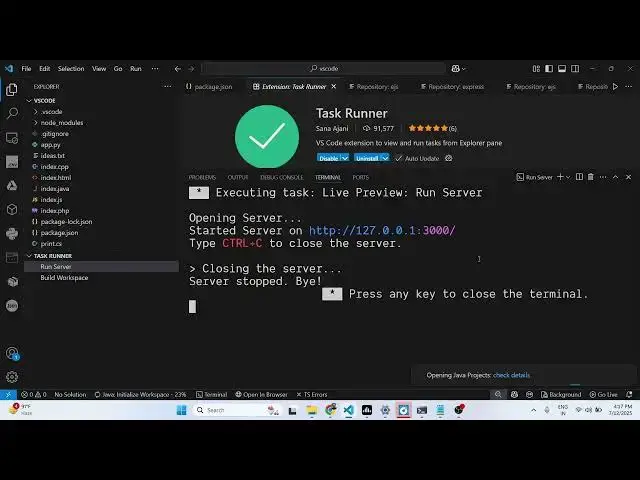
run different task or scripts declared
0:09
inside your
0:11
projects. It can be npm scripts, yan
0:14
scripts, any package manager scripts. So
0:16
if you go to the extensions tab, just
0:18
try task runner and this extension will
0:21
come right here. It's a fairly popular
0:23
extension having 92,000 installs. So
0:26
simply ex uh activate this extension and
0:30
after activating it, it will show you
0:32
the list of different types of scripts
0:34
and tasks that you have declared inside
0:36
your project in the sidebar section.
0:41
So if you go to the you will see this
0:43
will add this section in the explorer
0:45
window right at the bottom section
0:48
corner once you activate this. So now
0:51
inside this here it will show you all
0:54
the scripts that you already have inside
0:56
your package.json file. So first script
1:00
here is for running the server.
1:10
So let me just delete everything and
1:12
start from.
1:27
So here it will show you all the uh task
1:31
that you already have. So this one for
1:33
running the server. So it will start as
1:36
soon as you click this it will start the
1:39
server here and here you can
1:43
simply navigate to the server right
1:45
here. And the second one is for building
1:48
the workspace.
1:52
This is a nice little extension which
1:55
shows you all the tasks which are
1:56
already running inside VS code. It shows
1:59
you in this explorer window. Definitely
2:02
install this extension and also check
2:04
out my website free mediatools.com uh
2:08
which contains thousands of tools.
#Programming
#Software