Up next in 10


Get the full source code of application here:
Show More Show Less View Video Transcript
0:00
Uh hello guys, welcome to this video. So
0:02
in this video, I'll show you how to keep
0:04
track of which version of composer you
0:06
are using. Composer is nothing but it's
0:08
a dependency manager for PHP
0:10
applications. If you want to install
0:12
third party PHP packages, you install
0:15
them through composer. So inside the
0:17
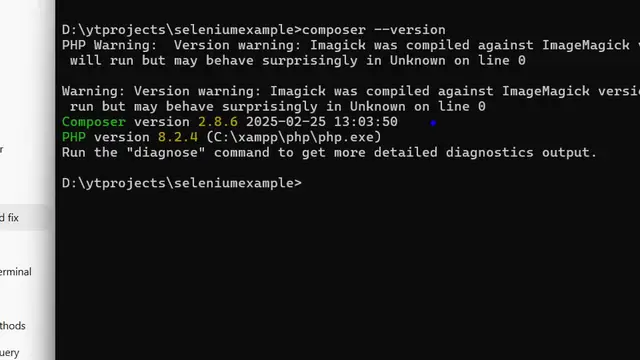
terminal, you execute this command
0:19
composer- version. So then it will
0:22
exactly tell you which version of
0:23
composer you're using. So in my case, as
0:26
you can see, we are using 2.8.6. six. It
0:30
also tells you the version number of PHP
0:32
as well. So the command is very simple.
0:35
After that, if you also want to see
0:37
where composer is installed in your
0:39
system, you simply uh get this by using
0:43
where command where composer. So now it
0:46
will tell you where composer is
0:48
installed.
0:50
This will give you this location.
0:52
So either you can copy this location and
0:55
go to file explorer
0:58
and simply paste this location.
1:02
It opens it.
1:04
You can go to the folder here.
1:07
You'll see this is your executables
1:09
here. This is your
1:13
in this easy way you can keep track of
1:14
it. And if you want to actually use the
1:18
composer command globally,
1:21
in my case, as you can see now, it is in
1:24
the command line. If you want to use it,
1:26
you do need to add this entire path.
1:29
Simply copy this path and go to the
1:32
environment variable and go to the path
1:35
and simply add this path. Simply paste
1:38
it. I have already done that. So that's
1:40
why we can access composer directly in
1:42
the terminal. So just do this and after
1:44
that you can access composer directly in
1:47
the terminal. So thank you very much for
1:50
watching this video. Also check out my
1:52
website freemediatools.com
1:56
uh which contains thousands of tools.
#Programming
#Software