Up next in 10

Emergent AI Code Builder is INSANE to Build Full Stack Web & Mobile Apps From Prompt Destroys Claude
Apr 1, 2026

Watch My Visual Studio Code IDE Setup Video For Fonts,Themes & Extensions
https://youtu.be/Bon8Pm1gbX8
Hi Join the official discord server to resolve doubts here:
https://discord.gg/cRnjhk6nzW
Visit my Online Free Media Tool Website
https://freemediatools.com/
Buy Premium Scripts and Apps Here:
https://procodestore.com/
Show More Show Less View Video Transcript
0:02
Hello guys. I will show you in this live
0:05
stream another AI code builder which is
0:07
pretty much
0:09
very popular which is called as emergent
0:12
AI. Emergent AI, if you search on Google
0:16
this is a AI code builder similar to
0:18
Claude cursor chat GPT.
0:21
So the very first link which comes this
0:23
is actually the website. The thing about
0:25
this website is that you can build out
0:27
web application
0:29
as well as mobile applications as well.
0:31
So full stack web and mobile apps in
0:34
minutes.
0:35
So we have options right here. You can
0:37
continue with Google account. Just you
0:40
can get started for completely free.
0:42
Just sign up using your Google account.
0:46
So once you are signed up you will be
0:48
redirected to their dashboard area.
0:51
So you actually get free access.
0:54
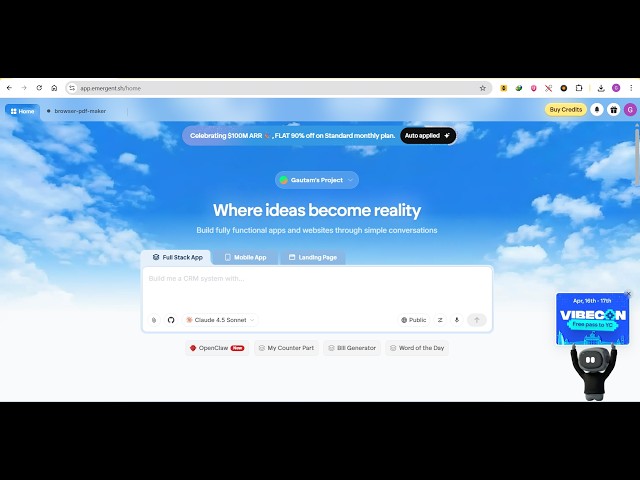
So we have this chat prompt here. You
0:57
can either build a web application,
0:59
mobile app or a landing page.
1:03
So you actually have the ability to
1:05
choose all these models.
1:07
So we are using this sonnet model.
1:10
All these models are available. So now
1:13
you simply tell the AI what sort of
1:15
application you want to generate. So I
1:17
will simply run
1:18
build a image to PDF web app in browser.
1:21
So exactly tell this prompt here.
1:24
Now after that the AI will take over. It
1:27
will actually build out the entire
1:30
application.
1:31
So
1:33
So now you will see the
1:36
AI will start developing the
1:37
application.
1:39
And once it completes it will show you
1:40
the live preview on the right hand side.
1:43
And you also will be having the ability
1:45
to deploy the application as well. So
1:48
as you see right here it start building
1:50
out this coding agent.
1:52
So
1:55
Now it's you just need to
1:57
it exactly gives the description of the
2:00
application. If you are happy with it
2:02
you click on
2:04
yes
2:05
build out this application.
2:07
So once it completes
2:14
it is actually setting up the project in
2:16
the background installing the necessary
2:18
dependencies.
2:24
It's [snorts] a fairly new app in the
2:25
market AI code builder emergent AI.
2:29
So definitely check this out. Just
2:31
create a free account.
2:33
Just log in with your Google account and
2:36
it provides you with the free access
2:38
to actually build out some cool little
2:41
applications. If you are not a developer
2:43
if you not a coder
2:46
this platform will be a pretty much
2:49
good for you. So as you can see in this
2:51
tab we are doing this you can create
2:53
multiple tabs as well.
2:56
So one tab is already running right
2:58
here.
2:59
So you can create multiple applications
3:01
as well. So
3:05
So right here the app will show right
3:07
here once it completes. So just need to
3:09
wait for some time.
3:12
So once it completes the app will show
3:15
right here.
3:24
So as you can see right here it's
3:29
actually building out all these files
3:31
here as you can see.
3:36
It's providing you the instructions to
3:38
the AI
3:39
then the AI is actually
3:41
building out the architect the prototype
3:44
for this application.
3:50
So you don't need to do anything. Once
3:51
you written the prompt you just need to
3:53
wait
3:54
for the AI to complete the app.
3:57
So
4:04
So this will save you a lot of time
4:06
because if you are not a developer
4:11
and it also have the pro plan as well.
4:13
If you are out of credits you can
4:15
actually buy some credits by clicking
4:17
this button. So as you see the pro plan
4:20
start with
4:21
13,000 per month. It gives you 750
4:24
credits.
4:25
And it also have $99 which gives you 50
4:28
credits.
4:30
So all the
4:34
You can actually purchase credits as
4:36
well. So
4:40
To be honest my
4:43
honest opinion about this tool it's
4:45
fairly new and it's definitely it's
4:48
fairly slow as compared to other tools
4:50
in the market which is Claude
4:53
chat GPT or
4:55
Gemini. It's a little bit slow but it
4:57
does the job for you.
5:03
As you see it's actually
5:05
uh
5:06
install these necessary modules which
5:08
are there jsPDF.
5:28
So it's little bit slow but
5:31
I personally tried this and built out
5:33
many web and mobile applications using
5:36
this platform.
5:38
So it created these four files as you
5:39
see.
5:41
So you written all this code here as you
5:44
will see right here.
5:46
We have app.css, index.css, index.html.
5:49
So
5:50
now it is actually deploying the
5:52
application after you writing this code
5:54
right here. So now as you see the
5:56
deployment has started and now you see
5:58
on the right hand side the actual
6:00
application has been deployed.
6:04
So you have the deploy button as well.
6:06
So you can actually first of all test
6:08
out the application once it has actually
6:10
made it.
6:13
So you simply select a bunch of images
6:15
click on convert to PDF.
6:17
So
6:24
and
6:26
the app definitely works and click on
6:28
deploy.
6:29
So for deployment you need to actually
6:31
upgrade to the
6:33
plan
6:34
which gives you
6:36
50 credits. So it start with 99
6:40
rupees per month which is very cheap
6:42
plan.
6:43
You can definitely enroll this
6:46
to build out cool little applications.
6:48
So you can open it in a new tab as well.
6:50
So
6:51
once it deploys it gives you a unique
6:53
URL where you can actually test out this
6:55
application. So
6:57
I really like this platform emergent AI
7:00
which builds out your application.
7:03
So as you can see the app is perfectly
7:05
working.
7:06
So the platform name is emergent AI.
7:09
Definitely check this out.