Up next in 10

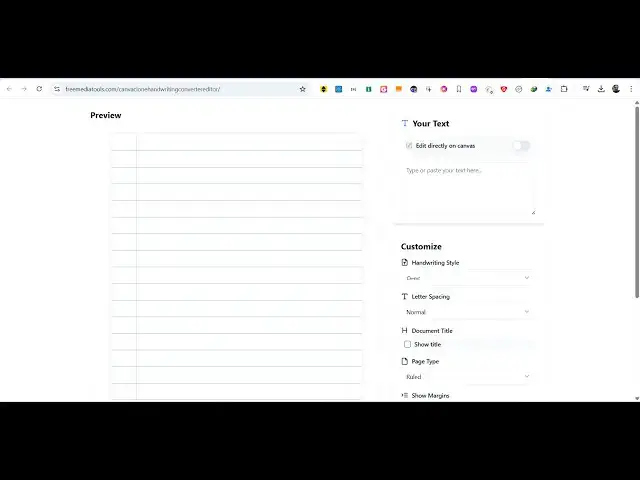
Build a React.js Handwriting Canva Clone to Export Text to Image in Browser Using Fabric.js in TS
Apr 1, 2025

Buy the full source code of application here:
https://procodestore.com/index.php/product/build-a-react-js-handwriting-canva-clone-to-export-text-to-image-in-browser-using-fabric-js-in-ts/
Watch My Visual Studio Code IDE Setup Video For Fonts,Themes & Extensions
https://youtu.be/Bon8Pm1gbX8
Hi Join the official discord server to resolve doubts here:
https://discord.gg/cRnjhk6nzW
Visit my Online Free Media Tool Website
https://freemediatools.com/
Buy Premium Scripts and Apps Here:
https://procodestore.com/
Show More Show Less View Video Transcript
0:00
uh hello guys uh welcome to this video
0:02
so in this video I will show you a
0:04
single page application that I developed
0:06
inside ReactJS uh which is a handwriting
0:09
converter so if you want to make some
0:11
kind of notes then you can use this tool
0:15
you can actually input any text right
0:17
here i have also deployed this tool on
0:19
my website
0:20
freemediatools.com so you can check out
0:22
the live demo so actually we have a text
0:25
area where you can actually enter your
0:27
actual text uh let's suppose I write
0:31
this text
0:32
here so as you can see I'm writing this
0:35
text it is converted into handwriting
0:44
text can see that
0:46
so this is converted into this text
0:49
ordinary text is converted into
0:51
beautiful handwriting text and this is
0:54
actually a piece of paper here you will
0:56
see all this design functionalities we
0:59
have different options here we can
1:00
actually change the font as well we have
1:03
different kinds fonts available so you
1:06
can basically change to any handwriting
1:08
font right here from this select round
1:11
just pick your favorite font
1:15
so now let's suppose I like this text
1:17
you also have the option tight spacing
1:20
if you want letter spacing normal wide
1:24
as
1:25
well extra wide spacing if you want you
1:29
can do that then we have also a show
1:31
title if you want to add a title to the
1:35
page you can say
1:37
simple
1:39
notes so this title will show right here
1:42
at the very top
1:44
and if you want this ruler thing you can
1:47
toggle this you can change to a plain
1:50
piece of paper as well if you are making
1:52
some kind of uh card here if you this
1:55
tool can be very much helpful if you
1:57
want a plain piece of paper or a rule or
2:01
a graph so it's totally up to you all
2:05
the designs are supported now let's
2:06
suppose I only want a plain piece of
2:08
paper and after that you can even
2:11
basically toggle this margin as well if
2:14
you want to have a
2:16
margin then you can toggle this option
2:19
so this will actually add this margin
2:21
that you see right here if you don't
2:24
want this just untick this option and
2:26
you can even upload a background image
2:28
if you want to you can see a background
2:31
image at the background you can do that
2:34
as well
2:36
so it's totally up to you if you want a
2:39
background image if you want to remove
2:41
it simply click the cross button and it
2:44
will remove and you can instead if you
2:46
want to change the color of the page if
2:50
you want to change it to the cream color
2:53
you will see you have different options
2:55
right here in the select dropdown you
2:57
can select any color of your
2:59
choice light blue light yellow can see
3:03
that so then we also can manipulate the
3:06
color of the text so here you can simply
3:11
select any color of your choice so this
3:14
will change to the color that you
3:19
select and you can even select a custom
3:22
color by selecting this and this color
3:24
picker will open and here you can simply
3:26
select your favorite color from this
3:28
color picker
3:34
so you can see that so if you want to
3:37
export this now we have the download as
3:39
PNG button right here uh this will
3:41
actually export everything of your
3:44
handwriting phone to an actual PNG image
3:46
file so that you can save it inside your
3:48
machine so this is actually the
3:51
application guys tool very simple tool
3:54
it works entirely in the browser it's a
3:56
single page tool which is developed in
3:58
ReactJS using fabric JS if you want to
4:01
purchase the full source code of this
4:02
application the link is given in the
4:05
description so this will be the
4:07
directory structure of the actual
4:09
project here if you see we are actually
4:12
having all the source code
4:14
here each component is divided into its
4:18
individual file here so it the code is
4:21
divided into multiple components so
4:23
after you purchase it it becomes very
4:25
easy for you to understand the code and
4:27
actually modify the code as well and add
4:30
additional functionalities as well you
4:32
will see all the user interface
4:34
component like this
4:37
here and if I show you the package
4:39
dojson file we are using this fabric js
4:42
uh library which is a JavaScript uh
4:45
animation library
4:48
so if you don't know about this package
4:50
fabric js is a open-source JavaScript
4:53
animation library canvas library so we
4:56
are using this uh uh library for
4:58
building this uh handwritten canva clone
5:02
kind of editor right in the browser
5:04
itself and you can see we are also using
5:07
tailwind CSS for the user interface and
5:10
uh react version if you'll see latest
5:12
version we are using react 18 so it's
5:15
compatible with the latest version so if
5:17
you are interested guys the link is
5:18
given in the description just go to the
5:20
website throwcodestore.com and you will
5:22
get this zip file automatically from
5:24
Google drive after you make the payment
5:27
and just you need to extract this zip
5:29
file so if you're running it for the
5:31
very first time
5:33
uh you just need to first of all open
5:35
the terminal and just navigate to the
5:39
directory after you navigate to the
5:42
directory simply write npmi so this will
5:44
install all the NodeJS modules which I
5:46
mentioned in the package.json file and
5:48
create this node modules folder after
5:52
that you just need to say npm rundev so
5:55
this will start the development server
5:57
localhost
5:58
8080 so now you'll see the application
6:01
is running on localhost so it's very
6:04
easy to compile and run this application
6:07
so you will see that the it's a routing
6:10
application
6:13
so let me just show you if you want to
6:16
run it locally because I deployed this
6:18
application that's why I put this so if
6:21
you're running it locally just remove
6:23
this and you will see on this home path
6:26
now you can see local host
6:28
8080 so the single page application is
6:32
running you can see that so again you
6:33
can do this just write the text you can
6:36
even toggle this option here uh if you
6:39
want to directly write in the canvas you
6:41
will
6:42
see so you can directly write in the uh
6:45
paper piece of paper
6:51
here so this is actually the application
6:53
guys if you are interested you can first
6:56
of all check out the live demo before
6:58
purchasing it if you like it then only
7:00
you can purchase it and still if you
7:02
face any problem you can contact me at
7:04
my email after you make the payment if
7:06
you face any issues I will readily help
7:09
you so you can see it's built inside
7:12
Typescript and each component is divided
7:15
into its individual file so it will be
7:17
easy for you to modify and add
7:19
additional features as well so thank you
7:22
very much guys for watching this video
7:24
and also check out my website
7:26
freemediatools.com which contains
7:28
thousands of tools regarding audio video
7:30
and image and I will be seeing you in
7:33
the next video
#Programming
#Online Goodies
#Other