Up next in 10

Build a MERN Stack Video Editor in Browser Using FFMPEG WASM & Socket.io Using TypeScript
Mar 5, 2026

Buy the full source code of application here:
https://procodestore.com/index.php/product/build-a-mern-stack-video-editor-in-browser-using-ffmpeg-wasm-socket-io-using-typescript/
Show More Show Less View Video Transcript
0:00
Uh hello guys, welcome to this video. So
0:02
in this video I'll show you I built out
0:04
a manstack video editor in the browser
0:08
using ffmppg web assembly library and
0:11
socket.io. So we are running this
0:13
application local host. As you can see
0:15
we have simply running npm runtime. So
0:18
this started this monst application. So
0:22
it has a front end and a back end. The
0:24
front end is running in ReactJS the
0:27
latest version. As you can see, we are
0:29
also using socket.io. We are also using
0:32
f ofmppg web assembly library. So at the
0:35
back end, we are using node express. Uh
0:37
this is actually the back end section.
0:39
As you can see, all the files are
0:42
customizable. Everything is
0:43
customizable. This is the front end of
0:46
the application of the video editor. And
0:49
this is the back end. So right here we
0:50
are using ffmpg ff library at nodejs
0:54
express. So this is our backend server
0:57
in monstack.
0:59
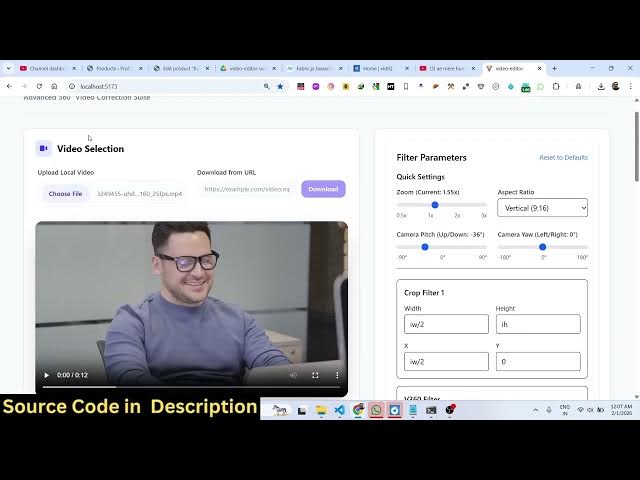
So I started this. So the interface is
1:03
quite simple. You basically select
1:05
whatever video file you want to select.
1:09
So after you select the video, the video
1:12
will get uploaded in the back end
1:14
section and it will display. And now
1:17
right here you can select uh basically
1:20
all these options of ffmppg. You can
1:23
zoom at a particular location. Zoom in
1:25
the video.
1:28
You can
1:30
change the aspect ratio 16x9. You can
1:33
change to a vertical video. You can crop
1:36
as well.
1:38
After applying these changes, you can
1:40
actually play preview.
1:47
So it will play using FF play in a new
1:50
window. As you can see at any point you
1:53
can stop the preview
1:55
and uh then you can click add text. So
1:58
right here if you want to trim out the
2:00
video right here you can specify the
2:03
starting duration and the ending
2:04
duration.
2:07
And now after that you can click
2:12
so you need at least two tasks. So,
2:19
so you can combine all task into a one
2:22
video. So, now the processing will
2:24
start. It will directly edit your video.
2:27
After applying all these,
2:30
just just make sure that the length of
2:32
the video is
2:42
so so you can stop the video.
2:46
So
2:52
the preview will open directly in the
2:54
browser using FF play.
2:59
So now you can see the video is
3:00
successfully created. It will appear
3:02
right here in the download section and
3:05
uh you can simply click the download
3:07
button to download the video. So
3:10
the video will get downloaded.
3:20
So basically the video you can see it's
3:23
saved right here in the outputs
3:24
directory in the back end section and uh
3:31
so it's in monstack. So the video will
3:34
get uploaded in the uploads directory
3:36
once you upload the video the output
3:38
will show right here in the output
3:39
folder. So it's actually a monstack. It
3:42
has fully front end and a back end as
3:45
well. So interface is quite simple. You
3:48
select the video. After selecting the
3:51
video, all these options are there.
3:55
You can zoom everything I showed you. So
3:58
if you still face any problem after
4:00
purchasing the source code, I will
4:02
definitely help you. You can email me.
4:04
So it's very easy for you to run this
4:07
application. All these filters are also
4:08
there. You can
4:22
so add task
4:34
and then you click the start export
4:36
button. After that the exporting will
4:37
start and the downloaded videos will
4:39
appear right here in this section.
4:42
And uh if you see all these videos fmpp
4:46
web assembly we are actually using all
4:49
these filters. This is the react project
4:51
the front end of the application.
4:54
So we have also used tailwind for the
4:56
interface of the application. For making
4:58
the interface we are using malar for
5:01
uploading videos express at the backend
5:04
server. alter for file upload and we are
5:08
using latest function of react socket.io
5:12
as well
5:14
and tailwind CSS for the interface of
5:17
the application. So
5:20
this is the dev script which will start
5:23
the back end and the front end
5:25
automatically.
5:27
So as we running it, we can even build
5:30
this as well to actually deploy this
5:33
application. So
5:36
if you're looking forward for a solution
5:38
on one stack solution for video editor,
5:40
this will be the perfect choice for you.
5:42
Definitely purchase this editor and uh
5:49
so if you want to clear out every data
5:51
you can click this button. It will
5:53
delete all the files on the server and
5:56
you can start it from scratch. You can
5:58
even download a video from a URL. just
6:00
put the URL and you can simply download
6:03
the video.
6:05
So these are all the filters which are
6:07
supported by SFMPG for cropping lens
6:12
scaling the video everything. So once
6:15
you get the source score it's easy for
6:16
you to customize it add additional
6:18
features as well.
6:38
So here you can load the filters
6:41
and click on process. So each
6:44
segment. So there is option to process
6:47
each segment here.
6:50
So ffmppg will directly execute all
6:53
these processing directly in the
6:55
browser. So there is no need for
6:58
refreshing the page. It will
6:59
automatically download the video once
7:01
the task is completed.
7:08
Click the start export button and
7:14
it will take some time for the
7:16
processing to fully complete
7:19
and you will get the notification once
7:21
the final video is downloaded. So if
7:24
you're interested guys, definitely
7:26
purchase it.