Up next in 10

BlackBox AI Coding IDE Builds Full Stack Coding Apps From Prompt Beats Claude,Gemini & Cursor??
Apr 2, 2026

Watch My Visual Studio Code IDE Setup Video For Fonts,Themes & Extensions
https://youtu.be/Bon8Pm1gbX8
Hi Join the official discord server to resolve doubts here:
https://discord.gg/cRnjhk6nzW
Visit my Online Free Media Tool Website
https://freemediatools.com/
Buy Premium Scripts and Apps Here:
https://procodestore.com/
Show More Show Less View Video Transcript
0:02
Hello guys in this live stream I will
0:04
share you with the very popular AI app
0:07
builder.
0:10
It's called as black box. So you have
0:13
heard this name black box AI code
0:15
builder. It also have its own VS code
0:18
extension as well. So once you search on
0:19
Google the very first website which
0:22
comes blackbox.ai.
0:25
So it's an all-in-one AI code builder.
0:28
It's a
0:30
You can directly log in with your Google
0:32
account. It will redirect you to the
0:34
dashboard area. It also have its own VS
0:37
code extension as well.
0:39
So on the website you can click on login
0:42
with Google account.
0:44
This will hardly take 2 minutes to
0:46
create the account and then you can
0:48
create full stack coding application
0:50
from a single prompt.
0:52
So it's similar to Claude, Gemini, GPT,
0:55
cursor, everything. So this is your
0:56
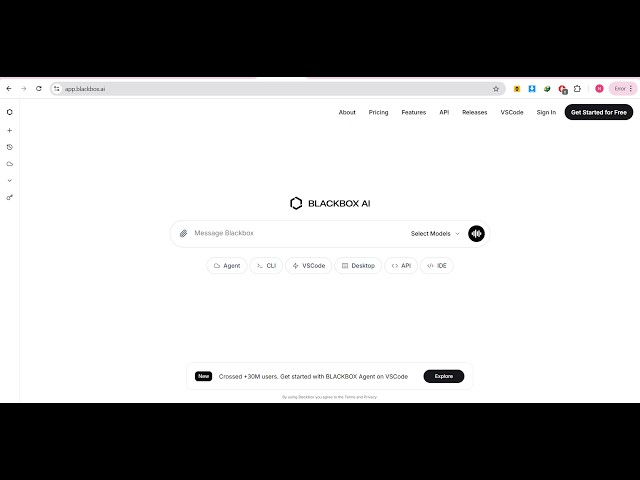
chatting screen right here.
0:59
You can select any of these models,
1:01
MiniMax, Claude, Sonnet, GPT, Gemini K2,
1:05
GLM, Grok.
1:07
So from here you can select the model,
1:09
whatever model you want to use.
1:14
They do have the pro plan starting from
1:17
$2 per month.
1:18
So so it you will get to use all the AI
1:21
models in a single subscription.
1:24
So I think it's a very good website
1:26
blackbox.
1:29
So let's suppose you want to use
1:32
to create a full stack application. So I
1:35
will say image to web app in browser.
1:38
You send this request and now it
1:40
instantly generates the code for you as
1:43
you can see.
1:44
It's generating the code.
1:54
It also has a VS code extension as well.
1:57
So
1:59
if you open VS code simply type
2:01
blackbox.
2:03
You can install the VS code extension as
2:05
well.
2:06
So it actually generated this code for
2:09
me.
2:10
576 lines of code.
2:12
It generated instantly. As soon as I
2:14
written the prompt automatically it
2:16
generated a fully functional image to
2:18
PDF application.
2:20
So you can build out unlimited
2:22
applications.
2:24
It also have a CLI version as well. So
2:27
it's
2:28
a great alternative to
2:31
Claude, Gemini.
2:37
So if you open VS code they do have this
2:41
VS code extension as well.
2:50
So [snorts] you can install this as
2:52
well.
2:53
It has all the models right here.
2:57
You'll be able to use all these models
2:59
in a single subscription.
3:01
So that's why I love this website. I
3:03
able to use different AI models
3:06
directly.
3:07
You can even ask general questions as
3:09
well. So you say top 10 frameworks of
3:12
JavaScript.
3:14
So as you simply
3:16
you will get this response right here.
3:19
The top 10 frameworks of JavaScript.
3:22
It will give you the response with
3:25
description, everything.
3:28
You can see that. So it's a really good
3:30
website blackbox.ai.
3:33
Definitely check out this.
3:37
You can actually chat
3:39
code with it. It does offer you with its
3:42
own CLI as well.
3:44
As you see the CLI version it has a its
3:47
own CLI as well. As you can install it
3:50
directly in the
3:51
command line.
3:54
It also have its own desktop IDE.
3:59
You can install it on site the Windows
4:01
machine. It's only up to 105 megabytes.
4:06
It's similar to cursor. Once it is
4:08
installed you will be able to access all
4:10
the AI models, coding agent.
4:13
So it's a simple app builder similar to
4:18
Visual Studio Code. It also offers its
4:21
own API as well.
4:24
So from here you can create the API key.
4:28
And
4:30
it also offers as a VS code extension
4:32
that I already told you it's a very
4:34
popular extension over
4:36
5 million installs. So number one AI
4:39
coding agent.
4:42
So this is their agent mode. So you can
4:46
use this on the terminal.
4:48
You can use it as an IDE similar to
4:51
Claude code, codex.
4:54
Or you can use it on the web as well. So
4:56
it's an all-in-one
4:57
AI coding
4:59
app builder.
5:01
So definitely check this out.