Up next in 10


Get the full source code of application here:
Show More Show Less View Video Transcript
0:00
Uh hello guys, welcome to this videos.
0:02
Uh hello guys, welcome to this videos.
0:02
Uh hello guys, welcome to this videos. In this video, I'll show you a cursor or
0:04
In this video, I'll show you a cursor or
0:04
In this video, I'll show you a cursor or claude Gemini alternative
0:08
claude Gemini alternative
0:08
claude Gemini alternative IDE which supports all these features.
0:11
IDE which supports all these features.
0:11
IDE which supports all these features. Augmentcode.com
0:12
Augmentcode.com
0:12
Augmentcode.com this is the actual platform you if you
0:15
this is the actual platform you if you
0:15
this is the actual platform you if you go to the browser. So you can see it can
0:17
go to the browser. So you can see it can
0:18
go to the browser. So you can see it can generate code it auto completion
0:20
generate code it auto completion
0:20
generate code it auto completion everything it can do. So it's similar to
0:23
everything it can do. So it's similar to
0:23
everything it can do. So it's similar to cursor cloud and gemini. So this is the
0:27
cursor cloud and gemini. So this is the
0:27
cursor cloud and gemini. So this is the so it's a VS code extension. You can
0:29
so it's a VS code extension. You can
0:29
so it's a VS code extension. You can install it as a VS Code extension. And
0:32
install it as a VS Code extension. And
0:32
install it as a VS Code extension. And if you go to the pricing and they do
0:34
if you go to the pricing and they do
0:34
if you go to the pricing and they do offer the free plan as well and up to 50
0:37
offer the free plan as well and up to 50
0:37
offer the free plan as well and up to 50 user messages, unlimited edits and
0:40
user messages, unlimited edits and
0:40
user messages, unlimited edits and completions and their pro plan start
0:42
completions and their pro plan start
0:42
completions and their pro plan start with $50
0:44
with $50
0:44
with $50 per month. And what you can do, you can
0:47
per month. And what you can do, you can
0:48
per month. And what you can do, you can go to your VS code simply install this
0:50
go to your VS code simply install this
0:50
go to your VS code simply install this extension
0:52
extension
0:52
extension augment core.
0:55
augment core.
0:55
augment core. This is the platform right here. You
0:56
This is the platform right here. You
0:56
This is the platform right here. You will see this is a verified extension.
1:07
So if you click it, this is their
1:09
So if you click it, this is their
1:09
So if you click it, this is their verified extension almost used by 46,000
1:13
verified extension almost used by 46,000
1:13
verified extension almost used by 46,000 developers. So it's a simple alternative
1:17
developers. So it's a simple alternative
1:17
developers. So it's a simple alternative to GitHub copilot cursor alternative. So
1:20
to GitHub copilot cursor alternative. So
1:20
to GitHub copilot cursor alternative. So just install this extension. After
1:22
just install this extension. After
1:22
just install this extension. After installing it, this extension will be
1:26
installing it, this extension will be
1:26
installing it, this extension will be activated. And
1:29
activated. And
1:29
activated. And once it is activated, you just need to
1:31
once it is activated, you just need to
1:31
once it is activated, you just need to sign in. Click the sign in button and uh
1:37
sign in. Click the sign in button and uh
1:37
sign in. Click the sign in button and uh just continue with your Google account.
1:43
So once you sign up,
1:45
So once you sign up,
1:46
So once you sign up, you now will be able to use this right
1:49
you now will be able to use this right
1:49
you now will be able to use this right inside your VS code. So click on sign up
1:52
inside your VS code. So click on sign up
1:52
inside your VS code. So click on sign up and start coding. So now it will
1:55
and start coding. So now it will
1:55
and start coding. So now it will redirect you to the VS code.
2:04
So right here in this you will see this
2:06
So right here in this you will see this
2:06
So right here in this you will see this chat prompt and your subscription will
2:08
chat prompt and your subscription will
2:08
chat prompt and your subscription will expire in 13 days. So now it gives you
2:12
expire in 13 days. So now it gives you
2:12
expire in 13 days. So now it gives you the free trial for 13 days and then it
2:15
the free trial for 13 days and then it
2:15
the free trial for 13 days and then it will expire and then you just need to
2:17
will expire and then you just need to
2:17
will expire and then you just need to upgrade if you want to. Now simply go to
2:20
upgrade if you want to. Now simply go to
2:20
upgrade if you want to. Now simply go to the file whatever file you are working
2:22
the file whatever file you are working
2:22
the file whatever file you are working right here. Simply open the chat prompt
2:25
right here. Simply open the chat prompt
2:25
right here. Simply open the chat prompt uh inside your agent mode. This is right
2:27
uh inside your agent mode. This is right
2:27
uh inside your agent mode. This is right in the agent mode. So what you can even
2:30
in the agent mode. So what you can even
2:30
in the agent mode. So what you can even attach files here automatically this
2:32
attach files here automatically this
2:32
attach files here automatically this will select the open file.
2:37
will select the open file.
2:37
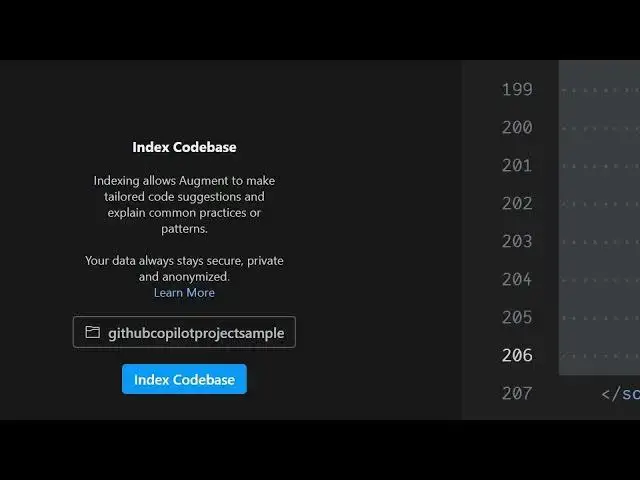
will select the open file. So it will simply say index code allow
2:39
So it will simply say index code allow
2:39
So it will simply say index code allow augment to make tailored code
2:41
augment to make tailored code
2:41
augment to make tailored code suggestions and explain common
2:43
suggestions and explain common
2:43
suggestions and explain common practices. So here you can simply say
2:46
practices. So here you can simply say
2:46
practices. So here you can simply say index code base. So it will everything
2:49
index code base. So it will everything
2:49
index code base. So it will everything your
2:50
your
2:50
your index indexing will start right here and
2:54
index indexing will start right here and
2:54
index indexing will start right here and now you will be uh receiving suggestions
2:59
now you will be uh receiving suggestions
2:59
now you will be uh receiving suggestions according to your own codes. So
3:03
according to your own codes. So
3:03
according to your own codes. So right here what we can do remove all
3:06
right here what we can do remove all
3:06
right here what we can do remove all this code and uh generate
3:10
this code and uh generate
3:10
this code and uh generate and write the image to PDF app.
3:18
So you can remove this all this code. So
3:22
So you can remove this all this code. So
3:22
So you can remove this all this code. So so I just simply ask a question right
3:24
so I just simply ask a question right
3:24
so I just simply ask a question right here.
3:27
here.
3:27
here. So now what it will do it will start
3:29
So now what it will do it will start
3:29
So now what it will do it will start generating the code for you.
3:39
So I will say approve. So now it will
3:42
So I will say approve. So now it will
3:42
So I will say approve. So now it will create a new file.
4:10
So it it is also having the support if
4:13
So it it is also having the support if
4:13
So it it is also having the support if you want to do autocomp completion as
4:15
you want to do autocomp completion as
4:15
you want to do autocomp completion as well.
4:20
So it will also just suggest you
4:23
So it will also just suggest you
4:23
So it will also just suggest you suggestions as you
4:28
you can see.
4:37
So this is the extension definitely
4:39
So this is the extension definitely
4:39
So this is the extension definitely install this augment. It's similar to
4:41
install this augment. It's similar to
4:41
install this augment. It's similar to GitHub copilot cursor cla and Gemini. Uh
4:44
GitHub copilot cursor cla and Gemini. Uh
4:44
GitHub copilot cursor cla and Gemini. Uh it's a great alternative and uh
4:55
you can try this in the chat mode. So
5:04
here you can ask any application that
5:06
here you can ask any application that
5:06
here you can ask any application that you want to develop.
5:24
So you can see it generated all this
5:41
So definitely check out this augment
5:44
So definitely check out this augment
5:44
So definitely check out this augment code. I think it removed all the files.
5:58
So definitely check out guys this
6:00
So definitely check out guys this
6:00
So definitely check out guys this augment code
6:03
augment code
6:03
augment code website.
6:05
website.
6:05
website. It's similar to GitHub copilot claude
6:07
It's similar to GitHub copilot claude
6:07
It's similar to GitHub copilot claude and person. And I will be saying to you
6:09
and person. And I will be saying to you
6:09
and person. And I will be saying to you in the next
#Programming
#Software