Up next in 10

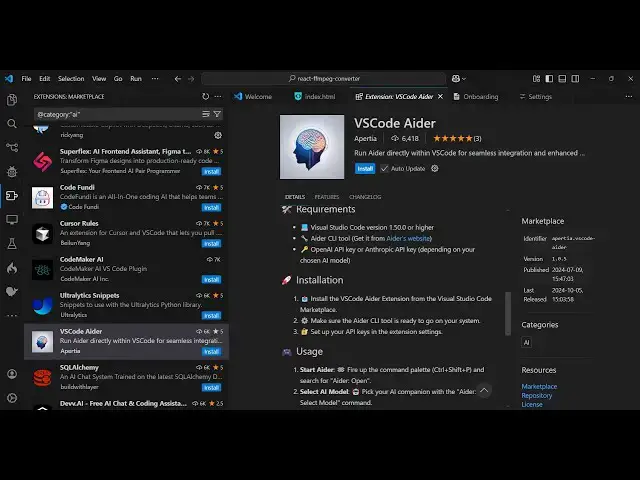
Aider VSCode Best Open Source Alternative to Github Copilot Best AI Coding Assistant Complete Setup
Mar 2, 2025

Get the full source code of application here:
Watch My Visual Studio Code IDE Setup Video For Fonts,Themes & Extensions
https://youtu.be/Bon8Pm1gbX8
Hi Join the official discord server to resolve doubts here:
https://discord.gg/cRnjhk6nzW
Visit my Online Free Media Tool Website
https://freemediatools.com/
Buy Premium Scripts and Apps Here:
https://procodestore.com/
Show More Show Less View Video Transcript
0:00
uh hello guys welcome to this video so
0:02
in this video I will show you a free
0:04
alternative to GitHub co-pilot and other
0:07
AI coding assistants which are paid
0:09
there is a free open-source uh extension
0:12
in vs code which is available which lets
0:14
you do everything related to coding it
0:17
will provide you autoc completions it
0:18
will provide you analyze your code it
0:21
will find you errors the extension is vs
0:24
code Adder if you just write this on
0:27
extensions tab it's a fairly new
0:30
extension vs code AER just write this on
0:33
the extensions tab so this is already
0:36
having
0:38
6,453 downloads so the name of the
0:41
software is AER this is a tool right
0:43
here if you directly type this on Google
0:46
it's very popular among developers right
0:48
now because the main thing is that it's
0:51
open source it doesn't it basically
0:54
works in the command line and you can
0:57
ask a question and it will generate the
0:59
code for you so this is their official
1:01
website which is a. chat so now let me
1:05
show you so this is actually the install
1:07
button click this install button and
1:10
just install this so as soon as you
1:13
install this you will see this uh this
1:17
AER just wait it will appear let me just
1:27
uh once you in install
1:31
this you can see a CLI tool you can even
1:36
get an A CLI tool by going to visit
1:39
their website right here and uh if you
1:43
want to install this tool inside
1:47
your there is this pip command
1:50
available so you can directly install
1:53
this by executing this command pip
1:55
install AER install so just install this
1:59
CLI to which is
2:01
available so you can see it is now
2:03
installing it inside my system so this
2:07
CLI tool allows you
2:11
to ask
2:16
question so after doing
2:21
this you come to the uses part right
2:27
here so you can see run ad the source
2:30
code you files you want to edit these
2:32
files will be added to the chat session
2:35
so that Eder can see their content and
2:37
edit them for you
2:39
so you can create any file that let's
2:41
suppose uh in my directory if I open the
2:44
command line here
2:48
so let me just open the command line
2:53
here so we have a
2:55
[Music]
2:57
simple this index.html file present
3:00
right here let me open command
3:05
line so what you can do you can just
3:08
type AER and just followed by
3:12
the file name
3:20
so first of all just install this aor C
3:36
me go to sorry P install erer
3:48
sorry so you just install this after you
3:51
do this just type eer
4:03
or you can even go to Powers shell right
4:05
here they have given this uh you can
4:08
open if it is not working with command
4:11
line just paste this command and it will
4:14
now install this
4:20
uh you can see it is installing this AER
4:23
chat right
4:27
here so just wait for the installation
4:30
to finish
5:10
so you can see one by one it is
5:11
installing all the packages which are
5:13
required here so once it does this you
5:15
will see
5:17
that installed one executable a.exe and
5:22
now you can see uh it is telling you
5:24
that is not in your path to use install
5:28
tools you need to set
5:32
this you
5:36
need to set
5:38
this this location into the path so just
5:43
open this
5:46
location in the file explorer so just go
5:49
to
5:51
this so here you will see this three
5:53
executables which will be present so
5:55
just open Powers Shield execute this
5:57
command and you will see this location
5:59
simply copy this and go to your
6:02
environment
6:03
variable and just simply go to system
6:06
variable and just select the path here
6:10
and just add this
6:13
entry so as soon as you add this simply
6:16
okay okay apply and if you type here AER
6:22
now so now you can see it will run
6:25
executable this AER will definitely run
6:28
you should probably run in your project
6:30
directory not your home directory so
6:32
just make sure you restart the command
6:34
line and let me close everything or you
6:37
can even restart your computer as well
6:40
if it is doesn't work in my case it
6:44
worked by just restarting the terminal
6:47
and now if I just open the terminal
6:49
right here just type erer followed by
6:52
the file
6:53
name so now you can see no GitHub Reaper
6:56
found create one to trap a changes
6:59
recommended I will say
7:06
no don't ask again sorry
7:11
yes you need to tell data which llm to
7:14
use and provide an API key the easiest
7:17
way to use the model and the API key
7:19
command
7:22
line so if you have a uh model which is
7:27
installed so if you are using any s sort
7:29
of uh deep
7:32
seek any sort of llm you can use right
7:34
here so if you go to deep seek API so go
7:38
to their
7:40
uh deeps platform
7:44
and just you need to get a API key first
7:48
of all to set up this AER CLI so that
7:51
just login with your Google account so
7:54
you can even do this with open AI as
7:56
well so I'm just using deep seek so here
8:00
you will see the API key section click
8:02
create new API key so I will just say
8:05
sample click on that so now this is your
8:09
API key so now it's very easy you copy
8:14
this command that you
8:19
see so paste this command and here you
8:22
need to paste your API key so whatever
8:24
deep seek API key this will be different
8:26
for you guys so don't copy my API key
8:30
so just paste it here so just enter
8:37
it so we say create a GitHub
8:45
repo so now you can see it is now using
8:48
this AER is using this
8:51
deeps model right here so now I can just
8:54
say make modify this
8:59
you can ask a question right here modify
9:01
this index.html file to make a
9:05
react calculator using
9:13
CDM so you should have at least some
9:16
kind of balance right here because I
9:18
doesn't have much in
9:26
my so you should have at least some kind
9:29
of thing right here
9:32
present so if you don't want to use
9:34
deeps you can use any
9:38
other
9:42
uh
9:50
so installations so I showed you how to
9:53
install erer guys so now to use this
9:56
it's uh either you can install the
9:58
extension
10:01
this is actually the extension
10:04
so you can just type the shortcut key
10:07
control shift
10:09
p and search for AER
10:17
so can just see AER open so AER is not
10:22
yet fully optimized for window some
10:23
features
10:24
made yes so it is the term ad is not
10:29
recognized as name of the command
10:36
line control shift p and just type erer
10:50
and it's not fully compatible for
10:53
Windows guys but I showed you how to
10:55
basically install this and uh
11:07
you can select any of these models which
11:10
is uh GPT
11:12
preview if I select GPT
11:41
if you want to exit you will see that
12:00
so if you want to connect to llms uh
12:04
which are
12:06
installed inside your
12:09
system so you can even use an open AMA
12:14
as well so for example if you are using
12:23
AMA you can even connect an open source
12:26
AMA model with this ader CLI as well so
12:30
ader can connect to local olama models
12:32
as well so if you have a local model
12:36
which is
12:38
there for this you should have Ama
12:40
installed on your system
12:44
so I think I have a AMA
12:48
installed so yeah so right here if you
12:52
want to uh search for
12:56
models you can install any model right
12:59
here let's suppose I want to install
13:01
this deep seek model
13:04
so what I can do you can paste this
13:08
command so it will actually install
13:11
these uh it size you will see 4.7 gab
13:15
you just make sure that you have at
13:17
least this space inside your you can see
13:21
I have does not have the space but you
13:24
can even connect local uh open-source
13:27
models as well by installing them and
13:30
then connecting them using AER CLI so
13:34
you can easily do that by following
13:36
their block post which is
13:40
there you can pull the model then serve
13:43
this start your AMA server another
13:47
terminal you install this and
13:56
Export so in this way guys you can do
13:59
this thank you very much for watching
14:01
this uh video on ader CLI it's a great
14:05
tool similar to GitHub co-pilot but it's
14:08
totally open source thank you very much
14:10
for watching this video
#Programming
#Development Tools
#Scripting Languages
#Intelligent Personal Assistants