0:01
Hey guys, welcome back to Simplified by
0:03
Singum. Well, today we are going to
0:05
solve exercise three. And as I said
0:09
before, these are the series of episodes
0:12
that I'm going to post every single day
0:14
where we are going to solve exercises,
0:17
Python exercises. So this concept is
0:19
actually for beginners. So like
0:22
beginners who have completed their
0:24
basics and now they want real hands-on
0:26
practice. So people like them these
0:29
exercises might really really help them.
0:32
So my job is to explain you the exercise
0:35
the concept and the formula and the
0:38
problem and we are actually going to
0:41
solve the real world problems every
0:43
single day. So these problems are
0:47
really interesting and these solve every
0:50
single day and always I will try to
0:52
cover some from maths and some from
0:55
physics. So people who love these
0:57
problems are really going to solve this
0:59
and we are going to write code for that.
1:02
So it's pretty simple. We will see what
1:04
the concept exactly is. So the people
1:06
who are starting from scratch can also
1:08
understand these exercises and we are
1:11
going to see the concept, the formula
1:14
and the problem along with the expected
1:16
output. So today's exercise is all about
1:19
finding the average speed in Python. So
1:25
you know average speed right? I'm
1:27
thinking that you guys already know what
1:29
exactly is average speed but by the way
1:33
average speed is nothing but it's a
1:35
ratio of distance and time. So
1:39
here it is already there. So average
1:41
speed is the ratio of the distance
1:43
traveled to the time elapsed. So for
1:47
example here you see a car travels 150
1:50
km in 3 hours. So what will be the
1:52
average speed of the car? Distance is
1:55
150 km and the time is 3 hours. So we
1:59
already have the formula which is
2:02
distance by time which is simple 150 by
2:05
3. So that will be the average speed
2:08
which is 50 km/ hour.
2:11
So we are going to find the average
2:14
speed with the distance and the time. So
2:17
we are going to calculate. So we the
2:19
humans know that the car travels 150 if
2:22
the car is traveling 150 km and in 3
2:25
hours so the average speed will be 50
2:27
km. But how can we tell the computer to
2:31
get the average speed of an object just
2:34
like that just by implementing this
2:36
formula. So for that we have to give
2:38
some set of instructions. So here we are
2:41
going to use Python programming language
2:43
to solve this problem to say to the
2:46
computer to solve this and we can just
2:49
give input and it is going to work for
2:52
us. So as always open your favorite
2:56
coding editor and my favorite is VS
2:58
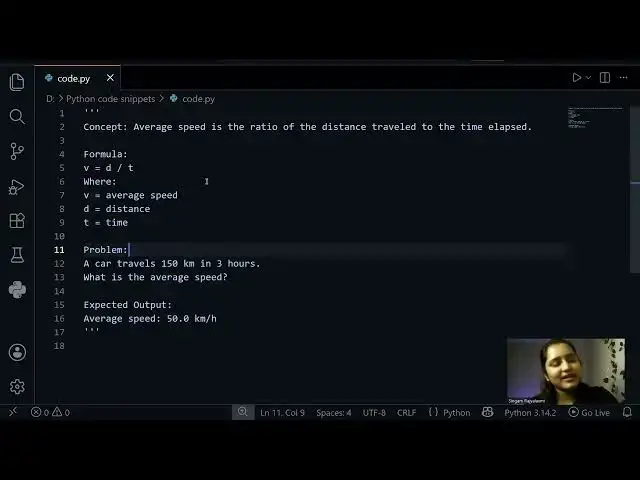
code. So here I kept everything together
3:01
the concept the formula and the problem
3:02
and the expected output. So the concept
3:05
is simple. We are going to find the
3:06
average speed and we know the formula
3:08
for that which is average speed is
3:10
nothing but the distance by time. We
3:12
have the distance and we have the time.
3:14
So now let's calculate the average speed
3:18
by just writing few lines of code. So
3:22
as always I will take the formula first
3:25
and then I will try to write code
3:27
according to that. So this is the
3:29
formula and we need the distance. So
3:33
distance is 150 km. So just give 150
3:39
three and yeah that's it. It is actually
3:43
done. So you can just print average
3:47
speed and you can see the output which
3:49
is pretty simple. It's 50.0.
3:52
So as I said before this is in
3:55
programming perspective you are the
3:57
developer and you did this but in order
3:59
to print it as user friendly I'm going
4:06
you can just do something like f the
4:12
of an object you can give car in this
4:14
case but for now I'm going to give
4:29
and that's it so this is going to give
4:33
as the average speed of an object
4:37
and it's pretty simple.
4:40
See, and instead you can also give
4:43
input. If you see my previous episodes,
4:47
you already know that I'm going to do
4:49
this. So, enter the distance,
4:55
right? And here you just give
5:03
Now pause this video for a second and
5:05
see whether this go right or wrong. Do
5:08
you think everything seems right and do
5:10
you think we are going to get the same
5:12
output once we give input?
5:17
So here the distance 150 and the time is
5:22
three. So here we are getting a weird
5:25
error right? It's type error unsupported
5:28
operand type of s because as I said
5:32
before in the previous episodes if you
5:33
watch the previous exercises where
5:37
whenever you are giving any input by
5:39
default computer will always take
5:42
strings. So in order to tell computer
5:44
that hey computer this is not the string
5:47
this is integer. So I want you to
5:50
convert that string to integer. So for
5:54
that you just give int here and it will
5:57
okay now it'll be thinking like oh okay
6:01
this is string and I have to convert it
6:03
to integer and I have to store it in the
6:05
variable d right and you can just give
6:09
int here as well because we need integer
6:13
value here as well and now it is going
6:16
to solve it and it is going to give you
6:23
See, it's that simple. So, whenever you
6:27
get any errors, don't panic. See what's
6:29
going on because that is where you learn
6:32
a lot. That is where you understand the
6:34
importance of type conversion. That is
6:36
where you will understand the importance
6:37
of variables, importance of syntax,
6:40
every minute detail regarding the code,
6:42
the error that you made. So, that's how
6:45
you learn and remember the things.
6:48
So yeah, this is how you can do you can
6:52
get the average speed of an object.
6:56
I hope this video actually helped you
6:59
somehow and I'm guessing that you have
7:01
learned something new here. If you still
7:03
have any doubts, if you're not getting
7:05
the concept, then just comment down
7:07
below. I'll always be there to read the
7:09
comments and I'll try to respond as soon
7:12
as possible once I'm done with that.
7:16
So yeah, see you in the next interesting