Up next in 10



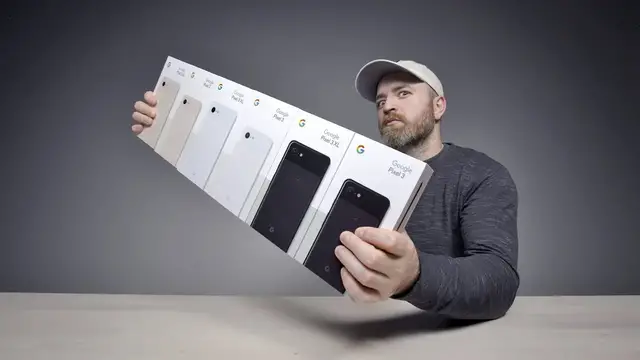
Unboxing every Google Pixel 3 and Pixel 3 XL. The newly announced Google Pixel 3 XL and Google Pixel 3 are Google’s follow up to last year’s Pixel lineup. The Pixel series has built a following within the tech community and the new Pixel 3 hopes to continue that trend. Will stock android and some sophisticated camera software make the Pixel 3 XL and Pixel 3 worth the price tag. Subscribe for my Pixel 3 XL review.
_________________________________________
WATCH SOME MORE VIDEOS...
This Smartphone Has 5 Cameras… But Why?
https://youtu.be/LNa93qmP868?list=PL7u4lWXQ3wfI_7PgX0C-VTiwLeu0S4v34
The Levitating Turntable - What Magic Is This?
https://youtu.be/JUlPN2A_r-g?list=PL7u4lWXQ3wfI_7PgX0C-VTiwLeu0S4v34
The iPhone XS Has A Serious Problem...
https://youtu.be/J_lRJuQtBmc?list=PL7u4lWXQ3wfI_7PgX0C-VTiwLeu0S4v34
Realme 2 Pro Unboxing - The $200 Real Deal
https://youtu.be/pNzhLB6vSGQ?list=PL7u4lWXQ3wfI_7PgX0C-VTiwLeu0S4v34
My iPhone XS Max Is Doing Something Weird...
https://youtu.be/Q3GGdtn9poo?list=PL7u4lWXQ3wfI_7PgX0C-VTiwLeu0S4v34
Show More Show Less View Video Transcript
0:00
Oh my goodness would you look at that! We have the brand new Google Pixel 3 and 3XL in the house
0:06
Not just these two, actually every single color variation of each model is here as well for us to check out
0:13
Do an unboxing video, initial impressions and so on. This is obviously a very highly anticipated device. Many people in the tech space, in the tech community
0:22
couldn't understand, couldn't believe what was going on with the camera in the previous version
0:28
This one claims to be the next level, right? The new one. It's gotta be better. Hopefully it's better
0:33
We're gonna find out. I have the 3XL in a color called not pink
0:38
It's not pink. Don't call it pink. That's the name of that color right there. This one is clearly white
0:42
Of course you can also pick it up in something called just black
0:47
These are both 64 gigabyte versions, though they will be available also in 128 gigabytes
0:52
The display on the Pixel 3 OLED, in fact OLED on both
0:56
On the 3 it will be a notchless display at 5.5 inches
1:00
On the 3XL it will go up to 6.3 inches with a notch
1:05
And something crazy about both of these is that they have two forward facing cameras
1:09
that are inside of that notch and stereo speakers. So it's a different type of implementation of the notch in the 3XL
1:16
Giving you a wide angle selfie capability and stereo speakers which I'm excited to check out
1:22
Okay let's start with the 3XL. Sense for the color there. It's a subtle hue. They brought back some wireless charging
1:30
Finally, on a Google device we have wireless charging. This is actually glass in the back
1:36
It's like a matte finish glass. So this will work with Qi wireless chargers or in fact also an official accessory here
1:44
A wireless charge dock which actually has some special functionality. I'll show you in a minute
1:50
A speaker grill up in the top as well as at the bottom
1:54
Stereo front facing speakers, this of course is a rarity in the smartphone space amongst flagships and other devices as well
2:02
Up here you can see those two front facing cameras which I mentioned earlier, one wide angle and one standard
2:09
Fingerprint scanner is in a familiar location over here where your index finger will sit
2:14
That single lens system capable of some incredible computational photography is up in this spot right here
2:22
Now the frame itself is made of aluminum, so pretty much the whole construction is either aluminum or glass
2:28
Though I do like the fact that the glass back is matte. It's resistant somewhat to fingerprints and smudging
2:35
You have USB type C, there's your sim card tray, accent color on your power switch
2:40
There is a green accent color on the clearly white version. A charge brick, which yes, it happens to be a quick charge brick
2:49
Fast charge capable. Seven hours of battery life with a 15 minute charge
2:53
Nice to see the quick charge brick in the box to go along with wireless charging
2:57
A rarity, you don't see this too frequently anymore. Some headphones in the box
3:02
They are type C headphones after all. There is no headphone jack, unfortunately, on the Pixel 3, Pixel 3 XL
3:09
But I guess this is the next best thing. You're getting some bundled Type-C earbuds
3:14
And you also get an adapter too. You can go from Type-C to a mini-jack connector if you want to use some legacy headphones
3:21
or some higher quality headphones that still use this particular connector. The Type-C cable itself and then also this adapter that goes from Type-C to the classic USB connector
3:33
This could be used to migrate over to this device from your previous one. one Okay so let go ahead and unbox all of them and we can do a quick comparison of the various color and size options
4:00
Now the thing about the glass on the back of these devices is it hardly even looks like glass
4:04
I'm like is that even glass? But I've been told that this is Gorilla Glass 5 Soft Touch Glass
4:11
And yes it does feel soft. There's almost no fingerprint effect on this glass
4:17
Now the thing I like about this one is it does have a contrasting color on the front because like the whole front is black, the back is white
4:24
I mean it's kind of a nice little touch. You get the accent button. It's just a little bit more unique
4:28
So here's your first look at the displays. We have the XL on the left, the standard Pixel 3 on the right, 6.3 inches, 5.5 inches
4:37
They're both OLED. Of course, we do have the notch. There's been a lot of discussion about this notch in particular on the XL version
4:45
I did mention earlier, at least in this case, you get an extra camera lens and the stereo speaker
4:51
I've also been told that you'll be able to turn off this notch in software at a later date
4:56
So it would actually end up looking kind of like the standard pixel looks here at the top
5:02
You'd have a similar bezel there if you did choose to do that in software. So you get a little bit more resolution in the bigger one
5:09
This is QHD plus compared to FHD plus, slightly higher PPI on the XL version also
5:15
So the bigger one is just under 3500 mAh, whereas the smaller guy is just under 3000
5:23
The regular Pixel 3, it feels surprisingly foreign because smartphones, especially flagship smartphones, have been growing every single iteration
5:34
I can see this being popular with people who are looking for something a bit more subdued, easier to hold in one hand
5:40
Somebody with a smaller grip, it's super comfy to hold. Myself, I'd gravitate towards the XL for the bigger display
5:46
Of course, the bigger battery Now, these are not going to be the champions when it comes to screen-to-body ratio
5:52
This is obviously an improvement over the previous version But you still have bezels here
5:57
The question is going to be whether or not that's worth it for you Can you be convinced with two front-facing cameras
6:03
Can you be convinced with hopefully better speakers? That's going to be up to you to decide
6:08
Nonetheless, that is the trade-off Speaking of speakers, let's go ahead and do the thing
6:14
Let's test out the stereo speakers on this unit. This is crazy loud
6:25
This is way better than the previous version. First impressions here, these are some speakers
6:33
And some of the loudest I've tested in here. This is our first glance here at what happens with the black bars
6:40
You can go ahead and pinch to fill the screen. Zoom to fill
6:45
Kind of giant bezels to be fair. Now there was a lot of talk about the display on the previous version, OLED
6:51
This looks like a completely new component to me. Also, if you head to the settings, you can kind of toggle in your preferences for the display
6:59
so that it suits your taste buds specifically. There's adaptive brightness, which you can turn on
7:04
Some advanced settings here for colors, which can go from natural to boosted to adaptive
7:10
Now you probably also noticed that the home button, the navigation region down here has changed a little bit on this particular device
7:17
You can now swipe up from there for multitasking and you can actually swipe across too to move between apps like this There also split screen as well so if I tap on an app icon here I can go to split screen mode
7:30
go ahead and pick my other app and then make my adjustments from there so it's right within the
7:35
multitasking. Maybe I'll actually use it now because I don't have to go looking for it. I'm
7:40
not really sure but it's in the Pixel device at this point. Now I know what you guys are most
7:44
excited about. You're sitting there watching this video, you're screaming, you're saying, Lou, what about the camera
7:49
There's a lot of pressure on this device to live up to the legend of the previous version, Pixel
7:55
Can it do it? I don't know. Let's launch it. Let's take a peek here
7:59
Now you can also employ some degree of digital zoom, as you can see here
8:05
Hmm, very interesting. If I tap on the face of the little figure there
8:12
see how now it is tracking focus? That's a nice little frame right there
8:17
Pixel cameras, I don't need to tell you, you guys already know, but like, there's some really nice stuff happening
8:22
That's just a simple frame. Lou, what about the portrait mode? And oh my goodness, would you look at that
8:28
Holy smokes! Preliminary video! This product is not retail yet, alright? I can't say too much, test too much
8:36
But you can look at that. You're allowed to look at that. That's fair
8:39
Very vibrant. Very wonderful. Okay, nice. Of course on the Pixel, there is a portrait mode on the front facing camera
8:47
There's actually also an official beauty mode. But look at that. Would you look
8:53
See, you can toggle it off. As far as I'm concerned with post processing when it comes to complexion and things like
8:59
this, that's got to be an option. You've got to be able to turn it off if you don't want it. So they have three settings
9:04
You can leave it off. You can go to natural. You can go to soft. I'm going to leave it off
9:08
So currently it's in the standard focal length. If I hit minus here, I will go to the wide angle selfie, which actually is a different lens
9:16
This will give me a lot more play if I have extra people in the frame where I want to capture something that's behind me and not just my face. Boom
9:23
That's a nice looking guy right there. Hey Jack, what do you say? Ooh
9:29
Do I look like I'm wearing makeup? Look at that. Wow. This is the kind of stuff I'm looking for, this level of detail
9:36
The beard hairs are one step. The pores on my face are a totally different step
9:41
That is a ton of detail. This is the standard focal length
9:45
If I hit the minus here, you see how much more I get in frame. We can jack in frame over there
9:49
Now we can go ahead and that's a nice wide selfie scenario
9:54
That's the amount of range that you're going to be able to get out of the wide lens
9:58
Now something else to mention about the camera. In the advanced settings, here's something I like
10:03
You have control over HDR plus, which will show manual control for HDR plus
10:09
If you want to toggle off the processing that's taking place in your images, you can go a
10:14
step further as well and right within the native photo app, you can shoot raw plus JPEG
10:19
So you get the maximum amount of data out of the camera sensor
10:23
Or if you want to make sure that there's no processing taking place on your images, if you're that type of person
10:27
I like having these options available. There's even an option to store videos more efficiently
10:32
in the H.265 codec instead of H.264. All options that you can toggle on or off
10:38
The back camera is 12.2 megapixels and the front is 8. But of course you can select various different settings
10:45
if you choose to, but that's the default setting. Now the rear camera is capable of 4K at 30 FPS
10:51
and it also features a fused image stabilization using both optical and software based stabilization
10:59
for video. Now there another feature in here called Top Shot which will take a motion image and then through that set of frames it will aim to select the best frame automatically This whole thing is a movement you see
11:13
like this and its suggestion is either here recommended another recommended one
11:18
There's probably some that are not good like there or there or there
11:26
Now speaking of selfies, there's also a photo booth option. It allows you to just smile to trigger a photo
11:34
Let's see if this works. Jack, you ready? Here we go. Waiting for my lips to move
11:40
You see, this is what it takes. It takes a feature like this to get a real smile
11:44
Now something else that piqued my interest on this particular device is in the settings menu
11:49
I know that seems strange. Like what are you doing digging through the settings menu? There's something called digital well-being
11:55
And if I click on this, this is all about how you use your smartphone, where you're spending your time, how you might want to make adjustments to that time spent
12:06
You can see here, it'll tell me how much use I've had today and where it was spent
12:11
Google, camera, photos, YouTube. You can set timers and reminders so that you're not spending too much time in apps or on your phone in general
12:19
You can use a feature called Shhh. Placing your phone face down on a surface, maybe at a restaurant, at home, on your nightstand, will put the device into do not disturb mode just by placing it down like that
12:31
Give you a little bit more control over your consumption on your smartphone
12:36
Lens is built in to the camera app. So just by swiping over to more and selecting lens, grab some text like right here, and boom, it'll pick it up
12:47
You think lens will know about my shoe right now? Tap on the shoe, oh! Nailed it
12:55
And boom, these are them actually, that's them right there. Now I mentioned earlier that this device has wireless charging
13:01
I'm of course a big fan of wireless charging, I really missed it on the previous version of the Pixel
13:07
And not only that, they're actually making their own version. First party accessory wireless charge dock, that's this guy right here
13:16
It's a soft touch kind of material and it works like this
13:20
You just drop it in, drop the phone right like that. Boom, starts charging
13:24
It's also quick wireless charging, so it's not going to take forever to charge up your device
13:28
That's, of course, one of the criticisms of wireless chargers, not in this case
13:32
Now, this display here, it kind of acts as your dash. You can imagine this beside your bed
13:38
You have Google Assistant, which you can trigger sort of like a Google Home
13:41
You could say, okay, Google, ask questions, and so on. You can also click on My Day
13:46
which would do, you know, sort of break down the weather, your commute. It can cycle through photos from whichever folder you identify
13:54
There you go. As you can tell these people, they all love each other very much
13:58
Now the other thing we do is, since it's sort of in a multimedia mode, is we can use this to trigger some audio, some music
14:05
Play Drake. You can see that the view looks different since it knows it's docked
14:10
This piece here is gonna retail for $79. I realize we didn't even talk about the price of these devices
14:16
Holy smokes. Okay, the XL, the 3XL is going to start at $899 USD and the non-XL, the standard Pixel 3 will start at $799 USD
14:29
So obviously these things are squarely planted in the premium price range
14:34
So now I'll leave it up to you guys. What do you think? Should I switch over to this device, huh? You want a little bit more, a little bit more testing
14:40
A bit more of a comprehensive evaluation? I think you deserve it
14:43
I think I do too
#Computers & Electronics
#Consumer Electronics
#Technology News