Up next in 10



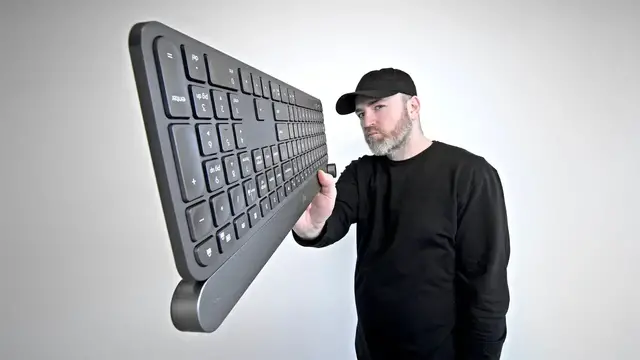
Logitech Craft Keyboard - https://amzn.to/3fw3git
FOLLOW ME IN THESE PLACES FOR UPDATES
Twitter - http://twitter.com/unboxtherapy
Facebook - http://facebook.com/lewis.hilsenteger
Instagram - http://instagram.com/unboxtherapy
Show More Show Less View Video Transcript
0:00
So as you guys know, I'm always on the hunt for that next cool thing, potentially something to enter my setup, maybe a more optimal version of something that I'm already using
0:10
You've seen so many crazy keyboard videos on the channel, most of them mechanical, some of them crazy elaborate
0:17
Today, it's a little more low-key, it's a little more low-profile. This is a product from Logitech, it actually came out a while ago, and somehow it slipped under my radar
0:27
Well, not today because I've been using a low-profile keyboard recently ever since I've been standing at my desk
0:35
For some reason, the angle I'm gravitating towards low-profile keyboards at the standing desk, it just fits better for me at the moment
0:44
Well, this might be the granddaddy, the godfather of low-profile keyboards. No, there are not any mechanical key switches
0:53
but there are some crazy features inside of something that's almost, it's impossibly thin
0:58
It's called the Craft from Logitech. And you guys, I mean, I don't need to explain to you
1:02
the Logitech love affair that's gone on for a while. This is my favorite mouse on planet Earth
1:09
You can go watch the video. Configurability, beautiful wheels on it, ergonomics, and so forth
1:15
And recently, the Logitech app has improved so much for customizability. And that's where this comes in to join the party a little bit
1:23
The craft has a configurable wheel on it. Now, you're looking at that thinking, so what
1:29
A wheel? I'm turning a dial. Microsoft did this a while back with their studio products
1:33
They had that wheel that you could use for creative input. What does that mean
1:38
Well, in certain applications, this wheel can actually control quite a bit
1:44
and potentially increase your productivity level. It will work with Illustrator, InDesign, Adobe Premiere, Photoshop, Lightroom, Word, PowerPoint
1:54
And you can configure what this thing does, whether it's zoom functionality or the size of a brush
2:00
Beyond the creative input, the keyboard also has illumination, which is smart
2:06
So if you approach the keyboard, the backlight pops on. It works over Bluetooth or a unifying receiver, which is included in the box
2:14
Works with Windows, Mac, and mobile platforms. So it got a lot going for it but it has a price tag to match up as well as you expect with a product in the premium Category with a name like craft i mean it just it sounds expensive okay so look this is the keyboard now i telling you i mean is that a look
2:32
or what apple would call this space gray at the top and then the black deck below it it's just it's
2:39
a nice color combo it's very uh darth vader it's very i don't know it's futuristic i like it look
2:45
at the, it's impossibly thin. Can I, can we, this is a phone, that's a Galaxy S20 Ultra. I mean
2:53
it's a big phone, but just look at how slim the keyboard is. My goodness gracious. Is that important
3:01
I mean, not really. There is an aesthetic component though, where maybe if you approach your setup and
3:06
you find it to be inspiring, if it's giving you positive feedback and you spend a lot of time
3:11
there then maybe there is some value associated with the appearance of the
3:15
thing but ultimately for me like I said the new angle I'm working a lot when I'm
3:19
standing it just gives me a different approach the height that I like and
3:24
therefore the low profile is just a little easier on my wrists at the moment
3:28
even though I'm giving up some key travel and probably a little bit of
3:33
typing accuracy also in the package look at this nicely wheeled up rolled up
3:39
USB type-c cable to charge this up. It does work wirelessly and can pair simultaneously
3:46
to three separate devices with a simple click of the switch over here
3:50
Also in the package as mentioned, you can connect via Bluetooth or you can use this 2.4 gigahertz little dongle
3:57
They call it a unifying receiver. What do we have on the unit? Well, the keycaps, you're probably gonna notice right away
4:03
they have a very strange shape to them. They are square keycaps, but on the inside
4:07
There's this divot, this little recess, which of course that's the shape of your fingers
4:12
And so even though you're giving up some key travel here, I believe the hope is that you get some confidence back based on the shape
4:18
So the quick brown fox. And you can see I do not have proper typing technique
4:25
So for me, it's kind of, it's even more important for me to have the confidence that I'm on the right key because I'm definitely not
4:31
See, the problem with a lot of low-profile keyboards is since you're giving up so much travel
4:35
oftentimes you may, it's easier to accidentally click a key compared to a mechanical key switch
4:42
where it's a more definitive press. Plus, a lot of the mechanical keys
4:45
are gonna have that natural sort of concave to them as well So this is a kind of an in type of solution Logitech has come up with You going to notice multimedia stuff up along the top
4:56
play, pause, you have your volume controls, you have controls, manual controls for the backlight
5:01
of the keyboard, brightness, and I like that they've put both Windows and Mac specific keys
5:06
All we've got, it's a very simple, it's a clean looking thing, which is good in my opinion
5:11
But that means all we have on the top is a type C connector and a power switch
5:15
We hit the power switch and there's a green LED indicator. So the Logitech options software has gotten so much better in recent years
5:24
In the past, I have issues with it. The new version, it really encourages you to customize your experience
5:31
So just like this, the application sees your various devices. Now it's important to know you don't have to do this
5:37
It would be a shame because you won't be taking advantage of the features here
5:40
You could just continue to use the keyboard the way it is without even installing the application
5:45
It'll work like any other Bluetooth keyboard once you get into the application
5:49
And you see the creative control come to life. It starts to explain to you. Okay. This crown is touch sensitive
5:56
So by default this is doing volume as you can see but that's really that's some minor functionality
6:02
I trust me. I like a volume knob. Ooh, that's quite satisfying. Listen to this
6:10
the crown is contextual. The crown adapts to the app you're using
6:16
and the tools selected. How cool is that? I can even change the default setting for it
6:21
prior to tapping it. It can control just within the OS, volume, brightness, next, previous
6:28
a custom keystroke, horizontal scrolling, which in a video editing application, for example
6:35
that's how I'll probably use it. The ability to navigate between tabs, as I said previously
6:40
switch between different desktops or pages and of course zoom by tapping on it because it is a
6:46
physical button you can press it can control play pause mute show desktop i mean it's so
6:51
brightness up that calculator my goodness so we'll switch it for now how about we try brightness
6:57
okay cool boom screen brightness up and down what if we wanted to control horizontal scrolling
7:06
Oh, interesting. When I changed to horizontal scrolling, it eliminated the clickiness So now it a smooth scroll which is what you would want in a timeline for example Navigate between apps And just like that navigate between apps re
7:24
the clicky factor. So you can stop more easily on a specific spot. Switch between desktops
7:31
Boom. Now you'll see the key with the contextual nature is if I open up a bunch of tabs
7:39
I can just quickly look at this. I mean it's so convenient
7:43
Dude's going wild over a little wheel, but I'm telling you there have been complete products
7:49
around the idea of putting a wheel next to your keyboard so you have a secondary left-hand input to go with your mouse
7:57
This is it's very interesting for creative applications. I'm telling you from personal experience
8:02
I've used wheels for that purpose in the past things like this guy have existed for years
8:08
and they're very commonplace in editing suites all over the world. But the problem with these is you now have a secondary device somewhere on your desk
8:18
You need more space. It's a less clean look. For most people, it won't justify the space that it takes up on the desk
8:24
and then maybe they won't use it. Of course, some people swear by it. Everybody's going to be a little bit different
8:29
But this achieves some of what that does in a package that really doesn't change the clean line
8:36
You end up with something that's very slick looking and you hardly even notice this wheel because of the way that it's integrated and you end up with a package
8:45
I mean, that's your package. It's nice. It's slick and it just it keeps your mind on the thing that you're working on, the location of it
8:53
Hopefully, you don't even have to think about it. It just becomes second nature with the left hand
8:56
So I think hence the name of the thing. It's going to be targeted mostly at creative people, people using creative applications
9:03
since everybody's creative, but people using the illustrators and the photoshops and the video editing applications and so on
9:12
But really, I think anyone can benefit from it, even in an Excel spreadsheet or even within the OS or even within a browser
9:19
So I'm excited to use it on a daily. I like the design
9:23
Impossibly thin. It is the Logitech Craft. You will pay for it
9:29
I will tell you what. You will pay for it. But that's typically the case with anything that sets itself at the top of the food chain
#Computers & Electronics
#Consumer Electronics