live_tv
Livestream Starting Soon
00
Hours
:
00
Minutes
:
00
Seconds
Up next in 10



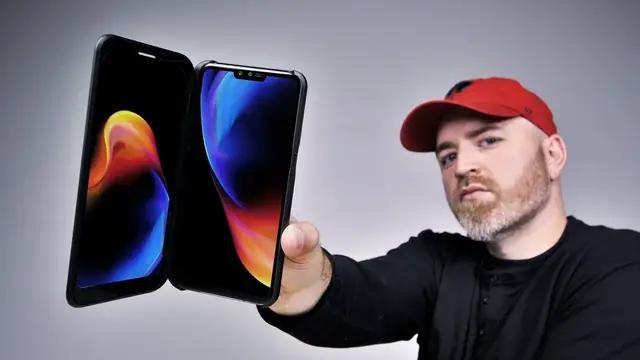
The LG V50 is one of the most unusual smartphones of 2019. It features a dual screen accessory doubling the screen real estate of the device. The LG V50 is also the first 5G capable smartphone I've had in studio.
FOLLOW ME IN THESE PLACES FOR UPDATES
Twitter - http://twitter.com/unboxtherapy
Facebook - http://facebook.com/lewis.hilsenteger
Instagram - http://instagram.com/unboxtherapy
Show More Show Less View Video Transcript
0:00
So here's one that kind of flew under the radar, at least for me, for us here at the studio
0:05
It's the V50 ThinQ from LG. Call me crazy, I think this is the first 5G device we've had on the show
0:12
Is that correct, Will? Yeah, I think it is, Will! Flagship level type of specs
0:17
It's got the 855 Snapdragon in it. Over here, this makes it quite a bit different
0:22
The dual screen accessory. It's almost like two phones in a sandwich
0:27
Anyway, let's look at the phone first. The cleaning cloth, a little microfiber
0:31
Pentacamera, so three on the back, two on the front. Dual screen support, that's what I'm excited to check out
0:36
And of course, Google Assistant built into a dedicated button. We have a fast charge power brick
0:42
We have a Type C to Type A cable as well as a C to A adapter included in the box
0:49
And they've also included a headset, braided cable in there, and interchangeable ear tips
0:56
mini jack so it still keeps a headphone jack no camera hump i mean what's this worth to you i'm not really sure i guess it depends on the
1:06
individual but what i like about it obviously you can place it flat on the table there's absolutely
1:11
no bump to it this little connector at the bottom that maybe comes into play for the dual screen
1:18
setup maybe some other accessories it's a nano sim and a micro sd so expandable storage people
1:24
gonna like that. You have that dedicated assistant switch below the two volume buttons. USB type-C
1:31
fast charge capable obviously, and the dedicated headphone jack that I mentioned earlier. On the
1:36
front you have the dual setup. This, kind of a rarity now. Of course the Pixel, the previous
1:42
Pixel device did this. The new one probably won't. We'll boot it up and we'll check those out
1:46
Oh, that 5G logo just lit up. Ooh. If you're not into the notch lifestyle, the look of having the notch at the top
2:00
so they give you the option out of the gate to black out that section of screen
2:04
to make it look like a more traditional bezel. Now, what happens when you do that is the phone can look a bit antiquated
2:11
but I like the fact that they give you the option right out of the gate. I'm not a huge notch fan myself
2:15
Of course we have options available to us now that don't have any notch associated
2:19
If you're gonna have a notch, the ability to turn it off is nice, especially when the brand gives you the option during the setup
2:26
It also gives you an option immediately for your button layout. So you can go with a home touch button style or a button combination
2:35
The mapping on the bottom changes If I switch between them you can move the back button around the home button around you can go with the more typical Android layout which is how I gonna keep it for now alright so it booted up now it the first glimpse at the display
2:52
this is 6.4 inches 3120 by 1440 it's PO LED its LG's PO LED the main camera in
3:00
the back is 16 megapixels it has 6 gigs of RAM I told you has Snapdragon 855
3:04
with the 5g radio built-in it has a 4000 milliamp hour battery I mean it's
3:08
Pretty much flagship specifications, 128 gigs of storage on this model in front of me
3:13
But it's got a price tag to match. It's very expensive. So it started out around $1,150
3:18
You could probably find it for less now, I would assume. It's just tough. It's about twice the price of some competitors that put a spec list very similar in place
3:26
I don't know, maybe it's got your feature set on it. But it's just tough to justify at that price point
3:31
Now this IP68, so it's gonna be pretty durable also. It's Gorilla Glass 5 on the front and actually Gorilla Glass 6 on the back
3:38
So I was a bit concerned with the flush mounted cameras on the backside
3:43
But Gorilla Glass 6 is pretty good stuff so it's probably gonna protect the glass that's over top of those lenses
3:49
Speaking of those lenses, why don't we just jump right into those. This is your focal range on the main camera
3:54
Once again, 16 megapixels capable as well of shooting 4K video. Take that photo
4:00
Alright, now we can get the zoom on. Ooh, that's a pretty nice looking zoom actually
4:04
I like the way the focus takes place too. It grabs it nice and quick and there's like a vibration on the phone when you have grabbed
4:12
focus to let you know that you should snap. And here's the wide angle
4:16
Now important to remember LG was one of the first to give us a wide angle lens on the
4:22
back of a smartphone. So they kind of pioneered in that space and now other brands have it
4:27
So I'll snap this photo. That's the wide one. So if we do a quick comparison here
4:32
There's your wide. like maybe some HDR effects are taking place slightly
4:38
That's a very bright green happening there. Here's your zoom in version
4:42
And you know what? They've kind of kept the quality. I've been noticing a quality difference
4:46
on multi-camera setups when you go to like the ultra wide. It can get soft in the focus department
4:53
This one is not soft. And then of course, the best looking one is the main camera
4:58
There's a lot of other modes available. There's a studio mode here, which is going to do some fancy lighting effects
5:04
There's, of course, also portrait mode. I've rarely been a fan of these modes
5:09
This one allows you to control the amount of blur that you're getting, so you can kind of tune it yourself
5:14
There's also an AI cam mode that aims to figure out what it is you're shooting
5:20
And there a full manual mode for the pros out there if we flip the camera around the two lens setup what a lot of other manufacturers have started doing with the single lens setup just having it crop in a little bit but really you just cropping into the same sensor This one on the other hand has two front cameras
5:38
but the issue I have here is it's not a huge difference. When I click between the two
5:43
I mean, yeah, it's wider, but it's not massively wider. Maybe when I'm in landscape, it'll be more
5:49
pronounced but he's still in the frame there. And this wide over here at a full reach I could get a group of people. I could get three four people and I'll
5:57
take a wide one as well. I'm quite happy with that. That is the standard lens
6:05
before you click the wide. See how you still see the complexion here you see the
6:09
pores and whatnot. If I switch over to the wider one. Oh it's more the same maybe
6:13
even nicer in fact. Quite a bit wider and if I go in just to give you a little
6:17
more detail, it's all there. So the standard camera is 8 megapixels and the other one is 5
6:22
I mean, as far as a 5 megapixel selfie is concerned, that's pretty good. It goes to show you, I mean
6:26
it's not all about the megapixel count. There's other factors involved. And you know what's
6:30
interesting to me here is how close they are. The color temperature, like, there was no major
6:37
color shift. It's not obvious that it's shot on a completely different camera. That can happen on
6:42
a lot of devices so actually just in this environment i'm pretty happy with the camera
6:47
performance here it's promising let's see how it works for dialogue we're gonna bring up the
6:51
lou later show here that gives you an idea of your screen real estate that's available to you
6:56
with your notch when you're zoomed into a youtube video and now i'm gonna go ahead and also boost
7:01
up the volume so we can get a sense for that today i don't know if it was today maybe yesterday
7:06
the galaxy you know what you do well very muffled lacking detail lacking clarity lg lets you go
7:12
crazy with the the configuration on your audio there's an equalizer in there vocal booster i got
7:19
the dts on they do have the hi-fi quad DAC built in but of course that's enabled for external audio
7:25
so i actually like the look of this that's just a render oh man it's really lacking in the detail
7:31
in the crispness granted if you go ahead and plug some headphones and i'm sure it's going to sound
7:35
great. Ooh, I kind of like how it changes the volume slider into these tiny little increments
7:42
so you can get the exact volume you want. Like, it's out of 100. Man, it sounds nice. You see
7:50
this stuff at the bottom gets unlocked as soon as you plug headphones in. It's not just these
7:53
headphones that are included in the box and allow you to turn on the Hi-Fi Quad DAC. It's like a
7:58
whole level of sound presets, bass that's available to you. But yeah, these sound great. But of course
8:04
This is the main attraction that what you all been waiting for What kind of mad scientist in the laboratory came up with this stuff over here It cool it a gadget That what I in it for Look at that I mean you see the Korean writing and you know it for real
8:18
Look at this thing. You want to watch a video and be chatting and be working
8:23
I'm into this. Wow, look at that. That's the whole screen right there. That's... Oh, and that's easy
8:29
Turn on dual screen. Look. That's kind of fun. We got a wow from Jack on that
8:35
This guy doesn't have any wows to give. Look at this! Okay
8:40
We're doing something cool right now! Boom! That doesn't look too crazy, that's not too fat or heavy
8:46
Let's say, you're just working like this, dual screen. Then you gotta put it in your pocket
8:51
You have the option at this point of closing it in the typical clamshell fashion like this. Or..
8:59
You're gonna fold this around back. Like that. Why would you ever bother with that
9:04
When you could be like this! Oh my god, swap screens. It's so smooth and seamless
9:10
This is how I would do it. You have like this, Jack. You're watching a video. You're watching a video
9:14
You're just reading some stuff. You're just doing some research as you would, guy like you
9:19
For gaming, this is way more comfortable. You could map. You could have your controls down here, put the game up there
9:25
Come on, Jack. That's cool, no? Isn't that cool? I can swap screens
9:31
Show main on dual screen. Show dual on main. Put main to sleep or turn off dual screen
9:37
So if you show main on dual, you open this back up to go get your apps. And you go back to the home page on this
9:43
The swap, it literally swaps. I don't think you live your whole life with your phone inside of here
9:50
I could give you a pocket. I could give you a pocket. I mean, that's not crazy
9:58
Okay. It actually comes out really easily. But it's a very light phone
10:02
so the accessory doesn't make it crazy heavy collectively. Here, here, and you just kind of do this
10:10
Pull it out. It's easier than a lot of cases. That's useful. Get the headphone jack, multimedia thing
10:17
Will, how much is this extra display? I'ma guess the extra display is $199
10:22
$190? You see this? Been in this. Been doing this. The phone is really expensive to begin with
10:28
which is kind of the problem. The phone is already $1,100 and then $199
10:32
It's a whole thing. If you don't spend a lot of time on a laptop or a tablet, for $199 you really change the way you can interact with your phone
10:40
with this accessory right here. You really change what a phone represents potentially
10:43
from a gaming perspective, from a multimedia perspective. It becomes like a little mini laptop
10:49
It's so cool, crazy, it's fun. I kind of like it
#Computers & Electronics
#Gadgets & Portable Electronics
#Technology News