live_tv
Livestream Starting Soon
00
Hours
:
00
Minutes
:
00
Seconds
Up next in 10



Learn more about the new Vivo X300 Pro here: https://www.vivo.com/en/activity/x300-series-launch
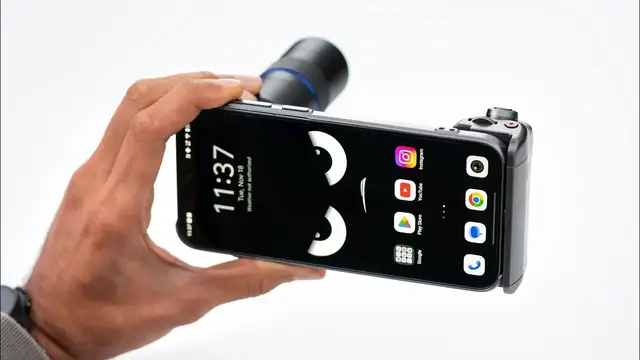
200 MP ZEISS APO Telephoto Camera. Experience limitless zoom.
#vivox300series #vivox300 #vivox300
Thanks to Vivo for partnering on this video.
FOLLOW ME IN THESE PLACES FOR UPDATES
Twitter - http://twitter.com/unboxtherapy
Instagram - http://instagram.com/unboxtherapy
TikTok - http://tiktok.com/@unboxtherapyofficial
Show More Show Less View Video Transcript
0:00
You know it's going to be exciting every time you get a smartphone that shows up in a box like this
0:05
Like, look at the scale of this box. You know you are getting extra stuff
0:09
And in this case, pretty cool extra stuff. Because this is the X300 Pro photographer kit
0:14
So this has that wild zoom lens inside. So if you're into smartphone photography and video, this might be appealing
0:22
Now, of course, you don't need to purchase a photographer kit. You could just buy an X300 Pro, but this makes it extra special
0:30
Oh, wow. So this pull tab, this is like a lifty, this is a lifting pull tab
0:37
Very luxurious, like a suede-like material. Uncover the photographer within. X300 Pro
0:44
Brown in color with a dual SIM, 16 gigs RAM, 512 gigs ROM
0:51
So that is number one. And then we pull our drawer here
0:55
And inside here we're going to find our imaging grip, phone strap, decorative ring, filter adapter ring, lens adapter ring and telephoto extender
1:03
This thing is wild. Look at this. Whoa. First things first, this is the telephoto adapter
1:10
I mean, that's crazy. Zeiss Vivo co-engineered. It has a bayonet style mount which is going to allow it to clip onto this
1:19
This is the adapter that's going to fit onto the case portion and then allow the lens to mount
1:23
and it's going to give you tremendous optical reach. The other thing that this is going to do for you
1:27
is it's going to give you that depth of field. So if you're using it for portraits or something that's closer to you
1:33
it's going to blur out the background in order to isolate your subject
1:37
and give you an image that doesn't look like it came from a smartphone. So this is the case
1:41
It has sort of a soft touch material in the center. It has a kickstand as well, which opens up like that
1:47
And then maybe more importantly, it's able to act as an attachment point
1:51
for your camera controls. And this is going to slide on like this
1:56
And it clicks into place. This is going to give us a much more comfortable grip as well
2:00
especially when we're supporting the weight of the telephoto adapter. The ring actually locks into place
2:05
See this little dot? It actually has a satisfying click. Nice. This is actually going to be your filter adapter ring
2:12
if you want to put an ND filter or something like that. And this is another decorative ring
2:17
if you want to have a different color. I don't know if you guys can spot that difference. This is like a slightly brighter metallic color
2:22
As you can see, this is a pretty robust camera strap. I mean, not just for this device, but for any camera, really
2:28
You got the carabiner clip, got the braided styling, couple of orange accents, and a quick release as well
2:34
Nice. So that's the photographer kit. If you buy just the X300 Pro
2:41
this is what that unboxing experience will be like. Ooh. Cool. So they're calling this brown, it's like more of a tan, very boxy design
2:55
You see the flat edges and obviously your substantial camera section which already has quite a camera array including your periscope style zoom lens but that goes to a whole different level with the optical zoom adapter Type C on the bottom you got your dual SIM card tray there power volume rocker
3:14
They've also got their own dedicated customizable button. Also in this package, you will receive a SIM tool, a case
3:22
It's nowhere near as elaborate as the one that comes in the photographer kit
3:25
but it matches, it's a color match and it's something to get you started. And then, of course, a USB-C cable is in there
3:31
I just want to see what this whole thing is like. A case, which goes on fairly easily
3:37
You can see that extra button is mapped to the outside of the case. A metallic style of paint to it
3:42
Our kickstand here allows us, obviously, to prop the phone up in a couple of different orientations, which is nice
3:49
We have a cutout for our flash as well. And then, of course, you can see the attachment points for the strap
3:54
If we would like to put the grip on, you'll notice that it's connected via Type-C directly to the phone
4:00
And when you insert it, it's guided by these channels on the case. So it lines up perfectly and clicks
4:05
So it's not going to fall off. And now we have something that's way more comfortable already, even without any kind of adapter, just for shooting in general
4:13
You know, it can be a little bit uncomfortable pinching your device in these awkward ways
4:17
Like this is, if you've ever used a real camera, you're feeling a lot more comfortable in this situation
4:21
It's just a couple of clicks. Oh another satisfying one. Here we go
4:26
Beautiful so you could leave that on too and use your smartphone like that
4:30
But they give you these decorative options in case you prefer to have a more minimal kind of setup
4:35
Once you have that on there, then we're gonna bring our lens in and things are about to get wild
4:39
I'm a little sensitive bringing it up But as soon as I heard that we were shooting this video today, I was thinking man
4:44
This would have been so cool to have at the jays game I was at the jays game six
4:48
I had pretty good seats to begin with but if you had this thing mounted up You're at home plate and with tremendous clarity and something that's kind of unbelievable on a phone
4:56
This is going to fit in like this and then just twist into place. Also satisfying. And then it has its own release button in order to free it
5:02
And I like how it has the marking on there as well. So you know roughly where to start it
5:06
And then it clicks. Once you have this thing mounted, it makes a lot of sense to have a handle on there
5:10
Because now you've got some weight. You have some legitimate optics on here
5:14
It's pretty wild. It's a lot more like a camera than a smartphone at this point. But obviously, the vast majority of people are using their smartphone as their camera these days
5:22
And if you want to get some sort of a hybrid or closer to that world of interchangeable lens systems
5:27
this lets you do that while maintaining the flexibility of shooting on your phone and posting immediately without any SD cards, without any USB cables necessary
5:35
I mean, it is kind of surprisingly sturdy. I still would prefer to have two hands on it if I'm going to be shooting with this
5:41
Now, there is all kinds of cool stabilization that goes on when you're shooting
5:45
because anytime you've got a zoom lens and it's a lot of reach going on, it can be hard to stay steady
5:50
This to begin with is a comfortable grip, but then there's also your optical image stabilization
5:54
at play that's gonna allow you to get those stabilized distance shots. Oh, one more thing before I completely set that up
6:00
and start shooting. There's also a standard X300 non-pro and this one in pink so that could be interesting Now the spec sheets here are pretty similar The battery slightly larger on the pro and the pro has some imaging specific features including the pro imaging chip and the ability to shoot in 10 log so yeah this one really comfy to hold they call it pink
6:22
but it's more like pearl it changes colors slightly i don't know if mo's gonna be able to
6:26
pick that up a rainbow effect on the ring around the camera section inside the package they're also
6:32
going to give you a case to get started a sim tray this case is definitely pink more towards
6:37
the pinkish hue and then they're also going to include like a serious power brick and usb cable
6:42
this is a flash charge 90 watt unbelievable so they're going to give you a 90 watt charger in
6:47
the package if i was comparing this to an iphone yeah this would be sort of like the pro versus
6:53
something closer to like the pro max when it comes to scale you're looking at 6.7 inches on the x 300
6:58
pro and 6.31 on the x300 so the x300 has 2 000 nits of global peak brightness plus one nit
7:06
minimum brightness you can get that gentle viewing experience even if you're in a completely dark
7:12
room so at the core of the x300 series is the dimensity 9500 flagship platform now this is
7:19
developed with mediatek and built on tsmc's n3p process now this dual chip integration is going
7:26
have benefits for that camera in portrait video, faster capture response, and stable performance
7:32
under demanding tasks. So they both have a 200 megapixel APO telephoto camera. So that's the
7:39
telephoto section without the adapter, obviously. They both also have a 50 megapixel wide angle
7:45
camera there as well. That's pretty crazy. 50 megapixels for the front facing camera. And
7:50
they're both 90 watt flash charge capable and 40 watt wireless flash charge capable. No
7:54
This is really cool. This would have been amazing when I was at the Jays game. And the bokeh is just, look at that
8:00
Obviously, we have our software versions of this, but that is just squeaky clean
8:05
Look at that. Mo's been shooting with the device to show you what you can do with it
8:09
So we're going to start with the ultra wide. So this is 0.6
8:13
What we can evaluate here is the flatness in the corners. Obviously, you're always going to get some small amount of distortion
8:20
Ultimately, we end up with a POV experience here. So here we have our 1x by comparison, a much flatter image
8:28
And now we're starting to see some bokeh in the background. This is 24 mil. Since there's such a focus on the zoom lens
8:34
it'll be interesting to compare a standard 1x to some of these zooms
8:38
So here we're at 2x and this looks great. Now we still have some blur in the background
8:43
Now here we are at 3.5. So this is 85 mil f267
8:48
This is their portrait mode. As we increase our zoom level, we get this flattening of the image
8:54
And then it also kind of changes attributes of, say, a human, for example
8:58
And that's where zoom lenses come in when you're shooting portraits. And people think there is some sort of optimal 35mm equivalent in order to make a human look the most aesthetically pleasing
9:08
10x look at these little chocolate chips Now we in the 200 megapixel mode And this is at 85mm And we got like a lot of detail outdoors now we have more light that a hell of an image here is an example of 4k 30 video but here you can
9:24
see the close focus is pretty amazing and this is on the 1x camera i presume
9:28
the video is almost as impressive if not more what is this stabilization that was amazing so we have now attached the external lens and we're at
9:42
800 millimeters 4k 30 you start to see a little bit of noise going on but totally usable and this
9:50
what is this 200 mil 1080p 30 this is incredible this image and you might be saying well 1080p why
9:57
does it look so good like what's going on a lot of this has to do with the isolation in the frame
10:01
and the ability to blur that background to draw your attention to the subject
10:05
Even if this is 1080p, it seems like that spec is almost less relevant in this scenario
10:11
than the ability you get with the optics. For you, this feels more premium
10:15
For me, this feels more premium. And it directs the eye. And we also have some tracking
10:21
The thing for me is the stabilization. Are you on a tripod? No. That's crazy
10:25
I mean, I'm sitting down. You're sitting down. The stabilization is wild at 200 mil
10:30
that's the power of image stabilization it's really amazing handheld pure cinema like it looks like
10:36
it's on a tripod honestly that's in your hands whoa fibers so a little bit of slow motion going
10:43
on here totally usable 4k 120 with the birds the canada geese check it out handheld is ridiculous
10:49
i can see a little bit of motion blur but holy handheld is ridiculous here's the thing you might
10:55
look at this and be like what are you doing what's going on here this is insane and it is and that's
11:00
was cool about it. But the real thing that ends up happening as you sort of expand your toolkit
11:05
from a creative standpoint is that you just start to experiment a little bit more. All of a sudden
11:10
you're like, yeah, I do have some reach. Let me point this at those geese. Yeah, this shot here
11:14
is even better. There's a little, I can kind of see the stabilization at work. It's funny. I was
11:19
in Florida recently. I had another scenario where I was trying to do what you're doing right here
11:23
We were on the ocean and there was a cruise ship going by. And one of the guys was like
11:28
is that a cruise ship? And I'm like, it's got to be a cruise ship. What other ship is all lit up
11:32
like that? And so I pulled out my phone and I tried to zoom in on it and it just looked like a blob
11:37
Honestly, it looked like a blob. Just based on what you were able to achieve with these Canada
11:41
geese, I'm convinced I would have been able to get a more detailed image. There is still a place
11:46
for optics. We know it on a daily basis. We shoot on a variety of lenses and they all do different
11:52
things. You will reach for different tools for different jobs as if you were a craftsman. And
11:57
And if you want to shoot Canada geese or you want to get that really smooth and buttery bokeh look
12:03
there's nothing that's going to operate the way that the proper optics will operate
#Computers & Electronics
#Consumer Electronics
#Camera & Photo Equipment
#Gadgets & Portable Electronics