Up next in 10



*This video is sponsored by Samsung Gear VR powered by Oculus: http://bit.ly/OculusGearVR
Gear VR w/ Controller (USA Link) - http://amzn.to/2eQGLKA
Gear VR w/ Controller (International) - http://geni.us/fwVn
FOLLOW ME IN THESE PLACES FOR UPDATES
Twitter - http://twitter.com/unboxtherapy
Facebook - http://facebook.com/lewis.hilsenteger
Instagram - http://instagram.com/unboxtherapy
Google Plus - http://bit.ly/1auEeak
Show More Show Less View Video Transcript
0:00
Yeah
0:01
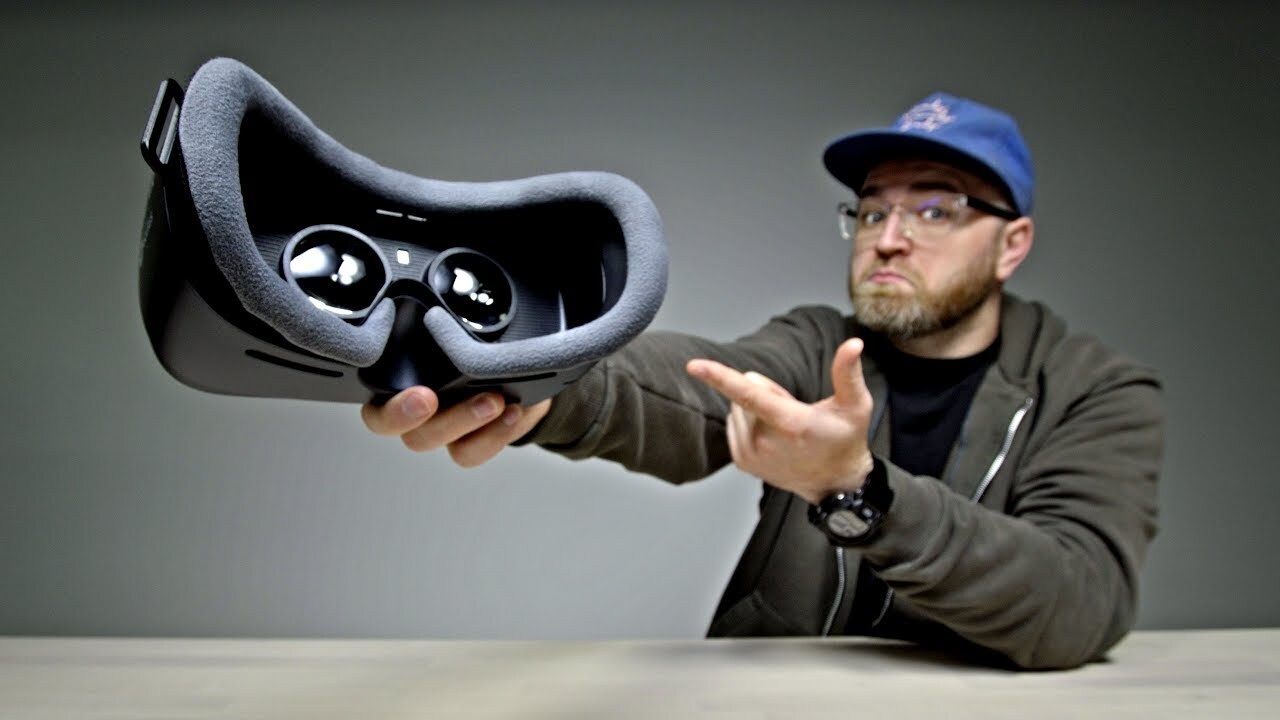
I have the new Samsung Gear VR with controller! I want to give a shout out to Oculus for sending this out and sponsoring this video
0:09
I'm pumped up to check this thing out. Finally, there's a controller you can interact with your device
0:14
I tried the previous version of this, but I think this one's going to be better
0:18
Now this one here, it'll work with Galaxy S8, S8+, S7, S7 Edge, Note 5, S6 Edge+, S6, and S6 Edge
0:27
cinematic wide view, 360 degree experience. When you dock your phone into this headset
0:32
it'll actually download the Oculus app with the various experiences in it
0:37
So you're off to the races straight away. I'll tell you what
0:40
Okay, there it is. The headset itself. Ooh, it's a very soft memory foam-ish material
0:48
You can see the lenses on the inside. Some buttons here and a touch pad
0:52
a home button and a back button. Ooh, that's a Robocop kind of look right there. Click that way and then that way and look at this
1:02
Kaboom. This is why it can fit so many different devices. Check that out. It's spring-loaded. You have this adapter here as well if you need to go down to micro USB
1:12
And that's why it can accommodate so many different phones in one headset
1:16
Of course the head strap controller right here. A couple of batteries for it
1:20
I love I love when they include the batteries Shout out to them for that a little bit of a wand type of feel to it It actually quite comfortable It has a trigger on it A touch pad on the top
1:32
Back and home. Boot it up. Like that. That's pretty foolproof there
1:37
Can I lock it? Oh. Welcome to your Samsung Gear VR. Whoa, hello there
1:42
Set up process. Remove your mobile device. Ooh. Unlock it. And install the required apps on it
1:48
We're gonna have to put an app in first. There it is. Look at that. So shortly after installing the device into the headset, it prompts you to get the specific app
1:58
Gear VR powered by Oculus. Oh wow, look at this. The screen resolution must be WQHD to use the Gear VR
2:05
Now this is really interesting. You guys remember when I did my original video on the Galaxy S8
2:11
And I was talking about how out of the box, the device doesn't come in the full resolution
2:16
Here's an application where having those extra pixels makes sense. So we toggle it up
2:20
Let's go. 2960 by 1440. I'm excited. So now we're gonna pair up the controller press and hold the home button
2:27
Calibrate the controller. Okay draw a series of figure eights Whoo-hoo, okay place your controller face down on a flat surface for a few seconds all right
2:40
Very nice. Yeah, right-handed for sure. So looks like we're ready to go here
2:45
I think it time to put the phone back into the headset Let try this out Ooh there we go This is my controller down here represented by the exact same object that I holding
2:59
And I can see this, and then it sends out this laser pointer looking thing
3:04
so I can select what I want without having to reach up and touch the headset itself
3:09
So it's a lot more natural. Oh, wow. Look at this. I'm rotating this around with the touchpad on the controller
3:17
and I'm gonna go and select one of these here and play it
3:22
Ooh. Oh my goodness. Oh. Oh no. This is a bigger drop now. Oh
3:33
Okay, that's good. We're good on the roller coasters. Now, keep in mind, I can go to the internet here
3:42
and do the usual things I like to do as well. I mean, here's YouTube over here
3:47
You got your social media. I could go on Instagram and VR. And what I like here, this is just a laid-back kind of experience
3:53
I can use the touchpad to just scroll through the videos. And they're huge within the headset
3:59
You can just scroll through some popular videos here. There we go
4:04
There's the complete Floyd Mayweather, Conor McGregor press conference, Los Angeles. I have to say, I was at the Toronto press conference a little bit better than this one
4:14
All right the old saloon Here we go Dead and buried Let check it out boom Boom so I think I have like limited Maybe I should have done the tutorial
4:26
Whoa Okay Yes, sir, whoa hey there brother
4:38
Why can't I am I out do I have to reload how do I reload? That's how you reload
4:46
Little flick of the wrist, baby. I don't know. Maybe it's just a time thing
4:52
Come on. There you go. Man, these dudes are getting close to me
5:00
I'm dying. I'm dying. I'm dying. Oh, I'm still alive. I'm still alive, baby
5:06
Oh, we got a sharpshooter over there. I died. Okay, cool. I'm happy with that
5:13
I think I feel like I kill a bunch of guys, you know, no tutorial. Skip the tutorial
5:18
That, now that was, that one there, that was cool. See that's the kind of thing that becomes available to you when you have the separate controller
5:25
rather than just being stuck controlling from the headset. Gear VR, powered by Oculus, with a new controller
5:32
I mean this has got to be the easiest path into VR
5:36
You probably already have the phone, you have the device, you just add this, you're untethered
5:41
you're living it up
#Computers & Electronics
#Virtual Reality Devices