Up next in 10



Check out the MSI MEG Vision X AI here: https://www.msi.com/Desktop/MEG-Vision-X-AI-2nd
@MSI #msi #ai #touchscreen #computer #cpu
This was one of my favourite products from CES this year. Thanks to MSI for partnering on this video.
FOLLOW ME IN THESE PLACES FOR UPDATES
Twitter - http://twitter.com/unboxtherapy
Instagram - http://instagram.com/unboxtherapy
TikTok - http://tiktok.com/@unboxtherapyofficial
Show More Show Less View Video Transcript
0:00
I saw this at CES this year when I was visiting MSI
0:03
There were two things that really caught my attention. There was the Dragon Gaming Laptop
0:07
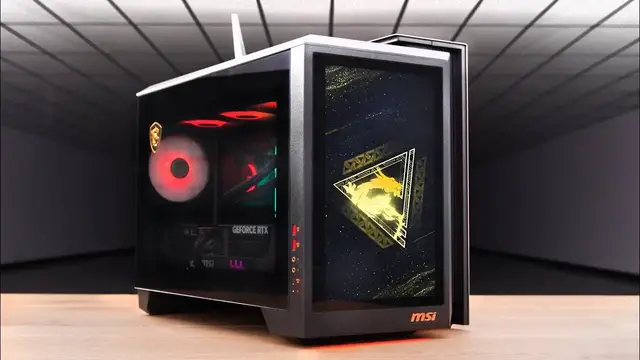
and then there was this, the MegVision XAI. This has a giant display on the outside of the chest
0:13
Why do you need that? You don't. Why do you want it
0:17
Because it looks extremely cool. And it actually does have some functionality because it's kind of like having a second monitor
0:22
Core Ultra 9, 285K, RTX 5090. And it actually comes with a gaming keyboard
0:27
and mouse in there. Yeah, ridiculous spec, 5090 RTX. This is the 322URX QD OLED gaming display, 240Hz refresh, extremely fast response time
0:41
supporting DisplayPort 2.1, and also Type-C 98W capable. This is going to be a nice little setup
0:50
First thing we find, extra cables. PCIe cables, power cables. Ooh, carry bag for your PC
1:01
Look at that. Cool. MSI Enthusiast Gaming. Whoa. Huge glass panel on the side
1:16
Obviously, you can admire your components. MSI Badge in the corner. Easy access on the side here
1:21
So a couple of USBs, og audio, USB-C port. A lot of ventilation on the top as well
1:27
And then the front is dominated by this display, which you can't really appreciate at the moment
1:33
because it's not turned on and it's covered by this plastic. Not anymore. It's in portrait orientation
1:41
It kind of reminds me of the early Tesla Model S that had like the portrait display in your dash
1:46
but it's big. This is like 13 inches. It's like having a laptop screen in a portrait mode
1:52
Power switch on the top. I think there's one on the inside too
2:01
Thermal paste and extra screws. What in God's name are you? A foot
2:17
Antenna, SATA. Large microfiber cloth. Whoa
2:29
Oh my god man. What is that at 590? 5090 yeah. That is a monster
2:41
Smells so good in there too. Just factory fresh in there. Well is this why Nvidia is taking over the stock market in the world
2:51
That's why. I'd love to see it. Just power. It's funny, when you think of power
3:01
you can think of it in so many terms A bodybuilder or a bomb or a V8 truck or that They all power but in different ways This is extremely dense power I just noticed there an actual manual switch to choose between
3:17
silent and gaming. Can you imagine opening the chassis and just being like, time for silence
3:25
The revelation of legend. I see those fans through there. That's cool
3:32
that's one dragon that's a second dragon a bunch of usbs my goodness one two three four five six
3:49
seven usb a couple of thunderbolt another type c connections for our wi-fi antenna og audio
3:55
one hdmi and three display port kind of like that they've included what they're calling a
4:02
gaming keyboard and mouse does that mean it's mechanical yes feet it is mechanical sweet
4:13
it's willy do style mechanical like oh yeah kind of like blue or green they're soft though
4:21
they're more tickly yeah they seem more light that's what i'm saying for the speed
4:28
That's a good one. After all these years, Mo. After all these years
4:38
That's a good one, Will says. This is a pretty lightweight mouse, too
4:48
Displayport, HDMI, power, USB, paperwork. I spot another dragon. What's the dragon counter at
4:56
Four or three? No, wait the mouse the keyboard I feel like you're missing some dragons. You're gonna have to do a dragon paddy
5:07
Headphone HDMI HDMI DisplayPort Type C upstream USB USB Careful what you wish for
5:28
Check it out. You've never seen a system like that. And the way it's set up right now is as an extended desktop
5:35
But the part that I was less aware of was the interface that was built specifically for this
5:41
And that's this dashboard right here, which gives you access to things you might want to control rapidly
5:47
That are sort of more associated with the system itself. And you don't want to like reach into a menu or something
5:53
That's what they built this display for. And what they built this interface for
5:57
Also, side note and potentially fun fact, Mo was very confused about this little contraption here
6:04
He said Lou I checked chat GPT didn know what it was so it nothing It doesn exist It basically what he said and I was like Mo So then just snapped a photo with Google Lens and immediately was brought to a Reddit thread of other like individuals that were curious
6:20
This is a support for the GPU because this GPU is absolutely enormous
6:25
Will is still trying to contain himself. He can't be contained because he saw the 5090
6:30
He saw the 5090 and he's breaking out of his containment. It's one of the most captivating items
6:34
in the entire unboxing. The entire laboratory here was like staring at it
6:38
as if it were the monolith in 2001. What? It was mostly Mo
6:43
Look at this thing. This is gonna give me quick access to all kinds of aspects
6:48
First of all, do you hear how quiet this thing is? I know I'm not playing right now, but still. Wow
6:56
Silent? In this dashboard, we can control our screen brightness, our lighting, I mean, look how beautiful the lighting is
7:03
It comes on, on the table, this little section over here. And any time that this RGB is bounced, it has that really pleasing gradient to it
7:12
The RAM is lit. The fans are lit. The GPU is lit. And the cooler on the CPU is also lit
7:17
It's all lit. We can also turn the screen off completely if we want to
7:23
We can quickly change our preset from gaming to working to meeting and to entertainment
7:27
So these presets are obviously going to adjust the performance of the system. You can also have it do this automatically
7:32
So you launch a game and then that happens. We can control whether or not we have this animated background by clicking this button here
7:40
We can freeze it. We can click here, which will bring up our lighting effects, our audio effects, visual and performance effects
7:46
We can also see certain things we might want to see frequently, like our CPU fan speed, our pump fan, GPU fan, and so on
7:54
I can scroll down here and quickly change my user scenarios if I want to jump into a silent mode
8:00
As an example, we also have our different sync settings for our lighting
8:04
Like we might want to switch to breathing, for example. Mimic our CPU temperature
8:08
That's pretty cool. This stuff is available to you in MSI Center, but it's just laid out kind of nicely here
8:13
And another thing that Mo mentioned to me, apparently this display is being fed via integrated graphics
8:18
So it's not utilizing any horsepower from the RTX. And obviously it's not utilizing any of the outputs
8:23
So you still have full access to your outputs there for multi-monitor setups. As far as like a 5090 build, it's fairly compact
8:30
Yet it still has this exclusive functionality of this display, which like I said when I first saw it is complete overkill
8:37
but that's why it's cool. Things start to get cool when they get a little bit overkill
8:41
and just extra, but that's what makes it unique. And that's why you know that not everybody's going to have it
8:46
So this is the way I think it will live for most people most of the time in this kind of interface sort of layout
8:51
looking cool, looking simple and clean if you want, or exposing more functionality
8:57
If you choose to, you can toggle it just like this. and I believe I can also click easy. What does easy do for me? Oh, even cleaner. Like look at
9:04
this right now. And there's different themes. And you can also go ahead and upload your own if you
9:09
prefer. But let's just try out a few different themes here. Look at this one. If you have like
9:12
more of a lighter setup going on And here we have a more subtle gradient option I don mind that either That sort of goes with our background So if I go here and all of a sudden I a dragon guy during my meetings now the dragon is for meeting mode
9:27
because I turn into a dragon when I'm having a meeting. Doing business deals and so forth
9:34
I need to be reminded. Most people, they'd have the dragon for gaming. I have the dragon for meeting
9:39
And then when I go to gaming, it's more ambience, quiet time, relaxation
9:45
like elon i'm a grand master during my off time what was he playing diablo what's the top rank
9:53
of diablo you don't even want to talk right now it was like i'm getting implicated i'm a tesla
9:57
investor leave me out of it i don't know but like whatever he was in diablo it got the whole world
10:03
was like is it possible for him to be running seven companies flying to space electric cars
10:08
neural link implants robo taxi and diablo rank top rank is it possible then he would just go on
10:16
twitter and he just posts it's like a dark room there's like a candle in the corner and he's just
10:20
grinding and he's just his his dude is all beefed up he's just crushing foes let's see how it works
10:28
as a as an extended desktop let's that's kind of cool i think what i would do in this situation
10:32
is i would just try to line it up a little different like i would probably just do something
10:36
like that you know i mean like you could have different tools over here if you're in your
10:41
photoshops or whatever you're doing and it's a touch screen so i could just reach up like this
10:46
but even if i'm just using my mouse this could be tools in an app or you could use it for social
10:50
media you could have a some kind of a news feed going on over here or if you're coding or something
10:56
says our resident edgelord So it actually has built-in speakers
11:08
I mean, but people do this. You could have your music playing. I mean, I got my chill melodies over there
11:18
and then I'm doing work over here, you know? It's kind of cool
11:28
I thought the drums were going to come back right there, you know
11:38
I'm going to play Overwatch because I have a 50-90. Right, Will? Shots fired
11:47
Shots fired? Oh boy
12:11
Did it. One for one. You said you were going to have to roll for a while
12:28
Thank you
#Computers & Electronics
#Computer Components
#Computer Peripherals
#Desktop Computers