Up next in 10


Linux - Regular expressions
Show More Show Less View Video Transcript
0:00
now in this video I'm going to discuss
0:02
something about the regular expressions
0:04
now the name itself regular expressions
0:07
means the things which you use on the
0:08
regular basis commands which we use on a
0:10
regular basis all the text sequences
0:13
which you use on the regular braces
0:14
those particular commands or those
0:16
particular files became used by using
0:18
the regular expressions now now the
0:20
dragula expression is just a string
0:22
which can be used to describe several
0:26
characters we have so it can be anything
0:28
it can be your file content which you
0:31
want sequentially into a particular
0:33
output or you can you know modify the
0:35
contents without modifying the input and
0:37
you get the modified output that also we
0:40
can do by using this regular expressions
0:43
now if i'm talking about this regular
0:45
expressions they are used in a different
0:47
way by do using different commands so
0:49
dump some of the commands unlisted like
0:51
you use educ you use ah commands you use
0:55
grep commands so this commands which we
0:57
are going to see later how to configure
0:59
those particular commands or how to use
1:01
this particular commands so this
1:03
commands can be used to modify your
1:05
output without changing the input file
1:08
one of it we all generally use that is
1:10
yours it sews it is called as a stream
1:13
editor you already have yours STD in
1:16
file you have already have your SD out
1:18
well which we have already discussed
1:20
into these standard files so those
1:22
particular file we are going to use
1:24
while defining the output so what we are
1:27
going to do is we are going to put the
1:30
input or feed the input and / which
1:32
passes through or goes through your STD
1:35
outflow
1:36
without changing your STD info means if
1:39
suppose I have lists of numbers starting
1:42
from one to ten but I just want to check
1:45
the first five numbers or numbers which
1:48
are less than five so I can give a
1:51
command but just for looking the numbers
1:53
which I have less than five so the
1:56
command won't change the input file the
1:58
command won't change the original file
2:00
but only the output which I will get
2:02
that will be the one to Phi itself so
2:05
that is what the STD or STD is going to
2:09
use so let us see how we can use this
2:11
regular expression by
2:13
using your sed into your terminal so
2:17
such command as a set like you know we
2:19
can also use this particular search
2:21
command so that if I want to change the
2:23
output so for example I am going to
2:26
create the file name with fruits and I'm
2:29
going to add some fruits over here
2:37
Michael
2:39
I'm going to repeat it once more once or
2:42
twice as well
2:45
and again cherry right so I have added
2:53
some of the fruits now so now for
2:55
example I don't want apple and I want to
2:58
replace some other fruits in this
3:00
particular name that is this particular
3:03
file I do not want Apple and I want to
3:05
substitute something else
3:06
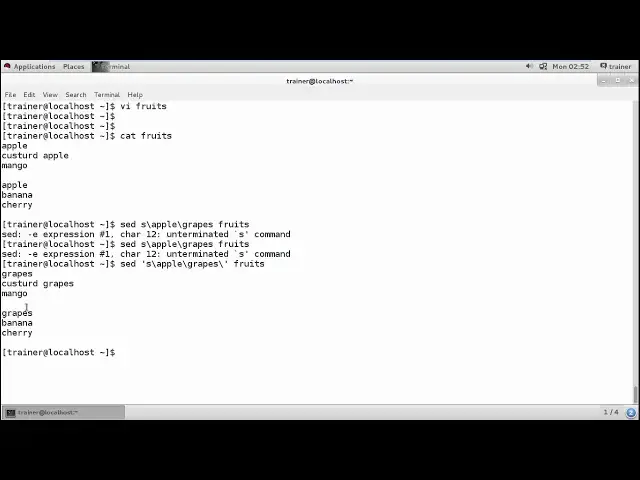
in spite of Apple what I can do is I can
3:09
use the substitution command so how you
3:11
generally use it so we will be using set
3:14
commands set and we need to define
3:16
substitute now what you need to
3:18
substitute and what for do you want to
3:20
replace I want to replace Apple with for
3:24
example grapes and in which file you
3:26
want to do it
3:27
fruit start sorry that is their fruits
3:30
file
3:32
okay just we need to define
3:40
so what I can do is I can just use
3:46
I'll sing the chords so that it subsets
3:50
and just a slash back slash and then
3:55
close the scores now it will accept the
3:57
same so you can see the Apple is
3:59
replaced by the gates but it won't
4:01
affect the original file again check
4:05
it's not a great you know affecting any
4:07
original file and you are getting you
4:09
know the worse you want to replace you
4:11
can replace same way I can you know
4:13
creative
4:20
company one and I'm going to add this is
4:27
production
4:30
company
4:34
the production is based on
4:39
software products right so this is the
4:45
you know the text I have written here
4:47
and I'm going to save the file and for
4:49
example now I want to just change the
4:52
production company to we can say a
4:57
deployment or a development company so
5:00
again I can substitute it in the same
5:01
way I can use a some onset yes / and
5:06
your what you need to change that is
5:08
production
5:13
with the word called us development /
5:18
and then the file name gender you can
5:23
see it has been changed the production
5:25
has been changed with the development
5:26
and the original file as it is
5:34
right so it won't affect that far same
5:37
way we can also do it as for the you
5:42
know globally and generate happens
5:44
globally all this particular file has
5:45
been changed all the name has been
5:47
changed now I can also use the
5:49
parameters that is G that it will do for
5:52
it globally means into this file the
5:54
number of words I have what the
5:56
development I can change it so this is
6:00
what exactly how we can change you know
6:02
particular particular letters or
6:06
particular words with different words so
6:09
this is what exactly we have seen into
6:11
this it come on we have many more
6:13
parameters of this it commands like see
6:15
this as very worst know the commands
6:18
generally we are generally used so you
6:21
can also use this set command like Mir
6:24
we can okay change the particular
6:26
instance of a lioness or like here we
6:28
can say we have seen we can change this
6:31
particular line globally right now
6:33
whatever if I want to if I do not want
6:35
to change it globally so what I will be
6:38
doing is
6:42
are they just changing the instance here
6:45
like suppose I have you know the
6:48
development returns over here and I want
6:51
to change not the oil but only on the
6:54
third line or only on the second line so
6:57
I can also refine to so it will change
7:00
the no.9 into this second instance what
7:03
generally we have so the same way like I
7:06
can take an example now
7:09
I'm just going to modify a file
7:14
and this is the company the same company
7:17
for a lambic to modify and I'm going to
7:19
add a line
7:26
if where I have repeated a same word
7:29
production as very
7:35
easy we can see okay so into one-liner
7:39
have at the production many times right
7:41
now I can find that
7:46
anyone production is over here and
7:48
production is over there same way if I
7:49
use the set command which I have used
7:51
earlier
7:53
not cheap but if I don't use this she
7:57
that is globally so what it will do it
7:59
will change the first instance not the
8:01
other instance which appeared in this
8:03
same line so if we want to change a
8:06
particular instance like if I want to
8:07
change particular instance that is
8:09
development into the second instance
8:12
only so we can check into the second
8:14
instance this production has been
8:17
changed but all the production's
8:18
generally we have into the first
8:19
instance has not been changed so this is
8:23
the way we can also you know use the set
8:27
command and whatever the changes I am
8:28
going to do here it is not going to make
8:31
any changes into any of my original file
8:33
that is company so for example if I want
8:36
this output of this you know changes and
8:40
I want to keep into the my order company
8:43
name like company one or company to I
8:46
can't define it so you can check for
8:48
both the files that is company one
8:52
company one and you can also check the
8:56
content of the company too
9:00
it will show you it has changed from
9:02
traction to development and this has
9:04
still production so I've just redirected
9:07
by one file entry into the waterfall
9:09
that's what we have seen and so this is
9:12
the set command saying they will have
9:13
many particular commands like your cut
9:15
commands we have on the dominie
9:18
generally you can use for modifying and
9:21
getting access to your particular part
9:24
of your data from your system so that is
9:27
what exactly we have so again we can use
9:30
a particular command called as a compare
9:32
command or we can say we can compare
9:34
both through two different files so you
9:36
can check out the difference between two
9:38
files like we have rigidbody files with
9:41
the name company right so company one
9:44
and company - now I want to check the
9:46
differences between this particular
9:47
files so I can give the command deff
9:52
company 1 & Company 2 now the lines
9:58
which are same as well show you the same
10:01
the lines which are different it will
10:02
show you the different lines so as this
10:04
is the company's file will you have this
10:06
had three lines we have added and they
10:08
start to compare two lines generally to
10:10
shrink you so we can also use if
10:12
commands to compare you know two
10:14
different file size over here
10:16
so some ethnicity as I told you there
10:18
are many things you normally we use in
10:19
today
10:20
you know Linux operating systems where
10:22
we do not affect your systems and in
10:25
daily usage in a regular expressions we
10:28
use it so you can find for it demand
10:31
pages and really you can find more of
10:33
the parameters of set and practice it so
10:36
into our next video I am going to
10:38
explore more about the file systems of
10:40
your Linux operating system and how you
10:42
create and manage your partitions so for
10:44
that keep watching and do practicing
#Programming
#Programming
#Software