Up next in 10


Linux - Break statement
Show More Show Less View Video Transcript
0:00
now here we are going to talk about how
0:02
we can use this break segments if I'm
0:04
talking about the break segment as we
0:06
have discussed earlier break statements
0:09
what it will do is will terminate the
0:10
execution process of your entire loop
0:13
and it will complete the execution till
0:15
we have defined a break statement so
0:18
very well you have defined a break
0:19
statement before that all the loops
0:21
which we have created will and over here
0:23
itself so if I want to just define the
0:26
break statement we do not have any
0:28
particular more of the commands or we
0:30
have dual different expressions used
0:32
over here just we need to define the
0:33
break after the loop once we have
0:36
completed the case or if you have used
0:38
any if-else statements so this is how we
0:41
generally use the loop let us see how we
0:43
can use our break statement into our
0:45
existing loop over here so we can use a
0:48
break statement over here like I am
0:50
going to use a break statement function
0:52
into this show so that yours
0:55
you know the loop which has been formed
0:57
or the you know the automation task
0:59
which has been formed by your Linux
1:01
operating system shell scripting which
1:03
you have created sometimes it gets you
1:06
know creating the values itself or him
1:09
not continuing the value itself but it
1:11
won't be stopped so if you want to break
1:13
those kind of loops what you will be
1:15
doing is you will be using the break
1:16
statement which we have seen now I'm
1:19
going to talk about the how you can use
1:21
the break statement right so for that I
1:24
will be creating a command and sorry
1:27
script that is equals to zero and here
1:30
I'm going to define well a condition
1:34
where my value of a is less than 10
1:43
correct so what should happen
1:48
it should do
1:52
that first it should print the variable
1:57
and then it should add the value if it
2:03
is
2:07
equal to
2:10
boy so it was should go on adding it so
2:15
your step psychologist if you find a
2:16
space in here
2:24
and then I'm going to a hundred in such
2:27
a way like if it is you know equal to 5
2:30
then I'm going to break it over this way
2:33
I want to I don't want that it should go
2:35
till 10
2:36
so I want that tell if it is you know
2:38
equal to 5 so self I it should print
2:41
force that it should not friend so I'm
2:42
going to break it some fair right so for
2:45
that I'm just going to define that if it
2:48
is you know equals to 10 so break in
2:51
between itself right and then thank you
2:56
fi and a equals to same if they'll
3:03
define expr like we are going to add go
3:08
on adding the value into the variable a
3:12
unless it is 10 but we will be breaking
3:16
it in between
3:18
so once we have done with that just
3:21
gives it done
3:22
and then I'll come out of a tunnel run
3:26
the same
3:28
can say in spite of I've given it should
3:31
you know go on adding till 10 but it
3:33
will get raked in between itself with a
3:35
while we have summer
3:42
okay so well 280 okay so this is the
3:50
expression which I have added I just by
3:54
mistake used to thee single quotation
3:57
signs that Just's the error which I have
4:00
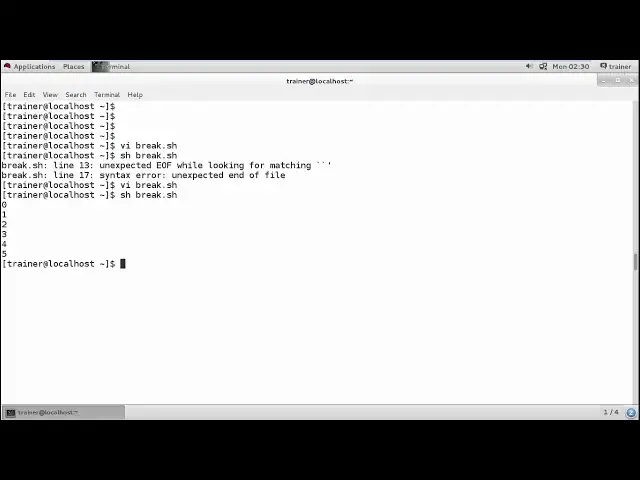
okay so the tester does this the same ok
4:07
then lets us run the same break dot as
4:11
as you can see it is printing only till
4:13
five
4:13
so if you do not have this break
4:15
statement which we have added here
4:19
like if I do not add this breaks
4:22
treatment so what will it will do it
4:24
will directly go on adding the numbers
4:28
still I am getting 10 so it might happen
4:30
sometimes you have created a huge
4:31
program and you know when that loop
4:33
should be created you can break it
4:34
wherever you want so this is about the
4:36
break statement we generally have so
4:40
even we can have money of the you know
4:42
commands we or any of these shell
4:44
scripting examples for these break
4:46
statements like if I am going to use
4:53
the same leg use the break one and such
4:58
a fun and here also I can add for a in
5:06
one two and three values so do for
5:14
variable a that we are going to define
5:17
and or we can define the variable P and
5:22
0 and 5
5:25
okay so it should be between 0 and B is
5:28
between 0 and 5 so what you can do is
5:31
you can define f
5:40
your value of a
5:44
is equal to 2 and the value of your P
5:52
variable is equal to 0 then it should
6:01
break because we have two different
6:03
statement right we are refining from B
6:06
is for 0 to 5 and in 1 1 2 3 so I'm
6:09
going to break in-between so you can
6:11
hear break
6:16
- right and else we can also define D
6:23
both the variables a and your variable B
6:32
okay I'll just end this particular
6:35
statement and we're done with the do
6:38
loop
6:40
here the loop which we have formed that
6:43
is a four loop and once we have done
6:45
with this what the four loops I have
6:47
ended over here and I'm going to save
6:50
the C as such break 1 dot passage file
6:56
I'm going to run so it's showing you is
7:00
having too many are human so I'm just
7:04
going to look in check for it
7:12
you
7:16
so it should break on break argument to
7:21
itself
7:27
you
7:36
okay so the error is over here that we
7:40
haven't defined EQ
7:44
once you are done with that again I'm
7:46
going to run with the same break 1 dot
7:50
message and sex again we have too many
7:55
arguments
8:00
just I'll set it the number
8:05
so come to know which is six okay
8:11
and - and I'm going to define that with
8:15
the arguments I'm going to accept here
8:18
again break 1 dot as such and I can see
8:23
the shrink you only 0 + 1 + 1 + 1 2 5 so
8:28
this is our the argument so generally um
8:30
what we missed was like while defining
8:33
the argument into the two argument I
8:35
have just braked into the break 1 dot as
8:38
such come on and here I have seen like
8:41
we should have only two were comments
8:43
which will be written and here as I'm
8:45
going to use both the I know argument so
8:49
I'll be using - a for adding it right so
8:53
this is what exactly the statement I
8:55
have created where generally I'm using a
8:58
break statement if I do not use the
9:00
break set - we'll go on creating the
9:02
loops as we have defined the you know
9:04
value in wind into this predicate for a
9:06
and B so this is what exactly the break
9:09
statements are like we have seen two
9:11
examples of your break statement into
9:13
the next video we are going to talk
9:15
about the continuation of this
9:17
particular statement so we'll be using
9:18
continued statement over here into the
9:21
next video
#Programming
#Programming
#Scripting Languages