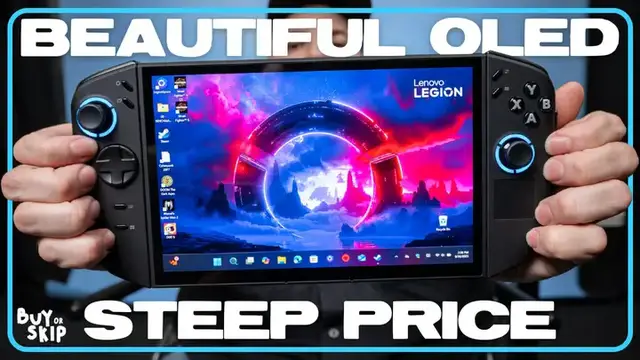

Tony is here with his Lenovo Legion Go 2 review, and the awaited second-generation handheld gaming console with detachable controllers had to deliver a lot to justify the $1,199 starting price. While the OLED display and versatile design are among best-in-class, performance was kind of a mixed bag. But watch the full video for Legion Go 2 gameplay comparisons between the Legion Go 2 vs. Go S, Steam Deck OLED and more.
Show More Show Less View Video Transcript
0:00
The Lenovo Legion Go 2 is here and it's big and expensive. We're talking over one grand for the
0:04
price of admission to this gaming handheld console. In this episode of Buyer's Skip
0:08
I'm going to break down the pros and cons for my Legion Go 2 review, including how it compares to the original Legion Go and the Legion Go S. Let's get into it
0:17
As usual, we're going to start with what makes the Legion Go 2 special. And I mean, I think it's pretty obvious just looking at this thing. This 8-point-inch OLED display is pretty
0:24
much the star of the show, especially given how we don't have many OLED consoles these days
0:29
Okay sure, there's the Nintendo Switch OLED and Steam Deck OLED, but for me, neither of
0:33
those impressed me as much as the Legion GO 2, display wise
0:37
Colors pop and I'm seeing strong contrast and the upgrade to HDR support makes games
0:41
like Cyberpunk 2077 look absolutely jaw dropping. I mean even the Windows 11 home screen feels alive, and you know that's really saying something
0:49
But when you're roaming Neon Soak Night City, the Legion GO 2 OLED's display really shines
0:55
Lenovo did drop the resolution from 1600p to 1200p, but honestly, it's a fair trade for OLED
1:01
And with a 144Hz refresh rate, every game you run feels fluid and smooth, which really elevates the experience
1:08
The tested performance tells a little bit of a different story, but I'll talk about that later in the video
1:13
Looking a little closer at the design, the Legion Go 2 does look a lot like the original Legion Go
1:18
It's slightly bigger and heavier, but more importantly, it's more comfortable to hold
1:22
thanks to its round, smooth controllers and even weight distribution. Basically, it's more ergonomic than before
1:29
Then you get the kickstand, which is super convenient and was one of my favorite features about the OG Legion Go
1:34
Lenovo even throws in a controller grip, kind of like what you get with the Switch, and honestly, this should be included considering how expensive this thing is
1:42
With the controller, you can play the Legion Go 2 in a console mode, as Lenovo calls it
1:46
I think I personally still prefer to keep the controllers attached, but it's good to have options
1:50
Speaking of options, we also get the same number of ports as before
1:54
To refresh your memory that includes two USB ports one located at the top the other one at the bottom There also a 3 headphone jack and a microSD card slot and like before the power button has a fingerprint reader which is a nice touch
2:07
No pun intended. I know I already talked about the controllers a bit, but they really are a selling point
2:13
in weighing up the Legion Go 2 against other handheld gaming consoles. These TrueStrike controllers, as they're called, might not be radically different from
2:20
what we got on the original Legion Go, but they have been redesigned with more ergonomic
2:24
lines, a smoother feel, and a more intuitive button layout. The Legion GO 2 also has Hall Effect joysticks and a redesigned D-pad
2:31
I found the joysticks fluid and responsive with just the right amount of tension when
2:34
you move them. Then we have the Ronda D-pad which is a lot better for fighting games like Street Fighter 6
2:41
And in case you were wondering, the new controllers are back-up compatible with the original Legion GO
2:45
Don't know how valuable that actually is, but either way, I'm here for detachable joysticks
2:49
As for what I'm not here for, let's pivot into why you might want to skip the Legion
2:53
go to and just a reminder that if you like these kind of videos you should consider subscribing
2:57
to the channel. Okay, we gotta talk about Windows 11. I know what you're thinking, oh here goes Tony complaining about Windows 11 on handhelds again
3:07
That's right because it's an operating system that has no business being on handhelds
3:11
This is especially true now that systems like Lenovo's own Legion Go OS operate on Steam OS
3:17
And as I said 5 million times before, Windows 11 sucks for handhelds. Don't get me wrong, using Windows 11 on gaming PCs and laptops is fine, but the same isn't
3:25
true for gaming handhelds. Moving the cursor with the right og stick or with your finger on the 8.0-inch screen
3:31
when navigating desktop is still a pain. Then on top of being clunky on touchscreens, Windows 11 also seems to contribute to slowing
3:38
down gaming performance and battery life, which is something we noted when we installed
3:42
SteamOS on the original ROG LiX and saw improved performance and battery life
3:49
Windows 11 might still have greater game compatibility and system customization than SteamOS, but
3:54
SteamOS comes out on top where it matters which is why I probably going to be sitting tight until Lenovo inevitably releases the Legion GO 2S but at the time of this video we haven seen a single rumor yet so we might be waiting a while
4:06
Lenovo sent us the most spec'd out Legion GO 2 so my expectations were pretty high for
4:10
what this AMD Ryzen Z2 Extreme driven machine with 32 gigs of RAM could do in terms of performance
4:16
and let's just say I was pretty disappointed by what our benchmarks produced
4:20
You can see our full set of benchmarks linked in the description if you're really interested But for now, I'll tell you that running the in-game benchmark tool and graphics cranked up to ultra
4:28
Cyberpunk 2077 ran at an unplayable 4 frames a second at the native 1200p resolution
4:34
In fact, no game that we tested with these settings managed to run well, which just absolutely shocked me
4:39
When I dialed back the resolution and graphics settings, I saw better frame rates
4:43
For instance, I got Cyberpunk 2077 to run between 45 and 50 frames a second at 720p resolution
4:49
and with the frame boosting AMD FSR 3 enabled. It's the same case with Spider-Man 2 and Dirt 5, but it's a bummer that I can't run most games even at 30 fps at the native
4:59
1200p resolution I wish the Ryzen Z to extreme chip inside this thing deliver a better performance and don't worry
5:04
I'm still gonna be tinkering with it, but it's not great out of the gate Another thing that's not great is how buying the Legion go to will make your bank account feel right now
5:14
It's the most expensive handheld for major manufacturer Yikes The Legion GO 2 starts at $10.99 for a model with the regular Z2 chip, and a whopping $14.79 for a fully decked out model
5:26
In comparison, the Asus ROG Xbox Ally with the Z2 chip starts at $5.99 for the base model, while the ROG Xbox Ally X with the Z2 Extreme chip costs $9.99
5:36
Yeah, $9.99 isn't cheap either, but it's still less expensive than even the base Legion GO 2
5:41
There's also the fact that ASUS is handheld runs on a leaner version of Windows which promises to have less of an impact on battery life and performance
5:49
Now you're probably wondering if you should get the Legion Go S instead of Legion Go 2
5:54
After all the Legion Go S is more affordable thanks to its starting price or sometimes lower if you catch it on sale Additionally you can opt for the Legion Go S model that runs on SteamOS which is a superior operating system for handheld compared to Windows 11 in my humble opinion
6:09
There are trade-offs, first the Legion Go S has a smaller 8-inch display and there's no OLED option
6:15
You're also getting a less powerful Z2 Go or Z1 Extreme chip. However, in my experience
6:20
the D1 Extreme model with CMOS offers comparable or better performance to Legion Go 2
6:26
Legion Go S also lacks detachable controllers. If the Legion Go 2's 8.8-inch OLED display and unique form factor are more enticing
6:33
then get this system, but if you want a more affordable handheld that runs on CMOS
6:37
then get the Legion Go 2. So should you buy or skip the Lenovo Legion Go 2
6:44
Buy for the gorgeous OLED panel, more ergonomic design, and for its detachable controllers
6:49
On the flip side, you should skip the Legion Go 2 if you don't want to deal with Windows 11
6:54
expect better performance, or if the asking price is too steep. While I wish the Legion Go 2 offered better performance, it's hard to deny its beautiful
7:02
OLED screen and its distinctive design. And considering how Microsoft will allow
7:06
other manufacturers to use its lighter Windows OS, which would make the Legion Go 2 easier to use
7:11
and potentially boost the performance, Lenovo's handheld might be a more compelling option in the
7:15
the future. That's it for this episode of Buyer Skip, let me know in the comments if you're planning
7:20
to buy Legion Go 2 or if you're going to wait for another handheld
7:24
If you liked this video make sure to hit the like button, subscribe for more reviews and
7:28
turn on notifications so you don't miss our next episode. I was Tony Polanco and I'll see you in the next video. Later
7:45
Lenovo, what is we doing
#Computers & Electronics
#Gaming Reference & Reviews