Up next in 10



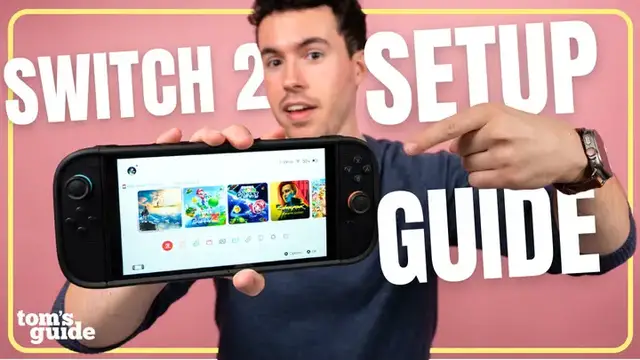
The Switch 2 is probably at the top of the list for someone you know and Phil is here to help you out! In this video, we’ll walk you through how to set up your Switch 2 audio, display, and parental control settings to get the best possible experience. And if the Switch 2 is a gift for a young child, we have the perfect tips to help you set up the console before it’s gifted so there’s no tears on Christmas morning!
Show More Show Less View Video Transcript
0:00
The Nintendo Switch 2 has been the biggest console launch in history
0:04
And whether you own one already or are buying it for someone else, this episode of Setup Essentials will help you get the most out of it
0:11
From the best settings to the best games and best Switch 2 accessories
0:15
this video will cover a lot. So go ahead and show some love before we get started by hitting that subscribe button
0:21
Now, let's get into it. I want to start with a quick PSA for the parents out there who are buying a Switch 2 for your kid
0:29
First off, you're already amazing. Your kid is going to lose their mind when they see it
0:33
But here's the catch. Chances are a brand new Switch 2 is going to need an update out of the box
0:40
And trust me, no one wants to spend their first morning with their console watching a loading bar
0:45
So here's my pro tip. You're actually going to very carefully unbox and set up the Switch 2 before gifting it so that it's immediately ready to play
0:56
Step one, boot up the console. We recommend keeping it plugged into Nintendo's included
1:02
AC adapter during this process so it doesn't lose power during setup
1:08
Step two, connect to the internet. This will prompt the software updates
1:14
Step three, optional but parental controls. If you're buying for your kids and want to limit
1:20
the types of games they can buy or how long they can play for, you'll want to set this up here
1:25
And finally, a bonus step. If you're buying digital games only, make sure at least one is installed
1:31
Once it's updated and ready, pack it back up, wrap it, and take all the credit for being the best gift giver of the year
1:39
Now, let's get into how to actually make the most out of your Switch 2
1:44
If you're someone who plays your Switch 2 in handheld mode a lot, you're probably wondering how to make your Switch 2 battery life last longer
1:50
There are a couple of settings you can change immediately, such as lowering the brightness, limiting haptics, or putting your console into airplane mode
1:59
However, there's another feature that many people don't know about, which is the auto update feature
2:05
If you're playing in docked mode, it's okay to turn this on. But if you're someone who plays in handheld a lot, keeping this turned on will drain battery overnight, more than you might think
2:15
I would suggest turning this off to save battery life and just manually check for updates
2:19
Speaking of battery life, you're going to want to make your console's battery last for years to come
2:25
And there's a setting that keeps this in mind. At the bottom of System Settings, scroll down until you see Stop Charging from 80% to 90%
2:34
I would turn this on for the sake of your Switch 2's battery long-term performance
2:40
So, what display settings should you go ahead and change on your Switch 2
2:44
I would go ahead and make sure 120Hz output is enabled. as some games such as Hollow Knight Silksong and Metroid Prime 4 support higher refresh rates
2:54
Then, ALLM is great for making sure when you're gaming on your TV
2:59
you get the lowest latency possible when using your controller. The Switch 2 is an LCD screen and although burn isn as common as with OLED panels I would make sure to turn on burn reduction to help minimize the chances of getting it
3:14
Better to be safe than sorry. Lastly, I would make sure TV resolution
3:19
and RGB range is set to automatic, so your TV resolution and color info
3:25
is correctly displayed when you're gaming. The Switch 2 is Nintendo's first console
3:31
to support up to 4K resolution with HDR support when docked, and if your TV supports this
3:37
you definitely wanna make sure to set it up. Go to Settings, select Display
3:43
and make sure HDR is turned on. Then, at the very bottom, select Adjust HDR
3:50
and follow the prompts to find the best HDR settings for your Switch 2
3:56
Now, depending on your TV, this might not actually give you the HDR performance you're looking for
4:02
There have actually been quite a few problems with the Switch 2's HDR, and honestly, I could make a whole separate video on that
4:08
but instead, I'll link a really great explainer on it in the description
4:13
The next setting we're going to look at is how to make your Switch 2 sound the best
4:18
Under audio, make sure audio output source is set to automatic, and TV sound is set to automatic too
4:26
This will detect whatever audio setup you have with your TV or monitor
4:30
to make sure everything is working correctly. The Switch 2 also supports virtual surround sound
4:36
allowing the system to apply spatial effects when you're playing your console
4:40
To turn this on, go to System Virtual Surround and Headphone Virtual Surround
4:47
Feel free to select Test Output if you want to make sure it's working correctly
4:52
Make sure you make adjustments to your microphone here if you plan on playing games that support it
4:57
or use Game Chat. You can manually choose a mic as well as make adjustments to see how it sounds
5:04
Lastly, and this is super important, is the audio headphone setting. If you're using headphones and the Switch 2 sound is too quiet, turn this off
5:14
Lower headphone volume is a safety feature for kids so they don't damage their ears accidentally with audio too loud
5:21
But as a result, headphones can sound really quiet sometimes with the Switch 2
5:26
If you're looking to use your Bluetooth headphones like AirPods, here's how you do it
5:31
In the Switch 2's device settings, go to Bluetooth, Pairing, and look for the new device
5:38
Then put your device into pairing mode, and you're done. You can now use Bluetooth headphones with your Switch 2
5:46
Now, I can't talk about the Switch 2 without talking about Game Chat
5:51
Nintendo introduced the Game Chat function alongside this console. So by pressing the C button on your controller, you can open up the chat menu
6:00
In game chat, you can invite your friends to video call during gaming sessions
6:04
so you can play remotely with your friends wherever they might be. And it's a great way to have fun, especially during multiplayer games
6:12
Now let get into the fun stuff the games Nintendo has been launching Switch 2 games pretty steadily so I go over my top recommendations But first let talk about Switch 2 edition games There are a bunch of existing
6:27
super popular Switch games that have received updates optimized for Switch 2, and these are
6:32
called Switch 2 edition games. Some titles got dedicated Switch 2 versions that take the original
6:38
game and provide benefits like updated graphics, frame rates, and new content. So if you're shopping
6:44
for someone who owned the original Switch, keep an eye out for the Switch 2 edition label. You
6:50
might want to hold off on buying those versions until you know for sure the person you're buying
6:55
for doesn't already have it because they can pay just $20 to upgrade their existing game to get
7:01
those benefits versus paying $80 for the whole game new. One more thing to keep an eye out for
7:09
when shopping for games is this game key card logo at the bottom like you see here. This means this
7:15
game is not on the cartridge but rather when you insert the cartridge into the Switch 2 it will
7:22
prompt you to download the game. Going back quickly to what I was talking about at the beginning of
7:27
this video, if you're gifting this type of game to anyone, I would consider downloading it first
7:33
onto the console when setting it up. That way, it's ready to be played right out of the box
7:39
The best family game for Switch 2, hands down, is Mario Party Jamboree Switch 2 Edition. As I
7:46
mentioned previously, this is a Switch 2 version, so if you already own the original, you can pay
7:52
$20 in the Nintendo eShop to get the upgraded visuals and the new modes. With Mario Party
7:58
you select a map and play game board style as up to four players roll the dice to move
8:03
to different spots and battle it out in different minigames. Whoever gets the most stars wins the
8:09
game. The Switch 2 edition brings even more minigames, support for the Switch 2 camera
8:16
mouse controls, and so much more. With the improved graphics too, Mario Party Jamboree
8:21
Switch 2 edition is the definitive version of one of the best Mario Party games ever made
8:27
Donkey Kong hasn't had an open world game since the N64, but 26 years later, he's back and packing
8:34
a punch. No, really, he's packing a crazy punch. This is Donkey Kong Bonanza, and it's my
8:41
recommendation for the best single player game on the Switch 2. You can explore various worlds
8:47
by punching your way through landscapes and obstacles as you try to find hidden Banandium gems
8:52
to upgrade your ability and fill your hunger for bananas. It's a fun, refreshing new take on the Donkey Kong franchise
9:00
that will have you wanting to punch your way through each nook and cranny
9:04
to find as many treasures as possible. For the best-looking Switch 2 game
9:09
I'm going to give it to Cyberpunk 2077. It's wild to think this massive open-world RPG
9:15
is running on a handheld, but somehow CD Projekt Red pulled it off
9:20
The visuals and HDR performance of this game are incredible both in graphics and performance mode Cyberpunk feels like a sci Grand Theft Auto with terrific gameplay side quests and exploration
9:34
It has an awesome story and first-person shooter gameplay, but parents keep in mind, this game does have a 18-plus M rating
9:42
For the best multiplayer game, I have to go with Mario Kart World
9:47
This game reinvents the Mario Kart formula by adding more players, new items, and even an open world mode where you can drive around and explore freely
9:57
It's fun for playing locally with your friends and family, but also for playing with people around the world
10:03
With so many different tracks, modes, and characters, this will keep you busy for years to come
10:10
If the person you're gifting for is probably going to play a lot of multiplayer games
10:14
with their friends and people around the world, you're going to want to get the Nintendo Switch Online Membership plus Expansion Pass
10:20
For $50 a year, this grants you not only the ability to play online with these people, but also the ability to play old retro games from consoles like the SNES, NES, Game Boy Advance, and more
10:32
You'll definitely want to pick up a case for your Switch 2. I've got some great suggestions for you guys, and you can find the link to these in the description
10:39
I think the RDS Deluxe Case is the best budget option. Coming in at just $20, this protects your Switch 2 while also leaving plenty of space for game cards or even the optional game card case accessory that you can purchase separately
10:53
For anyone looking to play a ton on the go, I would pick the Belkin Charging Case
10:57
It comes with a battery, so you can leave your Switch 2 charging while it's inside of the case
11:02
It even has room for an AirTag, which is so thoughtful and just brings a little more peace of mind when traveling
11:08
For $70, it's a lot of case for the money. Lastly, if you want the full package, the $135 D-brand Killswitch 2 Ultra Case protects the entire handheld while adding great quality of life features
11:22
Like grips for the Joy-Con, a dock adapter, a front protector with game cartridge slots, and even skins you can attach to the controllers to change the color up
11:31
It's the perfect blend of protection and style. Let's talk controllers, and I'm not going to lie, the Switch 2 Pro Controller is my favorite controller ever
11:41
This $90 controller is really comfortable. The buttons and D-pad are great
11:46
There are rear buttons you can program for your games, a headphone jack for audio
11:50
and it feels like the battery life just lasts forever. And if you're looking for something
11:54
a bit more budget-friendly, the Power A wired controller is about $30
11:58
while still allowing you to game in style. That's all for this episode of Setup Essentials
12:04
Although honestly, there is so much more about the Switch 2, I could probably do a part two
12:08
But hopefully you at least know everything you need to get started
12:12
On that note, let me know in the comments if you have any favorite switch to tips or tricks
12:17
that I didn't discuss in this video. Be sure to subscribe and hit that like button
12:22
Until next time, my name is Phil Rodriguez. This is Tom's Guide, and I'll see you in the next video
#Computers & Electronics
#Computer & Video Games
#Gaming Reference & Reviews