Up next in 10



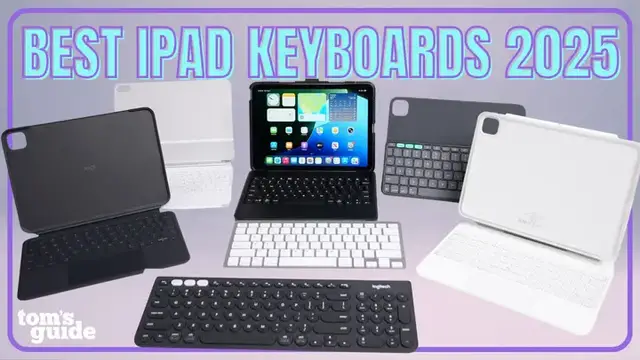
Trying to turn your iPad into a “laptop replacement”? Whether you want the premium feel of the Magic Keyboard, a more affordable alternative like the ESR Rebound 360, or the ultra-rugged Zagg Rugged Book, @paulantill tested the best iPad keyboards you can buy today to help you figure out which one actually delivers. If you’re upgrading to iPadOS 26 and ready to multitask like never before, here’s the best way to unlock the iPad’s full potential. This roundup breaks down the productivity experience, design, protection, and value each case offers. Perfect for iPadOS 26 multitaskers, writers, students, or remote workers.
Show More Show Less View Video Transcript
0:00
iPads these days pack some serious power, especially for Pro and Air models
0:04
But no matter how great the specs are, one thing is always holding iPads back from being a true
0:09
productivity machine. A solid keyboard. With iPadOS 26 bringing better multitasking and
0:15
productivity features, pairing your iPad with the right wireless keyboard unlocks its full
0:20
potential and makes it way closer to a laptop replacement. So here are the best keyboards
0:24
that I've tested that covers the bases. From premium to budget, some with integrated cases
0:29
a few standalone keyboards, and a couple with surprisingly useful features. And as always, I have everything featured in this video linked below if you want to check them out
0:38
We're kicking things off with the most recognized iPad keyboard you can buy today
0:42
the Apple Magic Keyboard. And yes, before you head to the comments
0:45
I know it's crazy expensive starting at $250 depending on which iPad model you need
0:51
but if you're more serious about turning your iPad, iPad Air, or iPad Pro into a true
0:56
macbook alternative with zero compromise this is the one to beat other keyboards offer solid
1:02
alternatives but apple's magic keyboard nails the buy once cry once mentality about investing in a
1:08
good quality keyboard you get a full function row aluminum palm rest and a large haptic trackpad
1:15
that feels super premium the typing experience is excellent the floating cantilever design makes it
1:19
easy to adjust your ipad angle and it connects instantly with a smart connector no pairing and
1:25
and no charging required. There are a few trade-offs, like offering no protection when
1:29
the keyboard is detached, not to mention this thing is heavy. For example, if you've got the
1:34
larger 13-inch iPad Pro with the Magic Keyboard, that combo almost weighs as much as a MacBook Air
1:40
which is just wild. At first glance, this might look like another Apple Magic Keyboard
1:45
but the ESR Rebound Magnetic Keyboard Case 360 adds a few clever twists at less than half the
1:51
price This iPad keyboard supports rotating your tablet and typing in both landscape and portrait mode which comes in handy depending on what you doing The keyboard connects over Bluetooth and has its own battery that charges via USB so you can use it wirelessly or even pair it with other devices You do lose that pass
2:10
charging and there's no function row at the top, which is a minor inconvenience that I really
2:14
haven't missed though. What I really like is that the keyboard and case are separate
2:18
so when you pop the iPad off, it's still well-protected. But notice that the standalone
2:22
case doesn't have its own kickstand, so you'll need the keyboard attached for adjustable angles
2:28
Otherwise, you get a magnetic strap to secure your Apple Pencil, some nice color options
2:33
and way more flexibility. Again, the keys and trackpad aren't as quality as Apple's
2:38
but for the price, it's still a strong pick. The Logitech Combo Touch goes for a different
2:43
approach, with an iPad keyboard that detaches from the case when you don't need it. You still
2:48
get a solid backlit keyboard, a much larger trackpad, and smart connector support, so no
2:54
charging or bluetooth pairing required, which is a big plus. This one's great if you still want that
3:00
classic iPad experience. You can flip the keyboard around to the back or pop it off completely
3:05
and the case itself has a built-in adjustable kickstand. The downside? The keyboard only works
3:11
when attached, so no wireless or multi-device connectivity here. While you get similar keys
3:15
to the Magic Keyboard, relying on a kickstand means that it's less stable on your lap or on
3:20
less than perfectly flat surfaces, where the keyboard can come loose a bit too easily
3:24
But for something lightweight, flexible, and easy to switch between typing and tablet mode
3:28
the Combo Touch is one of the better hybrid picks out there. And for just $106, it's a great deal
3:33
but you can also find it on sale for less. For the simplest, most budget-friendly iPad
3:38
keyboard pick, the Omotone Bluetooth keyboard is a solid little companion. It's usually priced at
3:43
at under $20 on Amazon and pairs easily with any iPad or Bluetooth device
3:48
You get a full function row and arguably the most ergonomic typing experience on this list
3:53
thanks to the raised back feet and full-size keys. I sure a lot of people including the over 20 people who reviewed this on Amazon like this because it looks really similar to the Bluetooth Magic Keyboard Apple Cells for Mac You could keep it simple and on with the silver
4:09
but there are a bunch of other fun colors that you can pick from. It's definitely not premium with its plastic build and body flex
4:16
especially with more aggressive typing, but it gets the job done on a budget
4:21
It's our most affordable option on the list, but still might be the best choice if you type for longer periods of time on the go
4:28
I have another more traditional wireless iPad keyboard pick if you're willing to spend a little
4:33
bit more, $80 to be exact, and it's the Logitech K780. This is the desktop style champion meant for
4:40
typing across all your devices. It's less about creating a laptop-like iPad experience and more
4:46
about simplifying your workflow across tablet, phone, and even computer. It's a full-size keyboard
4:51
with a cradle that keeps your iPad or phone upright in either orientation. And it connects
4:57
via Bluetooth to up to three devices. You just tap the easy switch button to jump between them
5:02
It's powered by two AAA batteries and it's rated for up to two years of use
5:06
Now, this is our heaviest and largest keyboard on the list, so it's meant to stay as part of
5:11
your desk setup. But if you regularly switch between your devices during the day and frequently
5:15
work from the same spot, the K780 helps streamline your workflow. Because it doesn't directly
5:21
attached to your iPad like some of our other picks here, you never have to replace it if you upgrade
5:26
your tablet or switch devices. The Logitech Folio Touch is a $160 iPad keyboard that takes a fully
5:33
wireless approach, connecting via Bluetooth to up to three devices and running on a coin cell battery
5:39
so no charging required. It's slim, lightweight, and magnetically attaches to the back of its case
5:44
when you're not using it. One limitation, though, is that the case offers no side protection for your
5:49
iPad and the magnetic keyboard attachment, while cool, can get knocked loose if it's
5:54
upside down. I've even had it fall off just when pulling it out of my bag, which is why
5:58
you see the P key missing While there no trackpad it might not be a deal breaker if you use your touchscreen a lot like me or you prefer using a wireless mouse Just don expect to use this comfortably
6:09
on your lap since the keyboard doesn't physically attach to the case, so it's pretty much desk-only
6:14
use. This is our most unique keyboard pick, but if you're like me and want a super portable
6:19
wireless iPad keyboard for touch-first workflows, this one covers the basics. So if you've made it this far and are thinking that none of these look protective enough for how you treat your iPad
6:31
this zag rugged book is built like a tank. With this magnetic hinge that opens like a laptop, it reminds me of those mini netbooks from 2008
6:39
Chunky, utilitarian, but incredibly reliable. It features a detachable case for your iPad that you can also use backwards for better stylus support
6:47
This iPad keyboard still connects via Bluetooth and charges via USB-C. It also supports seven colors of backlight, but it loses that built-in mouse
6:56
This also is drop resistant up to 6.6 feet, but this one offers even more protection
7:01
While it's one of the heaviest iPad keyboards you can buy, it'll help keep your tablet safe
7:05
no matter where you take it. All for $150 or less, depending on the iPad model
7:11
Speaking of iPad models, the most important thing when shopping for a lot of these iPad
7:15
keyboards with cases attached is to make sure you're getting the right one for your specific iPad
7:21
If you're not sure what kind of iPad you have, you can quickly check by opening Settings
7:25
General, About, then look for Model Name and Model Number. If you really want to unlock the full productivity of your iPad, there's a keyboard on this list that'll
7:34
make the experience smoother, faster, and way more enjoyable. Let me know which one you're
7:39
considering or if there are any others that I should try next time. If you found this video
7:43
helpful, consider subscribing. For more cool tech, you can find us everywhere at Tom's Guide
7:47
and you can follow me to see what other cool tech I'm testing. Until the next one, I'll catch you later
#Computers & Electronics
#Computers & Electronics
#Shopping