0:00
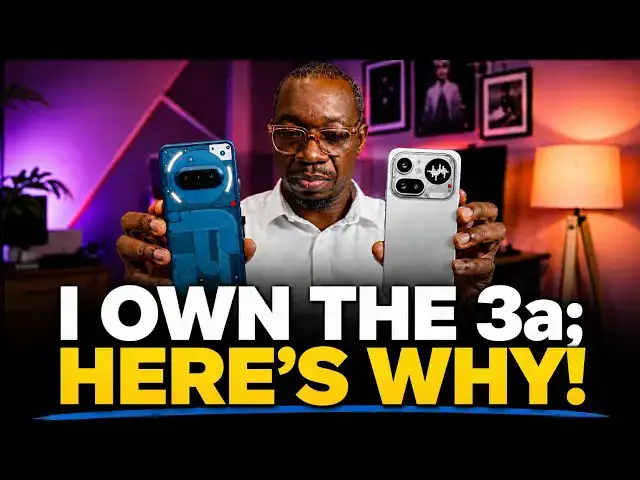
I have owned the Nothing Phone 3 A for 9
0:03
months now and it served me quite well.
0:08
The distinctive transparent back design
0:13
and the glyph lighting is quite
0:15
interesting and catchy.
0:17
I've been at a number of events and
0:20
places where someone sees the lights
0:22
come on when I get a notification and
0:25
they immediately walked up to me and
0:26
said, is that a Nothing Phone?
0:29
So, it's a very distinctive feature of
0:31
the Nothing Phone 3 A. Now that the
0:34
Nothing Phone 4 A Pro has been released
0:38
and is available not only in Europe but
0:40
also in North America, I wanted to do a
0:43
video to showcase to those who might be
0:46
considering or who might be wondering
0:49
whether the Nothing Phone is a good
1:02
The software is up to date and at least
1:05
95% of what obtains on Nothing Phone 4 A
1:09
Pro. So, my comparison will be mostly
1:13
software related. There are differences
1:15
in the camera setup, screen size and all
1:18
of that but the software is essentially
1:21
the same for the most part minus a few
1:24
differences. So, let's get started. The
1:27
hardware of the Nothing Phone 3 A
1:30
is something that I loved at first sight
1:32
but the software had to grow on me.
1:36
You see this black and white user
1:41
I didn't like it initially.
1:44
For all that I tried, I did not like it.
1:47
As a matter of fact, I preferred the
1:52
Android icons and this is what they look
1:54
like. This is what I have been used to
2:00
everything screaming for your attention.
2:03
But I have after I switched to the
2:07
which is black and white or gray scale,
2:11
depending on what you want to call it,
2:14
it was just a matter of weeks before I
2:16
fell in love with it. Now, I find those
2:19
colorful icons a little bit too gaudy
2:24
If I ever switch away from Nothing phone
2:27
to another brand, say Samsung or Google
2:31
it'll probably take me a bit of
2:35
to get used to the bright colorful
2:39
icons, the default colorful icons of
2:41
Android OS. I love how
2:47
The phone is there. It's not yelling for
2:50
my attention. It's not crying for me to
2:52
pick it up. And I still use my phone
3:00
helps keep the phone from becoming
3:04
Let's get to the Glyph interface. The
3:07
Nothing Phone 4A Pro does not mirror
3:11
transparent back design anymore, but it
3:14
has lights at the back that you can also
3:17
use for notifications. And one of the
3:19
beautiful things about that Glyph
3:21
interface is that I can set it to notify
3:26
me of messages and calls from different
3:31
in different [clears throat] ways, so
3:34
who is calling, at least for for those
3:36
that I customize their notifications, so
3:39
I can tell when it's my wife who has
3:41
sent me a message without picking up the
3:42
phone. This light flashes in a different
3:47
the way I have set it up for her. I can
3:49
tell when it's a particular business
3:52
partner who has sent a message or is
3:55
calling from how the light flashes.
3:58
It's quite extensive. In Nothing OS,
4:01
there is a whole section dedicated to
4:06
the Glyph interface. You can pick all
4:08
manner of ringtones, mute some, your
4:13
You can select how intense or bright the
4:18
light is. I have set it to the lowest
4:21
brightness. And then, flip to Glyph
4:25
allows you to enable a feature where
4:28
once I flip my phone face down on a
4:31
table [clears throat] or on a desk, the
4:32
Glyph interface kicks in.
4:34
And without picking up the phone,
4:37
when a notification comes in,
4:39
the light flashes. Like I said,
4:41
depending on how you customize it, you
4:43
can tell who is sending you a message or
4:47
who is calling. And that's a a nifty
4:50
tool. You don't have to pick your phone
4:53
for messages and calls that are not
4:58
You can compose your own ringtone sound
5:01
pack. This reminds me of the years of
5:03
Nokia when we used to compose
5:10
So, you can if you have the time,
5:13
you can do this. If you do not have the
5:15
time, you can go online and search for
5:18
people who have created ringtones from
5:21
this and then download.
5:24
So, I have a library here. Every single
5:26
thing here, I downloaded from somewhere
5:29
to use. Okay, so you can import from
5:32
If you have downloaded any custom Glyph
5:35
ringtones to your phone, you just pick
5:39
>> highly customizable and it's lovely.
5:42
You can also use the Glyph interface as
5:44
a volume indicator. You can use it to
5:47
follow progress on maps, calendar,
5:52
I haven't found it useful, but you just
5:57
You can also turn this on as music
5:59
visualization, so that as music is
6:01
playing, let's see if I can demonstrate
6:10
it's cool. I don't have much use for it.
6:13
You just might enjoy it.
6:15
And then, you can also set your bedtime
6:20
The Glyph interface is quite
6:22
interesting. You can turn it on quickly
6:25
by tapping this in the drop-down menu.
6:29
You can turn it off anytime it feels
6:32
like an inconvenience. There's a quick
6:36
Let's look at Essential Space. Below the
6:39
power button here, there is another
6:40
button. It's called the Essential Key.
6:44
When you tap on it three times, it opens
6:47
what is called Essential Space.
6:50
All the events and tasks you have
6:52
captured will appear here in your
6:56
I haven't found it useful, either.
6:59
I've captured a few things, but I just
7:02
use my gallery and calendar for all of
7:05
those. You might find it useful. Files
7:09
here can include audio recordings,
7:11
screenshots, notes, etc. etc. I haven't
7:15
used it much. Essential recording,
7:20
if you tap the button twice, it takes a
7:22
screenshot of what's on your screen, and
7:24
you can add a voice note or
7:30
And then, you save. And it's saved to
7:33
your Essential Space. If it's something
7:35
you will find useful, I'm not sure it
7:37
has gained traction a lot among Nothing
7:40
phone users, but it's an attempt and
7:44
nothing says it's AI powered blah blah
7:49
Nothing says that ChatGPT is integrated
7:56
You can use a ChatGPT widget.
7:59
It offers a similar switch to access
8:01
ChatGPT aligned to send a voice note. I
8:04
I didn't particularly like the widgets.
8:07
But I know there are others who
8:09
appreciate it. ChatGPT interaction. When
8:13
you capture a screenshot, you can edit
8:15
that screenshot directly using ChatGPT.
8:20
Let me give you an example. So when you
8:22
take a screenshot like this
8:25
Now you can tap on the ChatGPT icon
8:29
and it immediately takes you into
8:32
ChatGPT and then you can ask what you
8:34
want, ask a question, ask it to edit the
8:37
image, change the size, blah blah blah
8:40
blah remove the background, clean up the
8:44
Whatever you want to do with the image.
8:46
This is the AI chatbot generation and
8:49
you've been using ChatGPT and other AI
8:51
chatbots. Just use it as normal.
8:54
So you don't first have to manually go
8:57
open ChatGPT to do all that. So it saves
8:59
you one or two seconds.
9:03
One of the experimental features in
9:05
Nothing OS you can change the font
9:08
titles, the font of titles in the phone
9:12
to dot matrix. I have not liked it. This
9:20
>> So I have just left it turned off. I
9:24
I mentioned about glyph progress
9:26
earlier. It's an integration of the
9:28
glyph interface with third party apps
9:30
like Google Maps, ride-hailing apps and
9:32
all that to follow your progress.
9:35
There's a mode. You have a number of
9:37
settings here that you can play with for
9:40
when you game. I don't game on my
9:42
phones. I hardly play any games on my
9:44
phones, but if you play games, you
9:46
should take note of that. There's RAM
9:49
If you want to boost the RAM of your
9:51
phone. Again, RAM booster is not as
9:54
potent as hardware RAM, but if you do
9:58
need it, the option is here to improve
10:01
performance of your phone.
10:03
Circle to search is here, and I have it
10:05
enabled as well. Nothing Technologies is
10:08
committed to providing timely software
10:11
updates. The Nothing Phone 3A launched
10:13
with Android 15 has already received
10:16
Android 16. It's going to receive 17 and
10:19
18. Nothing says that this phone is
10:22
going to get three major Android
10:24
updates. So, I'm I'm expecting when
10:26
Android 17 rolls out, it's going to get
10:28
it quickly. When Android 18 rolls out,
10:30
it's going to get it quickly.
10:32
>> The Nothing Phone 4A Pro was launched
10:34
with Android 16 on it. Nothing has
10:37
promised just 3 years of updates for
10:39
that model as well. So, the experience
10:42
is going to be similar to this.
10:44
Software side, what are the key
10:47
differences between the 3A and the 4A
10:52
As you can see here, the 3A uses a
10:55
Snapdragon 7S Gen 3 chipset, and there
10:59
is 12 GB of RAM and 256 GB of storage
11:03
The 4A Pro uses Snapdragon 7 Gen 4
11:08
chipset. It's a fairly significant
11:11
upgrade to the 7S Gen 3.
11:15
which is where the biggest difference
11:18
between the 4A Pro and the 3A come in.
11:22
The 3A has a telephoto camera at the
11:26
back. The 4A Pro has a periscope
11:29
telephoto camera at the back. Periscope
11:31
telephoto cameras are an advanced type
11:35
of telephoto cameras and you can expect
11:38
improved zoom levels and details from
11:42
that camera. Personally, I consider the
11:44
4a Pro a significant upgrade to the 3a.
11:48
And then, that device comes with AI
11:51
Eraser. If you've been wanting to you
11:54
use AI Eraser on your phone, this is
11:56
great. You take a picture, there's
11:58
somebody in the background somewhere
11:59
that's an object you don't want there.
12:01
In editing, you circle that object, the
12:04
AI Eraser tool removes it and leaves you
12:06
with a clean image. It's fantastic. It
12:09
hasn't arrived on the 3a yet, but it's
12:12
on the 4a Pro. That's another reason why
12:14
you should get the 4a Pro.
12:19
The 3a has a 5,000 mA power battery with
12:23
50 W wired charging. The 4a Pro has a
12:30
It's a minor difference. It has the same
12:32
50 W wired charging and then it has
12:35
reverse wired charging as well, so you
12:37
can use it as a power bank to charge
12:39
AirPods, some other phone, some other
12:42
device. The Nothing Phone 4a Pro is
12:44
officially available in the US and you
12:47
can pick one directly from Nothing's
12:49
website or from carrier or from Amazon.
12:54
What does the 12 GB RAM and 256 storage
12:59
version cost? About $540
13:03
at the time that I am making this video.
13:07
I have a direct link in the description
13:10
that you can use to make your purchase
13:13
and get one of these. That price is
13:16
discounted from the launch price of
13:21
So, if you're looking for a good deal on
13:26
a powerful, competent mid-range
13:29
smartphone with excellent software,
13:32
great camera, a great build and design,
13:36
it's difficult to go wrong.
13:38
Thanks for watching this video. Do like
13:41
it. You follow my channel. Turn on your
13:44
notifications. I look forward to seeing