0:00
Hello friends welcome to Solid Works
0:02
tutorial and in this tutorial we will
0:04
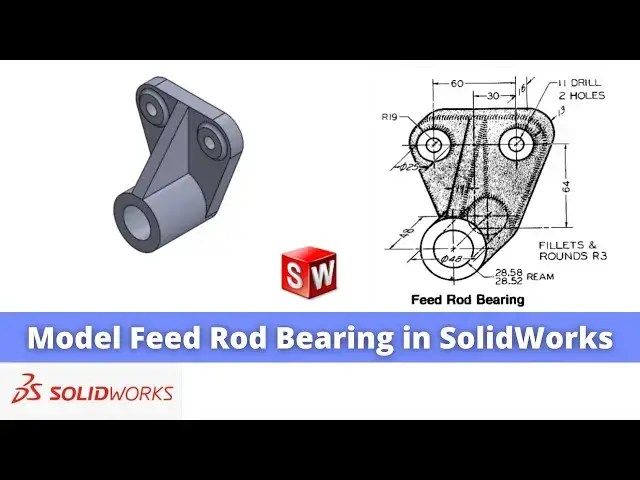
model this uh field rod bearing from
0:08
scratch and I will show you from the
0:11
scratch step by step how you can model
0:14
part so if we see our drawing so we can
0:18
see that our major feature will come on
0:20
the front plane so we will select the
0:22
front plane and click on the sketch and
0:46
fillet so click on the fillet so these
0:51
r19 so we will give the 19 mm select
0:54
these two edges click on
1:01
okay and here is a diameter 48
1:06
so here it will be 24 fillet so give the
1:12
24 select this and this click on
1:21
okay and click on the
1:25
vertical and uh from Center to Center is
1:30
so we will select a smart
1:33
Dimension and uh Q it
1:46
30 and from this Center to this Center
1:48
is a 64 so we will give it
2:01
we will see what is the UN constraint if
2:03
you select this so we can see that this
2:08
distance so what we will do we will
2:12
select this point and origin point and
2:21
now we will come out of the
2:24
sketch and we can see that here
2:27
thickness is given the 13 mm so we will
2:30
select the sketch click on the
2:32
extrude and give the 13 mm click on
2:42
now we will create this boss so we will
2:45
select the phas and click on the
2:49
sketch we will make this phase
2:56
uh snip the pencil icon to the edges
2:59
just so we can get a center marks and we
3:07
circle and we will select the age and
3:13
equal now we will come out of it and
3:16
total Extrusion is of 48 so we will
3:19
select the sketch click on
3:22
extrude and give it 48 click on
3:28
now the Bard size is a
3:31
28.58 so we will select the face
3:37
sketch we will make this phase
3:41
normal and we will snip to the diameter
3:44
we will get the center now we will
3:50
and give it a diameter of 28.58
4:04
Cut and from here say through all say
4:11
now we will uh ke this rib so for this
4:17
rib we will select the phas and click on
4:20
the sketch and we will make this phase
4:23
normal so this rib is of the 11 mm
4:27
thickness so we will uh click on on the
4:29
convert entities and convert this uh
4:45
uh we will delete this line and uh make
4:56
coincidence select the three-point Arc
5:03
now select the smart Dimension and uh
5:17
uh select this line and point and give
5:26
2 now we will come out of the sketch
5:30
select the sketch click on
5:36
reverse click on uh up to
5:46
now we will uh create a cut so select
5:49
the space and uh click on the
5:56
now we will select the line
6:01
join these two points to this and
6:08
this we will select the sketch and click
6:12
cut and from here we will select up to
6:15
surface and select this face and click
6:22
okay now we will create this two boss so
6:26
here it is given 60 and here is a 13
6:30
which means that uh this pad of the
6:33
3mm so we will select the face and uh
6:38
sketch make this phe normal click on
6:42
convert entities convert uh these two
7:01
here it is of the diameter 25 so we will
7:16
25 and now select this and this and uh
7:25
equal and uh select the sketch click on
7:31
and uh give the pad of
7:34
uh 3 mm click on okay now here is of the
7:40
drill of 11 mm so we will select the
7:44
phas and uh click on the
7:46
sketch make this phase
7:52
normal and instead of a whole feature uh
7:55
we will make a hole through the sketch
8:00
because it is a very simple drill hole
8:05
mm you can use the whole feature as per
8:12
wish we can also use the equal
8:14
constraint no issue now we will come out
8:19
it select the sketch click on extrud Cut
8:23
and from here say through
8:30
now here is a common note of a fillet
8:36
R3 so we will select the
8:39
fillet and uh we will select this
8:43
one and this one and give the fillet of
8:52
okay you can add the fillet uh to the
8:55
other edges like this rib here so so you
9:00
can see that we have successfully
9:02
converted this uh field rod bearing in
9:06
solid works I hope you have enjoyed this
9:08
tutorial and this tutorial is designed
9:10
for the beginner user of a solid
9:12
works if you like this tutorial then
9:14
please like subscribe and share my
9:16
channel thank you for watching and thank
9:18
you for your valuable time