0:01
Hi guys. Now, have you ever wanted to
0:03
test the keys on your keyboard to find
0:06
out if indeed they are working properly
0:08
before you buy your keyboard? So, in
0:10
this video, I'm just going to show you
0:12
how you can test all the keys on your
0:15
keyboard using a free online tool. And
0:18
this will help you make sure that all
0:20
the keys are working or are functioning
0:23
normally. So, if you want to test your
0:26
computer keyboard or your laptop
0:27
keyboard, then this is the best tutorial
0:30
for you. If you'll find this video
0:32
helpful, I'll kindly request you support
0:34
me by liking the video and also by
0:36
subscribing to my channel. All right,
0:38
let's get into it. Now, to get started,
0:40
all you need to do is to go to your
0:41
browser with your computer or laptop
0:43
connected to the internet and then just
0:46
search Keyest like that and then you'll
0:49
learn to this website. Go ahead and
0:51
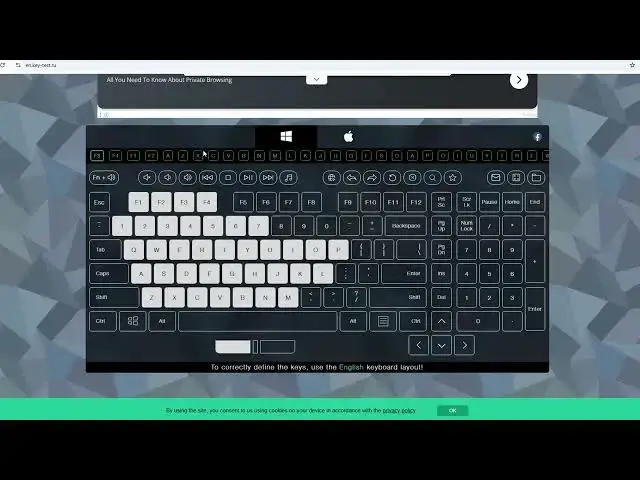
click on it. Now from here you'll have
0:54
here a presentation of your keyboard. It
0:57
should be looking more or less like
0:59
this. But you can see it has all the
1:02
keys just the same way they are on your
1:05
keyboard. Now from here you can go ahead
1:07
and tap on your keys on your keyboard
1:09
and you can see each and every key you
1:11
tap it will be written here and then
1:15
you'll see a sign that it has been
1:17
pressed. For instance, I'm yet to press
1:19
number six. If I press number six,
1:20
you'll see it change the color and then
1:22
indicate that it has indeed typed or it
1:25
is functioning well. So proceed and just
1:28
go ahead and type all the keys on your
1:31
keyboard to make sure that they are just
1:33
working fine. You can even test the
1:35
function keys and you can see here mine
1:38
are running well. So every key that you
1:41
tap if it is functioning you'll see it
1:44
here. So that's how you can test your
1:47
keyboard just using this keyboard tester
1:51
or key tester on your keyboard. So
1:53
that's how you do it. I've just left the
1:56
link to this website down below so that
1:59
you can go ahead and try it out to test
2:02
all the keys on your keyboard to see if
2:05
they are functioning. So if you have any
2:07
other question, kindly let me know in
2:08
the comment section. Otherwise, if this
2:10
video is helpful, please like it and
2:12
also subscribe to my channel. Thanks for
2:14
watching and let's meet in the next