0:00
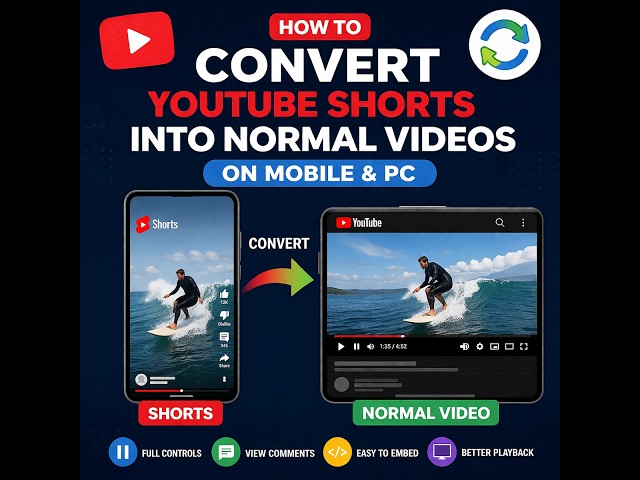
You ever find a really great YouTube
0:02
short, but you just wish you could watch
0:03
it like a normal video? Well, today
0:05
we're going to talk about a super
0:07
simple, kind of brilliant trick to break
0:09
out of that restrictive shorts player
0:11
and unlock the full YouTube experience
0:13
for any short you find. Oh, I know.
0:16
We've all been there. You're trapped in
0:17
that endless vertical scroll and all you
0:19
want to do is rewind to catch something
0:21
you missed or maybe read the full
0:23
description, but the interface just gets
0:25
in your way. It's a frustration we all
0:27
share. But trust me, the fix is
0:29
surprisingly easy. So, what's the deal
0:31
here? Well, the problem is really in the
0:33
design. YouTube built the Shorts player
0:36
for super quick, passive viewing, just
0:38
an endless stream of content. But that
0:40
means you lose all the good stuff. You
0:42
can't easily scrub through the timeline.
0:44
You can barely see the description or
0:45
the comments. And don't even get me
0:47
started on trying to share or embed the
0:48
link. It's just a pain. But what if I
0:51
told you the solution is sitting right
0:53
there in the URL and that it takes, I
0:55
don't know, less than 5 seconds to do.
0:58
It sounds too good to be true, but it's
0:59
not. Let me show you exactly how it
1:01
works. Okay, here it is. This is the
1:04
entire magic trick right here on the
1:06
screen. Take a look. A shorts link
1:08
always has slashshorts slash in it right
1:11
before the video's ID. But a regular
1:13
video link, it uses slashwatchv equals.
1:18
The secret is just swapping one for the
1:20
other. That's it. That's the whole
1:21
thing. All right, let's walk through
1:24
this so you can do it yourself. And the
1:26
best part is it's the exact same process
1:28
whether you're on your phone, your
1:30
tablet, or your computer. It works
1:32
everywhere. And here we go. Broken down
1:35
into four easy steps. One, just find
1:37
that URL in your address bar. Two,
1:40
delete that little slshorts slash part.
1:43
three, in its place, just type /watch
1:46
question mark v equals. And four, hit
1:49
enter. That's it. The page reloads and
1:52
you've got the exact same video, but now
1:54
in the proper fullfeatured YouTube
1:56
player. So, you might be asking, why
1:58
even bother with this tiny little edit?
2:00
Well, it's because you're not just
2:02
changing how it looks on the screen,
2:04
you're fundamentally changing what you
2:05
can do. Let's look at all the awesome
2:07
stuff you get back. All of a sudden,
2:10
bam, you've got the progress bar back.
2:12
So you can click and drag to any point.
2:14
You can pause, rewind. You can even
2:16
change the playback speed. The full
2:18
description is right there. The comments
2:20
are back in that familiar readable
2:22
format. And it works perfectly on a
2:24
desktop with real full screen controls.
2:27
And maybe the best thing about this, it
2:29
isn't some weird hack that only works in
2:31
one specific browser. Nope. This works
2:34
everywhere. iPhone, Android, Windows,
2:36
Mac. If your device has a web browser,
2:38
you can do this trick. Simple as that.
2:41
Now, for all you power users out there,
2:43
the folks who are sharing and embedding
2:45
links all the time, doing this manually
2:47
over and over again could get a little
2:49
old. So, let's talk about a couple of
2:50
ways to automate the whole thing. Pro
2:53
tip number one is the easiest. There are
2:55
a bunch of simple websites out there
2:57
that are just instant converters. You
2:59
paste in the shorts link, you click a
3:01
button, and it just spits out the
3:02
correct standard video link for you. No
3:05
typing required. Okay, this next one is
3:07
a total gamecher for anyone who runs a
3:10
WordPress website. You can actually add
3:12
a tiny piece of code to your site's
3:14
functions.php file, and from that moment
3:16
on, any shorts link you embed will
3:18
automatically transform into a regular
3:20
video player. It's a real set it and
3:22
forget it solution. All right, let's
3:24
answer a couple of quick questions that
3:26
are probably on your mind. First off,
3:28
you might be worried that changing the
3:30
player somehow messes with the video
3:31
quality, right? And the answer is a big
3:34
clear no. Not at all. You're not
3:37
changing the video file itself. All
3:40
you're doing is telling YouTube, "Hey,
3:41
load this exact same file, but use the
3:44
good player, not the shorts player. The
3:46
quality is 100% identical." And for all
3:49
my bloggers and website owners
3:50
listening, here's another big one. Does
3:53
this actually fix all those weird
3:54
embedding problems that shorts cause?
3:57
Yes, absolutely yes. In fact, this is
4:00
one of the biggest reasons to do it.
4:02
When you convert that URL, your
4:04
website's embedding system knows exactly
4:06
what to do. It sees it as a standard
4:08
video, which means no more of those
4:09
weirdly sized boxes or broken layouts.
4:11
It just works. So, look, the real
4:14
takeaway here is this. Shorts are
4:16
totally fine for what they were made
4:18
for, quick, bite-size entertainment. But
4:20
this simple little trick gives you the
4:22
power to choose. It lets you decide when
4:24
you want the quick experience and when
4:26
you want the fullfeatured controllable
4:28
one. At the end of the day, this is all
4:30
about taking back control. It's just a
4:33
tiny edit to a web address, but it
4:35
transforms a passive viewing experience
4:37
into an active one. It's the perfect
4:39
example of how a tiny bit of knowledge
4:41
can put you right back in the driver's
4:42
seat. And that really makes you think,
4:45
doesn't it? This solution was right
4:47
there, hiding in plain sight in the URL
4:49
the entire time. It kind of leaves you
4:52
wondering what other incredibly simple
4:54
fixes, what other little lifeimproving
4:56
hacks are hiding just below the surface
4:58
of the tech we use every