Up next in 10

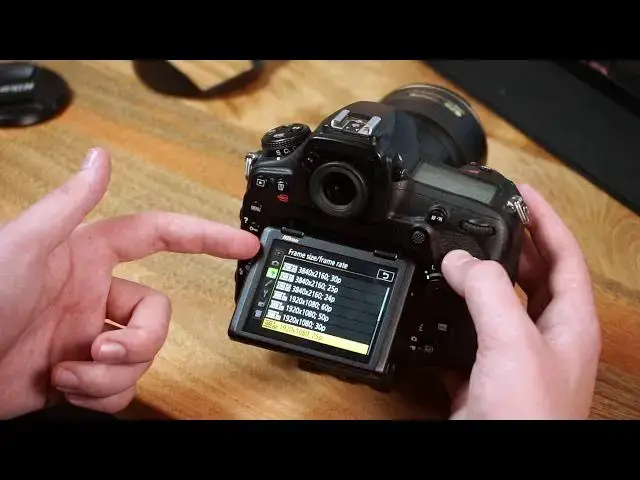
Nikon D850 Setup Guide (How to: Back Button Focus, Frame Rate, Image Quality, and more)
Feb 4, 2021
When I first got my Nikon D850, I struggled to get some of the similar settings and functions that I had on the Nikon D750. The two biggest were back button focus and changing the focus selector points.
I made this setup guide as a way to cover some of the settings I changed when I first got used to my new D850. Hopefully this video tutorial will save you some time with your new camera! :)
Here are some topics covered in this video about the Nikon D850:
- Back Button Focus
- Change Focus Selector Points
- Change Image Quality
- Change Video Quality
- Adjust AF Modes and work in Live Mode
Follow Mike Moloney on Instagram: https://www.instagram.com/mjmolo/
Read more photography tips on FilterGrade: https://filtergrade.com/category/photography/
-------
Shop!
Show More Show Less View Video Transcript
0:00
hey what's going on youtube it's mike
0:01
here from filtergrade
0:03
and in this video i want to talk about
0:05
some of the stuff i did
0:06
when i got the nikon d850 i got it about
0:09
a year back
0:10
after having the d750 for a couple of
0:12
years so i was already used to
0:14
you know the nikon full frame settings
0:16
and feel but
0:18
when i first got the d850 it wasn't
0:20
really easy
0:21
to change some of the things i was used
0:23
to like back button focus
0:25
and auto focus like the selector points
0:28
specifically
0:29
so i wanted to make this video as sort
0:31
of like a setup guide
0:32
for anyone who got the d850 and wanted
0:35
some tips on how to get going without
0:37
you know
0:38
stressing over looking up each
0:40
individual setting so i'm just gonna go
0:41
over like five to seven things that i
0:43
changed when i first got the camera
0:45
that helped me be more efficient and
0:48
just get into shooting faster without
0:49
having to adjust it
0:50
every time i went out for a new project
0:53
so the first setting i really wanted to
0:54
change and fix was back button focus
0:56
because i couldn't easily figure that
0:58
out
0:58
on the d850 so i'm going to show you how
1:01
i figured that out
1:02
if you go to the playback menu and then
1:04
select the fourth one down
1:06
custom setting menu then choose
1:08
autofocus
1:10
and then eight down is af activation
1:13
click this and then change af on
1:16
to just af on only and make sure that's
1:18
enabled
1:19
now as long as that's enabled you'll see
1:21
it on this screen it says off for some
1:23
reason on the other screen
1:25
so once you have auto focus set up then
1:27
cut into
1:28
controls and look for
1:32
number one custom control assignment and
1:35
then scroll down to af on
1:37
and you can change which button it is if
1:40
you want the back button
1:41
just af on that's the one i use just
1:43
select the first one make sure that's
1:45
enabled
1:45
you can also have it as the af area mode
1:48
button
1:49
or any other button but just select that
1:52
and that will ensure that auto focus is
1:53
on for back button focus so you can
1:55
quickly do that
1:57
the next thing i'm going to show you how
1:58
to do is quickly change your settings to
2:00
raw or jpeg
2:02
or shoot both if you need backups for
2:04
some reason
2:05
so if you go into the photo shooting
2:07
menu
2:09
and then scroll down into image quality
2:12
here's where you have all the different
2:14
options if you want to shoot both
2:16
the first few are raw and jpeg and you
2:19
have to make sure that you have enough
2:21
space for it or you can also have
2:23
multiple sd cards with the d850 or if
2:26
you just want to shoot jpeg
2:27
you can select one of those you can even
2:30
also shoot tips
2:35
all right now i'm going to show you a
2:36
few more things to do with autofocus
2:38
that help me uh especially with
2:40
selection of like points
2:42
this is you know obviously dependent on
2:44
what you need or what you want to do
2:46
so if you go here you can choose between
2:48
15 and 55
2:50
but then the way to actually change them
2:53
when you're looking through the
2:54
viewfinder
2:55
is through a button on the front okay so
2:58
you'll see the af
2:59
and the m button here if you want to
3:01
ever change it to manual focus you just
3:03
swipe it down
3:04
and then you just adjust your lens make
3:06
sure it's an af
3:07
and then hold this button down
3:10
while you're holding the af button down
3:12
on the left side make sure you scroll
3:13
the front scroll wheel
3:14
and look through the viewfinder and
3:16
you'll be able to see
3:18
the different settings and the different
3:20
amounts
3:22
after shooting a bit at fashion week i
3:24
wanted to learn a little more about
3:25
video
3:26
so i had to learn a few settings to
3:28
change the frame rate or the quality of
3:30
the videos based on my sd card
3:33
so if you go in the third tab the movie
3:34
shooting menu and then select frame size
3:37
and frame rate
3:38
this is where you can scroll through and
3:40
shoot in any different size
3:42
if you really need high quality you can
3:44
shoot as big as 38 3840 by 2160
3:47
but for my videos i just shoot 1920 by
3:49
1080p
3:51
and 24 frames the next thing i changed
3:54
was the movie quality setting
3:55
you don't really need it in high quality
3:57
unless you are going for
3:58
you know the absolute top so normal is
4:01
fine and then last but not least
4:03
choose between mov or mp4 mov is usually
4:06
easier for me to work with so i just
4:08
choose that
4:13
something i needed to learn once i was
4:15
doing more interviews
4:16
and live videos were the auto focus
4:20
settings
4:20
on the live mode so the easy way to
4:22
change this is
4:23
use the left af button again and press
4:25
it down
4:27
and then you'll notice the aff light up
4:30
and i'm going to change it back to afs
4:32
in single and then you use the front
4:34
scroll wheel and go through and that's
4:36
how you can change the different af area
4:38
modes
4:39
for live view so they're all different
4:41
settings you can also you can get wide
4:43
area
4:44
you can get face priority
4:47
normal area pinpoint area
4:51
and then a few others like subject
4:53
tracking
4:54
and so all these things are good for
4:56
different things whether you want to
4:57
focus on portraits
4:58
handheld shots or something specific in
5:01
your frame
5:02
so those are just good to know it's just
5:03
the f button on the left and then scroll
5:05
with the front scroll wheel
5:07
and you can easily change that and if
5:09
you want to change the af mode you
5:11
scroll with the back scroll wheel
5:12
between aff and s alright so thanks for
5:16
checking out these tips
5:18
if you have any other questions about
5:19
the nikon d850 leave a comment below and
5:21
i'd be happy to make some more specific
5:23
tutorials
5:24
otherwise i appreciate you watching the
5:26
channel go ahead and subscribe and leave
5:28
a like if you'd like to
5:29
and we'll see you next time
5:42
[Music]
5:48
[Music]
6:23
you