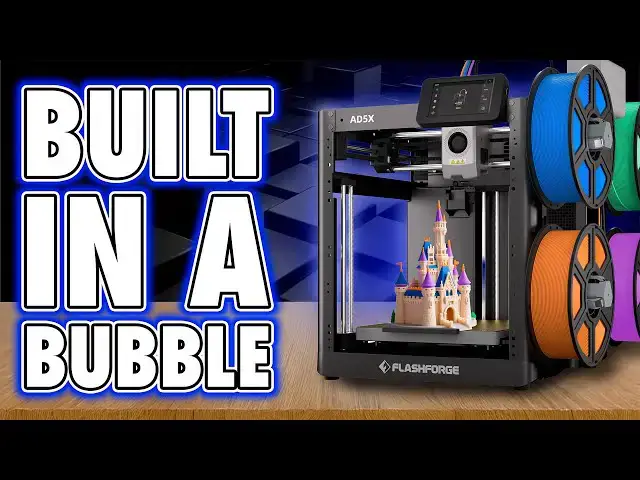
0:00
Last time I reviewed a Flash Forge
0:01
machine, it seemed like it was designed
0:03
by someone who'd never actually lifted
0:05
their head to look at the modern world
0:07
of 3D printing. It technically
0:09
functioned, but only in the same way
0:10
your nan's VHS still technically
0:13
functions, whilst everyone else is
0:15
watching DVDs or streaming content. It's
0:18
one of those experiences where you find
0:19
yourself halfway through a print before
0:21
wondering whether the machine was built
0:23
before or after they discovered the
0:24
concept of firmware updates. Everything
0:27
about it felt like it was made in a
0:28
vacuum and not the good kind. As if the
0:31
development team had been kept
0:32
underground since 2014 and were just now
0:35
learning that other printers exist. Back
0:37
then, they wouldn't have recognized a
0:38
modern workflow if it dragged itself
0:40
across their PEI sheet. So, when Flash
0:43
Forge sent me the AD5X, I genuinely
0:45
thought, "Here we go again. Let's see
0:47
what fresh nonsense awaits." And
0:49
honestly, I've been thrown off because
0:52
this machine actually works well. as in
0:55
I've had it for a few weeks now and it
0:56
hasn't once made me want to throw it
0:58
through a wall and that in itself is
1:01
more surprising than most of the things
1:03
I've printed this year. Hi, I'm Ross and
1:05
this is Far Hammer Videos. Now, this is
1:07
a brief one. I'll put about as much
1:09
effort in as Flash Forge did. Talking
1:11
about setup, this thing arrives mostly
1:13
preassembled, but really that's because
1:15
it's just a frame. Unclamp the LCD and
1:18
slide it into its mounting socket.
1:20
Attach the filament feeder arm to the
1:22
right hand side and then push and twist
1:24
the feeder itself to lock it into place.
1:27
Attach the four spring-loaded filament
1:28
winders on the same side, all of which
1:30
are numbered. Connect up the four PTFE
1:32
tubes and the hub in the top of the
1:34
hotend and then plug in the power cable.
1:36
This is in the back. Switch it on, let
1:38
it do its own self checks, and
1:40
setupwise, there you are. You're done.
1:43
It's basic. It's solid. Now, in terms of
1:45
specs, this is a 220x 220x 220 mm build
1:50
volume, so it's your standard cube, but
1:52
it is on the smaller side of modern Core
1:54
XY printers. The bed is a spring steel
1:57
PEI sheet that just works, something I
1:59
actually struggled with on my last Flash
2:01
Forge machine that still needed to use
2:03
glue. It slides into place easily, and
2:05
I'm a big fan of the plastic grip on the
2:07
front, as small of an enhancement that
2:09
that actually is. All the leveling is
2:11
automatic, which again, solid modern
2:14
feature. The hot end's a bit odd,
2:16
though. The nozzle is held in with a
2:18
magnetic bracket, which is great for
2:19
quick swap, and you simply need to
2:21
unlatch it and pull it away. But it was
2:24
also interesting to see that the heat
2:26
sink actually unfolds. Now, I haven't
2:29
actually experienced an extruder jam on
2:31
this, and I've done a lot of filament
2:33
swaps, but watching the online videos,
2:35
it doesn't look like it's the easiest
2:37
job to access the extruder gear
2:39
mechanism if you do face an issue in
2:41
there. Mounting filament is a case of
2:43
pressing it onto the pegs on the right
2:45
hand side and partially feeding it into
2:47
the automated feeder. From here, that
2:49
will then grab it and take care of
2:51
everything else, prepping it, ready to
2:53
be fed on demand. Just be aware though
2:55
that only spools with an inner diameter
2:57
of 52 to 58 mm will fit on these prongs.
3:01
Now, thankfully, more brands seem to be
3:03
adopting this as a standard because of
3:05
all the filament I have lying around, I
3:08
wasn't actually able to find one that
3:10
didn't fit. Now, overall, I like
3:12
automated filament feeders, but I would
3:14
prefer at least the option of something
3:16
more enclosed, which it doesn't seem
3:18
like Flash Forge have. Now, then let's
3:21
talk connectivity. All of the IO, all of
3:23
the main elements are sensibly on the
3:25
back, including the power and rocker
3:28
switch. And I assume, like many print
3:30
farms, I'm happy to see this actually
3:32
has an Ethernet socket. And you also
3:34
have Wi-Fi as an option, too, to connect
3:36
to your local network. Now, let's
3:39
address the control screen. It's fine.
3:41
It's functional. It's got a USB port on
3:44
the side, but it's resistive, not
3:46
capacitive, which means instead of
3:47
tapping, you're pressing firmly. And
3:50
even then, sometimes it responds,
3:52
sometimes it doesn't. Sometimes it jumps
3:54
back to the home screen just to remind
3:56
you who's in charge. Overall, I did find
3:58
it a little frustrating when I've got
4:00
other cheaper machines that are
4:03
capacitive and much easier to press.
4:05
Now, menu layout is simple. It's easy to
4:07
find what you're after cuz there's not
4:09
much here. It's nothing flashy. It's
4:12
clearly using the same skin as every
4:13
other modern printer. It works. There's
4:16
just no innovation or advancement here
4:18
either. And when loading filament, you
4:20
can select both the color and material
4:22
type in each slot in order to sync that
4:24
back to the slicer. But speaking of
4:26
legacy, there's also no camera, not
4:29
installed as standard. Anyway, this is
4:31
an extra and you'll need to buy it if
4:33
you want remote monitoring. Yep, that
4:35
makes sense for those of you who want to
4:37
avoid the extra cost of a machine if you
4:39
won't use this function. I'm just not
4:41
sure the price of this machine reflects
4:44
that of a more budget friendly device in
4:47
the first place, at least at the time of
4:49
recording this video. Anyway, please
4:51
don't have a go at me months from now
4:52
when you find this in a sale. But here's
4:54
the funny thing. Flash Forge also sells
4:58
an enclosure kit, which is great, right?
5:00
Well, no, because that kit only includes
5:03
the clear acrylic panels and nothing
5:06
else. You actually have to print all the
5:08
frame and mounting brackets yourself.
5:10
So, the enclosure kit actually wants you
5:12
to print your own parts, which again,
5:14
it's good for keeping the cost down, but
5:16
ideally you'd want to print this in
5:18
something like ABS, which in case you're
5:20
not familiar with Irony, is one of the
5:22
main filaments that actually benefits
5:24
from an enclosure in the first place.
5:26
So, in order to print this reliably, you
5:29
probably actually already want a printer
5:30
with an enclosure. I'd expect you'd want
5:33
to print an enclosure in a more
5:34
heatresistant material like ABS, but in
5:37
order to print ABS, well, you really
5:40
need a printer with an enclosure. Sure,
5:42
yeah, you could print it in PET G or
5:44
PLA, but the result will be a machine
5:46
that does little more than prevent the
5:48
average breeze from affecting your ABS
5:50
print rather than actually having a
5:52
chamber which controls the environment
5:54
properly to print materials like ABS.
5:57
Yeah, are you with me? It's a bit of a
5:58
catch 22. It's genuinely one of the more
6:01
eastern printer brand things I've ever
6:04
seen. It's perfectly circular logic. But
6:07
honestly, in day-to-day use, this is
6:10
where the AD5X surprised me because it's
6:13
been decent. Reassuringly decent in my
6:16
experience. Once a print starts, it just
6:18
runs. No drama, no skip steps, no sudden
6:21
mystery errors at 92%. Print quality is
6:24
solid. PLA prints come out smooth.
6:26
Bridging is clean. Supports snap off
6:28
easily. Overhangs are handled nicely.
6:30
Bottom layers are crisp. My first layer
6:33
printing test was solid with only some
6:35
slight bubbling in one corner. My first
6:38
actual test print on this, which was
6:40
their logo as a test print built onto
6:42
the printer, had one of the smoothest
6:44
top layers I've ever seen. So, I dove
6:47
straight in and printed a multiolor
6:49
Borderlands mask. And I've got to be
6:51
honest, it looks incredible. It's really
6:53
good quality. But the reason I wanted to
6:55
print this specifically is as a perfect
6:58
example of why I've been avoiding
7:00
multiolor prints on filament changer
7:02
machines. I know I roughly talk about it
7:04
but then avoid doing it because of the
7:07
waste here for this one mask. I've got
7:10
an entire tub. Then there's the purge
7:12
time. This whole print took almost two
7:15
days now. Yeah, you can reduce this
7:17
waste volume and time by reducing the
7:19
amount of material purging it does in
7:21
the slicer or by purging into infill
7:23
too, but because this was a mostly white
7:26
print, I wanted to avoid any chance of
7:28
crosscontamination. And this bin is the
7:30
result. It's not a criticism of Flash
7:33
Forge. Don't hold it against this
7:34
printer. It's just how multicolor FDM
7:38
with filament changes work. And I don't
7:40
think I'm the only one who's kind of
7:42
gone, yeah, we love multiolor prints,
7:45
but because of this waste, so many of us
7:48
would rather just print individual
7:50
elements in their respective colors and
7:52
glue them together afterwards. Am I
7:54
alone on this? Because it feels like
7:57
that's the next advancement in 3D
7:59
printing. This type of filament changing
8:01
seems to be steadily going the way of 3D
8:04
TVs. You just can't buy them anymore.
8:07
But quickly covering the slicer. Out of
8:09
the box, this uses Flash Forge's own
8:11
version of Orca Slicer, but you can just
8:14
use base Orca slicer, which to be honest
8:16
makes more sense to me because it's got
8:18
all the latest Orca updates in it rather
8:21
than being a Flash Forge derivative
8:23
where we get updates when Flash Forge
8:25
get time to integrate them. We may as
8:28
well just use Orca. But finally, and
8:30
just an aside, I wanted to show
8:32
something else off cool that I got my
8:33
hands on. Hand Boost sent me their C1,
8:36
which is basically an ultrasonic cutter.
8:39
Now, I actually thought this didn't work
8:40
at first because I couldn't see the
8:42
blade vibrating when it was turned on,
8:44
but it was only after touching it to
8:45
bare plastic you can hear this subtle
8:48
high-pitch squeal as it effortly just
8:50
slices through like a hot knife through
8:52
butter. Now, they wanted me to give my
8:54
opinions on this. I'll be honest, it's a
8:56
little heavy due to the battery and
8:58
mechanics, which well, it stops it being
9:00
super comfortable to hold. And yeah,
9:03
it's a little bit unwieldy, but once you
9:05
get used to it, it is incredibly handy
9:07
to have. Probably as handy as it is
9:10
dangerous. So yeah, if you grab one, be
9:13
careful when using it. I'll put a link
9:14
in the description, but I absolutely
9:17
love mine. But yeah, final thoughts on
9:19
the machine. There's not really much
9:20
here. The Flash Forger Adventurer AD5X
9:23
is a great machine, but it seems built
9:25
by a company that still behaves like
9:27
it's the only company making 3D
9:29
printers. They're just blind to what the
9:31
competition are doing in terms of
9:33
features and price. It is like it was
9:35
designed in a bubble. One where other
9:37
brands doing the same thing, either
9:39
better or cheaper, don't exist. One
9:41
where including a camera would be a
9:43
revolutionary act or a new UI means
9:46
changing the font. And yet, what we've
9:48
got here is genuinely good. I like it.
9:51
It's easy to set up, easy to use. It
9:53
prints well, and it doesn't overpromise.
9:56
It's stable. It's quiet, and it gets the
9:58
job done. Yeah, it's not exciting. It's
10:01
not trend setting, but it seems
10:03
dependable. And that makes it perfect
10:05
for people who are perhaps tired of
10:06
flashy gimmicks or just want a solid
10:09
printer that doesn't give them anxiety.
10:11
It's the kind of printer you buy because
10:13
you don't want to support the big flashy
10:14
brands with their weird policies. You
10:17
know who I mean. But you also don't want
10:19
to drop into the bargain bin lottery
10:21
with budget brands either. It is middle
10:24
tier in a good way. Mediocre, but
10:26
perfectly so. A reliable workhorse, just
10:29
with the face of a pensioner who still
10:31
calls the internet the web. Now, if this
10:34
is what you're after, grab one. I would
10:36
appreciate it if you use my affiliate
10:37
links in the description before making a
10:39
purchase. I'll net a commission at no
10:41
cost to you when you do that, and that's
10:43
how I can afford to run the channel. I
10:45
want to say thanks for watching. Big
10:47
love to the members. Your names are on
10:48
screen now. You legends are another
10:50
reason I keep this going. Please, if
10:52
you're watching, consider joining up if
10:54
you want early access, bonus content,
10:56
Discord rolls, or your name in lights or
10:59
all of it. So, please do that or don't.
11:02
I won't cry probably. At least not if
11:04
you bother doing the like and subscribe
11:06
thing. Thanks again for watching. Until
11:08
next time, they're in their own little
11:10
world. Faux hammer out.