0:00
If you're new here, you won't have heard
0:02
me gush about the Any Cubic Photon M3
0:04
Premium before. That was my fourth ever
0:06
printer review, but longtime viewers
0:09
know I've loved it for a long time. Even
0:11
the thumbnail back then just read, "Buy
0:13
this printer." It wasn't clickbait, no
0:16
hyperbole, no drama, just me being
0:18
aggressively confident. Those who bought
0:20
it sing its praises to this day as being
0:22
one of the last great printers
0:24
available. But in truth, it simply
0:27
didn't sell well. at least not enough
0:28
for any cubic to keep it alive for more
0:30
than 6 months. And the spare parts
0:32
disappeared soon after. That unfortunate
0:35
flop pushed the brand into a bit of a
0:37
spiral. One where they wrongly assumed
0:39
people just want cheaper machines. And
0:41
that's how we ended up with the
0:42
relatively awful M5 line. Now, the M7s
0:46
were better, but also weird. Some solid
0:49
ideas mixed with some choices that still
0:51
make my eye twitch. So, when I say the
0:54
P1 is a solid, thoughtful equipped entry
0:56
into the 10-in category, I'm not hyping
0:59
it up. I'm acknowledging that it's more
1:02
capable than most people expect from the
1:04
brand. It deserves your attention, even
1:07
if just to see where they've landed.
1:09
because of course this is still any
1:11
cubic. So they've sprinkled just enough
1:13
chaos into this design to remind you
1:16
exactly who you're dealing with. Whether
1:18
those choices actually impact you
1:20
practically or psychologically or
1:23
whether this is still a better deal than
1:25
the compromises forced on you by other
1:27
brands. Well, that's for you to decide
1:29
after you watch this. Hi, I'm Ross and
1:31
this is Fhammer Videos. Let's get into
1:33
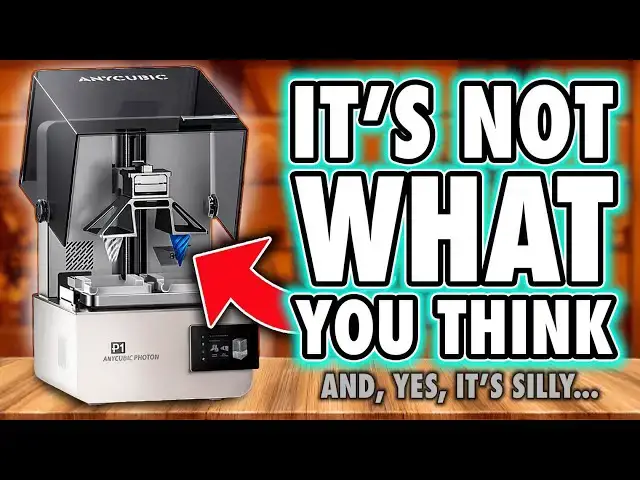
it. Okay, first up, this dual build
1:36
plate thing. Ignore it. any cubic have
1:38
plastered it across every piece of promo
1:40
they've shown, but it's an optional
1:42
add-on, not the default machine. We'll
1:44
get into what it's good for later. Just
1:47
know it's not how the printer ships. And
1:49
I think it's a stupid marketing choice
1:51
because yes, it grabs attention, but it
1:54
also confuses people right up front by
1:56
making the printer look like some
1:58
ridiculous contraption before you've
2:00
ever had a chance to see what it
2:02
actually does. I'm quite confident that
2:04
more people will bounce after seeing
2:06
this than be impressed by it. But
2:08
anyway, now we know what it isn't. Let's
2:10
talk about what it is. At its core, it's
2:12
a standard 10-in resin printer. A normal
2:15
build plate, a normal VAT, and then a
2:17
collection of weird, sometimes clever,
2:19
sometimes questionable engineering
2:21
decisions stacked around it. Unboxing
2:23
here is business as usual for any Cubic.
2:26
There's no premium experience. Just a
2:28
brown cardboard box with the printer
2:30
gently sandwiched in some foam. Tilt the
2:32
box, slide it out, peel the wrapping,
2:34
and remove the accessories embedded in
2:35
the top layer. Basic, but it works. The
2:38
printer is pretty light considering the
2:40
supposed quality they've advertised is
2:42
inside. But visually, it's fantastic. It
2:45
feels like the next step in any Cubix's
2:48
professional aesthetic phase. Clean,
2:50
plain, borderline medical. It doesn't
2:52
scream at you like a gaming PC. It just
2:55
sits there looking competent. The lid is
2:58
an up and over design, this time with an
3:00
integrated handle. Just be aware that
3:02
when you lift it, it extends beyond the
3:03
machine's footprint that you'll see
3:05
advertised online. So, you'll need
3:07
roughly 65 cm of height and 53 cm of
3:10
depth for full clearance. Or you can
3:13
just remove the screws on the side and
3:15
use this as a removable face plate,
3:16
which is actually ideal for farms. Now,
3:19
the first problem, I actually normally
3:22
don't bother testing UV leakage from
3:24
these covers because historically most
3:27
brands have been good enough. But after
3:29
my first print, I noticed some cured
3:31
resin on top of my build plate, which
3:34
shouldn't happen. So, I grabbed a UV
3:36
meter and a UV torch. And yeah, UV light
3:39
gets through the lid. It's not a ton,
3:41
but it's clearly enough to cure the
3:43
resin that's in my machine. Now, to be
3:46
fair, my workshop isn't exactly a dim,
3:48
cozy side room, the same sort of place
3:51
most people keep their printers at home.
3:53
I've got daylight fatigue reducing LED
3:55
strips and big studio lighting. So, my
3:58
environment is certainly harsher than
4:01
normal, but still this has never
4:03
happened to me before. And when I raised
4:05
it with any cubic, they basically said
4:07
this is the lid they're shipping with it
4:09
and suggested using it in dimmer rooms,
4:12
which I've got to be honest is a
4:14
hilarious solution to a hardware design
4:16
floor if nothing else. And it's a good
4:19
job they aren't positioning this as a
4:20
professional machine for controlled
4:22
environments like dental studios then
4:25
cuz they're not going to use daylight
4:26
lamps or whatever lamps have UV in them
4:29
to prevent fatigue. Anyway, since we're
4:31
on the lid, the ceiling is also
4:34
creative. They've added felt-like strips
4:36
on the top of the body, but they seem
4:38
more like soft closed dampeners than
4:40
actual seals because the rest of the
4:42
edges and the entire top perimeter have
4:45
noticeable gaps where VOCC's will
4:47
escape, but also fresh air can pour in.
4:51
I'll come back to that in a minute. Now,
4:52
ports wise, the power socket is on the
4:54
back, but there's no rocker switch.
4:56
There's also a rubber bung on the back
4:58
covering a vent hole. And now we know
5:00
what it's for. It's a proprietary
5:02
connector for any Cubix's Air Pure 2.0,
5:05
which essentially is a hose with an
5:07
inline fan that vents fumes outside your
5:09
home. And I've got to be honest, this
5:11
looks like a solid add-on. Finally,
5:13
someone is doing this properly with an
5:15
official product. And they even offer
5:17
printable connectors for old machines or
5:20
third party units, too. Also, on the
5:22
back, like the M7, you can access some
5:24
of the internal controller boards, which
5:26
should help maintenance a bit. The USB
5:28
port, however, is on the front just
5:30
above the power button on the side of
5:32
the offset screen. And realistically,
5:34
most people won't use it much because
5:36
the printer has built-in Wi-Fi, which
5:38
allows for remote sending, starting, and
5:40
monitoring of prints from both the
5:42
slicer and the phone app, and that is
5:44
incredibly handy. But sadly, there's no
5:46
Ethernet socket available, something
5:48
more common in professional devices. So,
5:50
it's a good job they're not pushing this
5:52
towards professional users. Anyway,
5:54
jumping inside. First up is the build
5:56
plate. This is now a solid high-grade
5:59
stainless steel platform, much tougher
6:01
than usual aluminium plates because
6:03
it'll resist scratches far better. The
6:06
downside is the completely flat top
6:08
rather than a taper, which means manual
6:10
cleaning after every print. If you don't
6:12
wipe it before removing the plate, resin
6:15
is going to run everywhere. Now, just
6:17
quickly jumping down to the vat. This
6:18
has two small prongs at the front which
6:20
let you mount this plate sideways so
6:23
resin can run off. Now, this helps, but
6:25
I'd prefer this to be on the side of the
6:27
vat because the current position limits
6:29
the height of models you print to the
6:31
depth of the screen. And you also do
6:34
still get runs down the handle, and you
6:37
can't close the lid with this in place.
6:39
It's definitely useful, but it's
6:41
imperfect. Also, this steel plate has
6:44
four recessed screw holes, which means
6:46
it isn't perfectly smooth, and these
6:48
recesses will leave dents in parts of
6:50
your bottom layers. Again, not ideal if
6:53
you're printing direct from the plate,
6:55
as professionals, engineers, and dental
6:57
users sometimes do. So, again, it's a
6:59
good job this isn't being targeted at
7:01
them. There are also two other plates,
7:02
which I got to see firsthand at Form
7:04
Next. One is another steel plate which
7:07
has relief holes to reduce early layer
7:09
suction, and the other is the dual VAT
7:11
aluminum plate. And let's just say it,
7:14
for most hobbyists and most users of
7:16
this machine, this dual plate looks
7:18
ridiculous. But there are some real use
7:21
cases. Some like dentistry where
7:23
printing two materials with different
7:25
exposure settings at the same time would
7:28
actually matter. I can also see it being
7:30
useful with expensive resins like
7:33
casting resins. Putting a small amount
7:35
into one side and only printing what you
7:37
need rather than filling a whole vat
7:40
certainly has its upsides. So yes, it's
7:42
niche. It's kind of industrial and it
7:45
has genuine use cases, which makes it
7:48
amusing that other design choices don't
7:50
fully support those users or their
7:52
environments. But all the plates do
7:54
attach with a compression latch, which
7:56
is very handy and should honestly be
7:59
standard by now. Now, when it comes to
8:01
the mechanism, we have dual linear rails
8:03
and what any cubic are calling an
8:05
industrial-grade ball screw. Now, that
8:08
sounds very professional, but it's a C7
8:10
grade, not a C5. C7 is more commonly
8:13
used on hobbyist machines rather than on
8:15
proper industrial equipment. It's still
8:18
good. It's just not as good as the
8:20
wording would lead you to believe. Will
8:22
it impact the average user? Probably
8:24
not. But this is the kind of choice that
8:27
makes the machine look proumer and
8:28
professional from the outside rather
8:30
than being genuinely professional-grade
8:33
hardware on the inside. And this is one
8:35
of the things that keeps the cost down.
8:37
Now, moving on to the VAT. It's metal,
8:39
which is good. And they finally ditched
8:41
ACF release film in favor of clear PFA.
8:44
So for all my haters out there who
8:46
argued I was wrong about frosty release
8:48
film reducing print quality, please
8:50
explain why any cubic have now ditched
8:51
it here. Yeah. All right. You also get
8:54
the aforementioned clip so you can mount
8:56
the plate sideways for runoff and a very
8:59
good pore spout. This alone could be a
9:01
solid reason to get this printer. But
9:04
one very odd thing or dangerous thing
9:06
which I hope is just in my early model
9:08
is the max fill line. Now the specs of
9:11
the machine say that it holds up to one
9:13
liter of resin. But even with a full
9:14
bottle of frozen Hyperfine in mine, my
9:17
resin level was still well below that
9:19
line. I could have easily poured in
9:21
another bottle and probably more before
9:24
actually reaching it. Now, the problem
9:26
here is if you filter that line, the
9:28
resin will most definitely and almost
9:30
immediately spill out of the spout as
9:33
soon as the plate enters the vat. So,
9:35
either that needs fixing or you need to
9:37
know not to fill it that high. So, it's
9:39
a good job you're watching my videos.
9:41
Please subscribe for more tips on how to
9:43
avoid screw-ups by avoiding the
9:45
manufacturer's defects. The best feature
9:48
of this vat by far is the built-in resin
9:50
heater, which includes temperature
9:52
sensing rather than just a simple onoff
9:55
that other brands deliver. Now, this is
9:57
great for colder environments or just
9:59
getting your resin to a consistent and
10:02
ideal temperature during prints, and it
10:04
can be set as high as 40°, too, which is
10:07
going to be incredibly handy for those
10:09
really dense resins, more engineering
10:11
stuff. So, that's something. And not
10:14
only does this a fix with latches, but
10:16
when you mount this to the machine, you
10:18
get a really satisfying click, which
10:21
yeah, is something I'm still weirdly
10:22
fixated on and was since my Form Next
10:25
preview. But this is something that does
10:28
feel premium. So overall, this is a good
10:31
featurerich large with a couple of
10:33
questionable markings. Now onto the
10:35
screen, and it's number time because
10:38
this is where a lot of people get hung
10:39
up on the stats. The P1 uses a 14K panel
10:43
10.1 in with a resolution of 13,312x
10:49
pixels across an area of 223x
10:53
126 mm. That gives us 16.8 micron pixels
10:57
on the X-axis and 24.8 8 micron pixels
11:00
on the Y or technically 17x 25 because
11:04
who the hell is working in fractions of
11:06
microns other than any cubic to make it
11:08
look slightly better in their write up.
11:10
And while we're talking about size, the
11:12
build height is 230 mm. So it sits
11:15
comfortably at the slightly larger end
11:17
of the current 10-in category. Now this
11:20
resolution in practice, most resins can
11:23
only render at around 25 to 30 microns
11:26
in ideal conditions anyway. So, the
11:29
screen is already outperforming what the
11:32
materials can physically reproduce. So,
11:34
I want to say that before anyone jumps
11:36
on the why is this not 16K or higher
11:38
bandwagon. And well, not only that, but
11:41
the 16K screens used in a lot of current
11:44
machines are physically smaller and
11:46
require more UV power and heat to push
11:49
light through the tighter pixel grid.
11:52
That means they tend to run hotter and
11:54
burn out faster. So yes, 16K is a bigger
11:57
number, but in this context, it doesn't
11:59
automatically make things better. Trust
12:01
me, this 14K panel was the better
12:04
choice. However, the bigger and possibly
12:07
more obvious question is, does this
12:09
corrugated layer they've added to reduce
12:11
peel forces affect print quality? Well,
12:14
if you've been watching my videos, you
12:16
already know the answer. Yes, of course
12:18
it does. And if you need external
12:20
validation, go and watch J3D's video on
12:22
screen protectors. Even clear flat glass
12:25
protectors soften detail a bit. So, you
12:28
shouldn't be surprised that there's more
12:30
distortion from a wavy bonded surface
12:32
that scatters light in various
12:34
directions. And to back that up, when
12:36
you compare prints on this to the same
12:38
14K panel on any Cubic's own M7 printer,
12:41
of course, once you've swapped its
12:42
default ACF for PFA, the P1 is softer,
12:46
not dramatically, but visibly. And here,
12:50
you can't remove it and get the
12:51
sharpness back. Unlike ACF, this is a
12:55
built-in hardware bottleneck. Now, any
12:57
cubic have obviously been obsessed with
12:59
reducing peel forces without copying the
13:01
mechanics that other brands use. First
13:04
with ACF and now with this. And yes, it
13:07
does reduce peel forces slightly, but
13:10
the price is a small loss of surface
13:12
quality every time they chase this goal.
13:14
Now, I'm saying that I am splitting
13:16
hairs. Does it matter in practice? For
13:19
most people, probably not. Most users
13:21
are probably printing pre-supported
13:23
miniatures with anti-aliasing and using
13:25
softer, tougher resins, not the more
13:27
brittle, highdetail stuff I use for
13:30
screen testing. In real world prints,
13:33
you'll struggle to see a meaningful
13:34
difference. In terms of print success or
13:37
speed, the benefit is marginal. Reduced
13:40
peel force does help during the first
13:42
few millimeters of a lift in terms of
13:44
speed, but most of the speed advantage
13:46
in this machine probably comes from the
13:48
dynamic pressure sensing algorithm,
13:50
which I'll talk about in a minute. The
13:52
other theoretical benefit I was shown at
13:54
form next is the idea of fewer supports
13:56
are needed because of reduced peel
13:58
forces. But any cubic slicer doesn't
14:01
implement this. The auto support tool
14:03
gives you the same density if you're
14:05
printing on this as if you were printing
14:07
on the original any cubic photon. So
14:09
unless you're manually supporting and
14:11
iterating your own models supports,
14:14
you're unlikely to see that benefit
14:16
either. So maybe, but it's only a maybe,
14:19
you will slightly reduce the fails you
14:21
could get from models tearing from the
14:23
plate, assuming we can trust any Cubix's
14:26
dynamic force sensors and reaction to
14:28
that. But the truth remains, the P1
14:31
trades a small amount of sharpness for a
14:33
small reduction in peel force. And here,
14:35
unlike with ACF, you can't swap it out.
14:38
This is a fixed design choice. And this
14:41
time, you're stuck with it. It makes me
14:43
wish for a version of this printer
14:44
without this because I can all but
14:46
guarantee if somebody figures out how to
14:48
safely remove this wavy cover, you'll
14:51
get sharper prints. If we can give this
14:53
some praise though, any cubic have
14:55
finally given us a much better screen
14:57
replacement process rather than take the
14:59
whole base apart like with previous
15:01
machines. Here you just remove the
15:03
surrounding tape and undo eight screws
15:06
and that lets you lift out the screen
15:07
and unclamp the ribbon cable. Fantastic.
15:10
I genuinely have half a mind to check if
15:12
a normal M7 screen will work in this,
15:15
but I don't currently have one to hand.
15:17
So maybe that's a future video. Right,
15:19
leveling. So despite the product manager
15:22
of this machine telling me at Form Next
15:24
that this doesn't have autoleveling but
15:27
assisted leveling, the marketing team
15:29
still calls it autoleveling. And
15:31
honestly, I've got more of an issue with
15:33
the term than the implementation. To be
15:37
clear, this is not autoleing. The plate
15:40
doesn't magically set itself. What
15:42
actually happens is the plate presses
15:44
down on the screen and there are force
15:45
sensors in each corner that measure how
15:47
much pressure is applied. You then turn
15:50
the four screws on the top of the build
15:51
plate until the readings match, meaning
15:54
it's parallel to the screen. So, it's
15:56
assisted leveling at best. You still
15:58
have to do it, but Any Cubic does say
16:01
they'll calibrate the machines at the
16:03
factory. And that there is the real
16:05
value, giving you the impression that
16:07
it's doing it automatically. And if you
16:10
do ever need to rele yourself, at least
16:12
it's in a measured way. But the bigger
16:14
issue I have with this is a
16:16
spring-mounted screen because any
16:18
pressure on that screen during printing
16:20
from the plate or the resin beneath it
16:23
will push the screen downwards. The zero
16:25
point isn't mechanically fixed. Unlike
16:28
systems from other brands that actually
16:30
lock the screen in place, this one stays
16:33
somewhat fluid, and that can lead to
16:35
some early layer compression, sometimes
16:38
visible as a line across prints or even
16:40
tearing if the model volume changes and
16:43
pressure drops. However, any cubic has
16:45
been leaning heavily into dynamic
16:47
pressure sensing for years, more than
16:49
most other consumer brands. So much of
16:52
this behavior is compensated for in the
16:54
software, in their algorithms. The
16:56
printer detects when movement stops,
16:58
manages lift heights, and even detects
17:00
when a layer has fully peeled from the
17:02
release film before moving on. And in my
17:05
testing so far, the results have been
17:08
mostly flawless with a couple of prints
17:10
that have shown this compression line
17:12
partway up. But most of the errors have
17:13
been caused by me having to go back to
17:15
performing manual exposure tuning on
17:17
this printer, something I haven't had to
17:19
do in a while. So, it's a bit of a weird
17:21
system. Good, bad, good. you are relying
17:24
on any Cubix's pressure sensing to make
17:26
potential issues disappear. And this
17:28
seems to do a passable job in most
17:31
scenarios. I mostly print pre-supported
17:33
models anyway, so those lines are
17:35
normally part of the support structure,
17:36
and I never actually see it on the
17:38
models themselves that I'm printing, but
17:40
I know this is going to bother some
17:41
people, like those looking at this for
17:44
engineering use. So yeah, you're
17:46
beholden to any Cubix's algorithms, but
17:49
if you don't like it, you can turn most
17:50
of this off and go back to basics,
17:52
setting your lift heights and retract
17:54
speeds and all that manually, albeit
17:57
with a springy screen underneath. And
17:59
finally, on main hardware, the light
18:00
source. It's a 405 nm chip on board
18:03
array, which is pretty standard for
18:05
consumer resin printers. It's reliable,
18:08
it works, and it's a sensible choice for
18:10
this price. Again, it's just not the
18:12
kind of thing you'd normally find in
18:14
actual professional machines, which is
18:16
typically more 385 nm. But again,
18:19
thankfully any cubic aren't pretending
18:21
this is for pro users. When it comes to
18:23
ancillary features, though, there's also
18:24
the built-in camera, which is only 480p,
18:28
but it's sufficient for remote
18:29
monitoring through the Any Cubic phone
18:31
app, and it'll generate some passable
18:34
time-lapses. It's not going to win
18:36
cinematography awards, but it works. On
18:39
the software side, the UI has had a
18:42
noticeable upgrade. The layout is
18:43
similar to previous generations, but
18:45
you've got more control on screen and
18:47
more information available without
18:48
digging through menus. It's still clean
18:51
and it genuinely feels more mature than
18:53
earlier versions. One thing missing
18:55
though is the ability to set up multiple
18:57
exposure tests directly in the UI like
19:00
on other brands. But this is still much
19:02
better than it was before because now
19:04
you can easily set up tests using the
19:06
built-in model or your own. The starting
19:09
exposure time is set in the resin
19:10
profile and then you define the
19:12
increments using this tool. And the test
19:15
actually prints with numbers physically
19:17
printed next to each sample so you can
19:19
see which is which. Just be aware that
19:21
it will shrink larger models that you
19:23
import. And speaking of the slicer, this
19:25
itself has come a long way. Resin
19:27
profiles are now neatly nested by brand
19:30
and you can create multiple plates with
19:32
auto layout options that actually work.
19:34
For the dual build plates, you can
19:36
select each side independently and then
19:38
assign different resin curing profiles,
19:41
but the layer heights need to match for
19:43
hopefully obvious reasons. And speaking
19:45
of that dual plate function, I said I
19:47
wanted to cover it for those who want
19:48
the specification. Each of the two zones
19:50
on either side of the screen have a
19:52
volume of 66x 126x 195 mm XYZ. And the
19:58
Y-axis obviously matches the full screen
20:01
depth. And while any cubic hasn't
20:03
provided me with the exact resolution of
20:05
these zones, doing a bit of math, it
20:07
works out to approximately 3,940 pixels
20:10
wide by the same 5,120 pixels deep. And
20:14
yes, the printer even has a built-in vac
20:16
cleaning function for each of these
20:18
zones independently. Anyway, back to the
20:21
slicer. The thing that now feels dafted
20:23
is the new placement of basic movement
20:24
controls behind nested menus. there's
20:27
plenty of space to put them permanently
20:29
on the screen in the same way that Orca
20:31
Slicer does it. That would be much
20:33
handier. But overall, I do think this is
20:36
a very competent program that does keep
20:38
improving. And I usually prefer sticking
20:40
with the manufacturer's slices anyway
20:42
just to avoid more compatibility
20:44
nonsense. And finally, because I know
20:47
someone will ask, yes, the printer does
20:49
have a power loss resume feature, but a
20:51
lot of people still message me about
20:53
backup batteries or UPS units for 3D
20:55
printers in case of a power cut. Now,
20:58
Apherey, which I think is how it's
20:59
pronounced, actually sent me one of
21:01
theirs to test it out, and I've been
21:03
using it just fine. It's solid. It's got
21:05
loads of outputs, and it's portable
21:06
enough to take camping if you ever want
21:08
to charge gear off-rid. And I even
21:10
learned this week that it's got
21:12
expandable power storage, which is
21:14
pretty neat. So, if you want a decent
21:15
UPS to pair with a resin printer, I'll
21:18
drop an affiliate link to it somewhere
21:19
in the description. But here we are with
21:21
the printer. Where does that leave us?
21:24
The P1 is a very capable machine with
21:26
smart upgrades, sensible workflow
21:28
improvements, smart features like adding
21:30
a camera, and a genuinely better user
21:32
experience than anything any Cubic has
21:35
put out in years. But it's still not the
21:37
second coming of the M3 Premium, and
21:39
it's not the proumer resolution that the
21:41
marketing implies. It's very much a
21:44
consumer machine that's wearing proumer
21:46
clothing. It's got the look, the
21:48
features, and the ambition, but it's
21:50
built from the cheapest viable versions
21:52
of those parts to hit a price point. And
21:55
because of that, it falls short of being
21:56
the premium, uncompromising successor
21:59
some of us were hoping for. Let's be
22:01
honest, this is just the successor to
22:04
the M7, not a proumer beast. But here's
22:07
the thing. If you want a reliable,
22:09
modern, wellfeatured 10-in resin
22:12
printer, you don't obsess over
22:14
microscopic differences in sharpness,
22:16
and you're not expecting it to replace
22:18
an $800 to $1,000 plus real proumer
22:21
unit, then this is a pretty great
22:24
option. If though you're the kind of
22:26
person who buys a machine based on the
22:28
theoretical maximum print resolution,
22:30
microscopic edge fidelity and you feel
22:32
the emotional trauma of not having C5
22:35
grade hardware, you're going to hate
22:37
this loudly on the internet. I think for
22:40
everyone else, look, this is a good
22:42
printer at a fair price with some
22:44
meaningful quality of life features that
22:46
genuinely can improve day-to-day use.
22:49
It's not perfection. Please ignore the
22:51
hype. This is little more than a capable
22:54
machine that genuinely improved
22:56
day-to-day use. Although, if you
22:58
accidentally cure resin on that wavy
22:59
screen, good luck getting it off. This
23:01
is little more than a capable modern
23:03
machine for the user who actually
23:05
intends to print with it. And that's
23:07
okay. So, if that's what you want and
23:09
you're happy to accept the limits it
23:11
imposes, then yeah, definitely pick this
23:13
one up because if the M3 Premium was the
23:16
best thing they've ever built, the P1 is
23:18
the closest they've come since. even if
23:21
it's mostly playing dress up. If this
23:22
video was helpful to you, at least open
23:24
your eyes on what you're buying here,
23:26
then please, as always, consider using
23:28
my affiliate links and discount codes
23:30
when I have them in the video
23:32
description. I'll get a commission on
23:34
the sale. That won't cost you more, but
23:36
it is how I fund this channel. If you
23:38
enjoyed what you saw, hit subscribe, hit
23:40
like, hit the new hype button, whatever
23:42
that does. Tell your friends, and even
23:44
consider joining us to get your name in
23:46
the credits like these wonderful people
23:48
who are on screen now. They do
23:50
legitimately help to keep the lights on.
23:52
So, for this reward along with Discord
23:54
rolls and early access, please consider
23:56
signing up. I want to say thanks again
23:58
to you for watching and until next time,
24:01
I can't carry it for you, but I can
24:03
carry you. Fauxhammer out.