live_tv
Livestream Starting Soon
00
Hours
:
00
Minutes
:
00
Seconds
Up next in 10



Join this live session with Mahender Pal and Venkata Subbarao for the next episode of Microsoft Business Application Live Show on March 14 at 10:00 PM (IST).
In this session, we will be giving a walkthrough on Web API in Power Pages.
📺 CSharp TV - Dev Streaming Destination http://csharp.tv
🌎 C# Corner - Community of Software and Data Developers
https://www.c-sharpcorner.com
#CSharpTV #csharpcorner
Show More Show Less View Video Transcript
0:05
[Music]
0:13
[Music]
0:34
hello everyone Thanks for joining us today for the another business application show
0:40
where we talk about uh Microsoft Dynamics 365 and Power
0:46
Platform I have my friend with me So we both uh you know host this uh so and
0:54
this host this so is presented by Corner community and let me share
1:01
my screen here just to go through that agenda for
1:13
today Okay So as I said that uh now from last
1:19
couple of sessions we have been discussing about the power pages So we started uh with the basic introduction
1:26
of the power pages and we we saw how we can set up our pages how we can create uh you know different layouts how we can
1:34
utilize uh you know liquid code how we can write uh JavaScript how we can
1:40
create templates So we discussed a different different aspect We discussed about how to you know set up the
1:46
security how to set up table permission and then set up the web roles for the power pages Right So on
1:53
the continuing on the power pages today we are going to talk about the web API
1:59
So how we can use web API in power pages and what is their use and what are the
2:04
different functionality we can implement using the web API Okay So uh this is the
2:10
highle agenda So we will start with the basic introduction Then we will see what are the different operations that we can
2:16
use uh you know with the web API in the power pages and then we will talk about
2:21
the site settings So we have uh you know couple of site setting that we need to configure before we can apply uh you
2:28
know uh web API calls or we can do web API calls And then we will see what are
2:33
the security aspect behind the scene and how the authentication works and then we
2:38
will show you demo on that that how we can use this web API Okay So before
2:44
jumping onto the main topic let's have a quick introduction about ourself myself Mahindra and my I have my friend Wenita
2:52
with me We both are Microsoft MVPs as well as Sharp for MVPs We have more than
2:59
you know 10 years of experience on the Microsoft uh stack So that's what our
3:07
quick introduction and let's jump into the main
3:16
topic Okay So web API So uh you know we have been
3:23
discussing about the power pages that how we can build different type of uh
3:29
you know website using the power pages So we we have a option that we can
3:34
create a static uh you know website using the power pages where we have the
3:41
static content So we can just uh you know provide uh basic detail and we can fill the contents on the pages and
3:47
nothing is going to change there right it's static okay so we are not bringing uh some dynamic information from table
3:55
or some other places and rendering on the page it's simple pages that we have
4:01
on the static one on the other hand we have a dynamic website where basically
4:07
the content of the website change based on the context text Okay So maybe in one
4:14
page when you are seeing that you know your customer information in another page you are saying
4:20
your customer's case history or maybe their opportunities right and you may
4:26
have different type of options that you will provide on the every page depending
4:32
on the requirement Okay So that's basically the uh concept of the dynamic
4:37
uh website and there in case of the dynamic website as I said that the
4:43
contents basically change based on the context Okay So which functionality you
4:48
are performing for what what is the requirement for that particular page depending on that the contents changes
4:56
right So let's take an example that if you are working with the customer information and you have the page where
5:04
you have you know rendered the customer form So we can use the you know form
5:09
that we have in the first party app So we can utilize those forms to render on the power pages right So we discussed in
5:16
our earlier session that how we can show that entity forms on that entity forms we have a
5:23
requirement let's say to you know uh use some kind of read some kind of data of
5:28
the customer So maybe there are two fields okay and we want to perform some kind of calculation into two fields or
5:35
maybe we want to hide so fields based on particular field okay maybe let's say
5:40
you know what is the customer relationship type based on the customer relationship type maybe there are two or
5:46
three field maybe let's say credit limit or maybe some some address information or something we want to show or hide
5:54
right so that kind of thing can be easily done using the JavaScript So we
6:00
can write JavaScript we can write jQuery and using those and we can also utilize
6:05
our liquid to you know uh do that kind of validation Okay So all the data that
6:12
is required for us for our logic to be implemented that is available on the
6:17
same page Right But let's take an example that we are on the account page but there are some
6:25
other information that we need to read from a different uh table maybe contact table maybe opportunity table and based
6:33
on that information we want to do some kind of modification on the customer page Okay So here we are talking about
6:39
two tables One account table and one is the referential table or the child table
6:46
or the related table It could be a contact or case or opportunity depending
6:52
on the requirement Right and based on that second table information we want to
6:57
do some kind of modification on the account page In that case we cannot use
7:03
simple JavaScript Okay we have to use some kind of some some mechanism where
7:09
we can retrieve data of the secondary entity and then once we have the data
7:15
based on the data we can perform our logic Okay So in those type of situation
7:21
the web API comes into the picture So web API help us to query the data from
7:27
the different different tables Okay So we can uh if you are familiar with the
7:33
you know data versse or you are familiar with the dynamics 365 first party app just like there we can write web API
7:40
calls to you know work with the different entity to collect the data to create the data delete modify so doing
7:47
different uh set of operation that we can perform those set of things we can also do using the web API in the power
7:54
pages So it allows us to do different type of operations on the these tables
8:01
depending on the requirement Okay So then is in this particular scenario when
8:07
we have the you know uh web API concept here So it makes our page
8:13
more dynamic right We can bring information from the secondary table as
8:18
well We can render that information Maybe if you want to render that information on the table we can do that
8:24
or we want to perform some kind of logic that can be also done So that's what we
8:29
have here is the web API
8:37
now So we are saying that web API now we have that now what are the different
8:44
type of operation what are the different type of methods that we can perform in the web API okay using the web API into
8:52
power pages So here you can see on that we have these set of operations So mo
8:58
mostly you know we call it card operations right all the card operations can be done using the web API So we can
9:04
perform read operations So if you want to read data from the related table or
9:10
non related table depending on that requirement you can use that read option
9:15
read operation and the method that we use is the get okay so standard method
9:21
that we have you know when we want to call any any web API so we use that uh standard method here to retrieve the
9:28
data get in in in uh CRM or in the first party app or in the data versse we use
9:34
that retrieve or retrieve multiple Right so those type of thing that come into
9:40
this category get method where we can read the data from the table and perform
9:45
our operation The next one is the create So
9:51
let's take an example that on the account from the account uh web page we
9:56
want to create some kind of task Okay Or maybe we want to create opportunity
10:01
Depending on some data that we are collecting from the account and based on the data we want to create opportunity
10:08
record we want to create uh you know contact record or we want to create task record So those type of thing can be
10:15
done using the post method and it allows us to create the record for the table of
10:22
the data versse Right The next one have this update Okay
10:30
So this operation is basically if you want to do some kind of update into the
10:35
table Okay It could be a particular one row or it could be a multiple row or you
10:41
know you can do this uh update on one record or multiple record depending on
10:46
the requirement So for example if you have some you know particular GUID of a
10:52
record and you can use that GUID to update the data using the patch method
10:58
Okay Then we have the delete Delete is basically if you want to totally remove
11:04
that uh record from the data works So that case we use that delete We also use
11:11
this for the disassociation So for example when there are two tables and we
11:16
have related two tables using the relationship right so those set of relationship can be deleted using the
11:24
delete option So for example one record is related to another record and we have
11:30
let's say 1 to n relationship right So when we have this kind of relationship
11:35
in the one table we set up the lookup right and that lookup basically is for
11:40
the association between these two records Okay So for that you can see
11:46
here we have a post one that we use for the association and if we want to
11:51
disassociate that record then we use delete operations Okay So these are the
11:57
set of operations that we perform on the power pages and using that we can do
12:04
different kind of modifications updates deletion on the set of tables depending
12:10
on the requirement It could be that you want to update order information of the
12:15
customer It could be that you want to update customer information It could be that you want to update opportunity
12:22
records or uh case records right So now the simple question comes
12:31
into mind that when we have a page right let's say for example we have account page and in that account we want to do
12:38
some modification we can update those field and we can submit that right so that it will just save that account
12:45
report but what about if we want to do some kind of modification on the related
12:51
entities you know or maybe related tables right or maybe let's take an
12:56
example you want to put some kind of you know custom buttons and on the click of
13:01
custom button you want to do some kind of operations So in that case we can use this web API and this is very helpful to
13:09
make your web pages dynamic and perform different type of operations using
13:16
that Okay So now as I said that before you
13:24
know you can uh execute these web APIs you need to per uh you know do some kind
13:30
of configurations here So you can see on this table So we have a uh you know uh
13:36
there are uh in the modeldriven app that we have for the power pages management
13:43
There we have the site settings under that site settings you need to do these
13:48
setting so that you can perform the web API action So first you need to enable
13:53
that So for example you know if I want to work with the account entity then I need to write like this web API account/
14:02
enabled and then there will be value that I want to enable it or disable it
14:08
So if I'm setting it true it means I can perform web API against the account
14:14
table and if I am setting false it means I cannot do that and I'm making like
14:20
setting it disabled So you can see here this is the screen sort like for you know some of that side settings here
14:27
where we have this for example this one is you know done for that incident entity like you know case entity So
14:34
similar to that we can perform this to whatever entity uh that we have uh you
14:40
know we want to work with right and then we can also mention the set of fields
14:46
here So if you want to you know use some particular field for that updation you
14:52
can mention those fields or if you want to say that no I want to you know use
14:57
all the fields that is all the columns that is available into the table then we can use the star here star means that
15:05
it's going to consider all the columns that is part of this particular table
15:11
right and then here we have this you know filters as well that If you want to
15:17
apply the data filters or if you want to see that error settings when this error is happening you want to you know enable
15:24
disable that uh in inner error that is there So these type of setting can be
15:29
configured here just like this So we can just write the name of the setting and
15:34
then we can put the value what is it's like true or false and depending on the
15:40
fields like if you want to you know uh set some c particular field or if you
15:45
want to use all the fields okay so those type of setting can be done on the power
15:51
pages management modeldriven app and once this is done then we can go to the
15:58
next step the Next step is the security Okay
16:04
So you are going to access uh you know your table information You are going to
16:10
do some kind of modification on the table But before doing that you need to
16:16
make sure that you have a proper rights You have a proper permissions in place
16:21
Right you can see here we discussed this in the earlier sessions uh there that in
16:27
the table permissions we can set up that table permissions we can provide that information that on which table you want
16:35
what type of permissions so you can see here so we can set up so if you want to let's say I'm just saying that I just
16:41
want to retrieve it okay so I just want to read it so I can simply say read one
16:46
so read permissions means then I won't be able to do any other actions like I
16:52
won't be able to update it I won't be able to create it I won't be able to delete or associate these record with
16:58
the other record Okay So depending on the what permission is set up here you
17:04
will be able to do that set of operations on the web pages So we can select our main table
17:12
here We can do that kind of access here And this is just an example that we when
17:17
we will go to that access types we have different type of uh access that is available that works like a level up to
17:24
what level you want to go Okay So we have discussed all these in our earlier session So you can watch our earlier
17:31
session that's there on the sharp you know live TV or it's there on the YouTube as well So you can dis you know
17:38
watch all of our sessions there as well Okay So once we have these you know set
17:45
table set of permissions are there then we associate the web roles Okay so web
17:50
roles are just like the security roles that we have in the data versse So those web roles are basically assigned to the
17:58
users and then based on the web roles only then it see that okay what type of
18:03
action you can perform on the power pages Okay So that's what we have here
18:09
on the table security So make sure uh once you have
18:14
that you know setting in place you set up that security and set up whatever
18:19
security requirement you have for the set of users Okay
18:27
Now we have this security setup Now let's uh talk about that how we can
18:35
write the code for the web API So there are basically two things that we need to keep in mind The first thing is that
18:42
when we are you know making web API call there is basically we need to get that
18:48
authentication token from the database Okay So for that Microsoft has provided
18:55
a web API wrapper and you can see that this is basically that web API wrapper
19:00
that is available here This basically help us to get the token from the
19:06
database Okay And this wrapper we can place somewhere So let's take an example
19:13
that you know on the we can create a particular web template and we can put
19:18
this uh web uh API wrapper on the template and that template may be you
19:24
know available to that complete our website so that in any page
19:30
when we will write our actual web API method to perform that set of operations
19:36
like read create or retrieve So we can utilize this uh token to perform those
19:42
set of actions Okay So these this is the web API recorder that we need to put on
19:48
the web template and then after that we can write our particular request Okay We
19:55
can write our get request update uh you know patch request or delete request or
20:02
you know associate request So those type of requests can be returned after this
20:07
and and we will show you this on the demo that how we can write those set of
20:16
request So if we you know want to conclude this like okay what are the
20:22
main you know steps that is there the first thing that we need to do is to
20:27
enable side settings that that is very much required The first step that we
20:32
need to do once that is done then we will set up the table permissions and
20:38
web roles to make sure that the user who is going who is going to perform those set of actions have the required
20:44
permissions on the table Once that is done we can create a web
20:50
template and under that web template we can put this web API wrapper which will
20:55
help us to generate the token to get the token and after that we can write our
21:01
actual web API request to do those set of operations So these are the mainly
21:07
highle step that we need to do Okay And now let's see this in the action So I'm
21:13
going to pass Mike to my friend Wenit and he will show you the demo on
21:19
this So Wenit over to you Yeah thanks for having us Thanks for your
21:25
explanation on the Yeah So hi everybody So let me deep dive into the um the
21:33
presentation on the demo screen Let me share my screen
21:38
Yeah
21:50
Okay So hope you can see my screen right
21:55
uh not yet Yeah it's loading now Okay Yeah we can see it
22:02
Okay So uh so the first thing what we have to do right so as uh mentioned in
22:09
the last slide first thing what we have to do we have to create one particular
22:18
page So page web page has to be
22:24
created Okay And so in my example just I have created a new web page So just here
22:32
I'll go into here I will keep it here as an create contact So here in this demo
22:39
which I'm going to do uh a demo it is on on the contact creation So how I am
22:45
going to leverage the web API so that within a small u interface of uh adding
22:52
the details of a contact how I can save those details into the uh database So
22:58
just I'll create this one as a step one It is an add page Here I'll comment the start from blank and I'll say that
23:05
create the content So you can give any kind of things So here my demo which I'm going to show it is create creation of
23:11
the contact So that's what I am going to give it So that is the step one which uh
23:16
you all uh know about this one So after this one the second step is uh we have
23:23
to go to the page settings and then have to go for the uh permissions here
23:29
So so second one is the permissions So in this permissions which
23:36
uh so this is the create contact I don't want the users uh to log in uh I don't I
23:44
don't want the uh anonymous users to simply create my contacts Okay So I want only the administrator and the
23:50
authenticated users uh to do it So for that just I have created so anyone can
23:55
see the page and I want choose the who can see the pages So just I have selected admins and the authenticated
24:01
users Here I can also give the come some other web role contacts also custom web roles like some um kind of the
24:08
supervisors or the managers who are present that those also can be given here So that's how that you can provide
24:15
the permissions So how you can go for this one is uh in the security part go to
24:25
that page permissions and you can see it on the create contact just you can uh see that
24:32
details of it Next is the table permissions So the third point here is we have to give the
24:40
table permissions Here we have the table is
24:46
contact right So first what we have to do right we have to create one table permission for and enable this for the
24:54
contact So for that what is that is been to need to be done So in the create here
24:59
just uh specify the contact uh table
25:05
permission and then just select contact and here the access type I am
25:11
giving the global access uh see here one of the catching point here
25:16
So my intent was to perform all the operations on the contact rather than
25:22
going for the different uh permissions Two ways of doing it is you can enable
25:29
all the permissions on a single one otherwise you can go with the different permissions Actually uh in normal u
25:37
usage what the user will be doing it is we'll be creating different permissions on the same table so that few people can
25:45
only perform the create and few people can only perform the read and few people can only perform the delete and update
25:52
so that it will be easy for them So for those respective users this table permissions can be uh created So for now
26:00
this particular demo just I have created for this the table permission So already an uh table permission is present and
26:07
then I have to select the roles that is admins and the authenticated users only
26:12
I will be going to give it So this is how you will be giving it So if you
26:18
observe right just I'll open
26:25
this contact global access read write and update append and create and append to administrators and the authenticity
26:32
users that I have given So till now what is that if you perform all these uh uh
26:38
three steps So what will what will I will get
26:43
it is just I a web page and the web page will have the contact and it has the permissions and it has uh I have given
26:51
the table permissions So if you observe here
27:00
right okay so if you observe I have given only access this the create
27:06
contact uh one this my web page create contact I have only given the access to
27:12
the authenticated users and the administrators that is the reason why you don't see that particular page uh
27:20
link in the navigation ation Okay this will only I will get it only if I click
27:26
if I sign in then only I will get this uh
27:31
particular one Okay so now this uh second uh the third point of the create
27:38
contact is uh so the table permissions is done Now we have to go with certain
27:44
other uh permissions as well Okay So for that just we have to go to
27:50
the advanced settings where we have to per we have to
27:56
enable few of the side settings here So the fourth point is site
28:03
settings For this uh contact table we have to
28:12
enable enable or create three new
28:18
records in site settings in portal
28:25
management app Okay So what are those records so
28:30
one is for the create uh for the contact first we have to specify the entity
28:36
enabling enabling for this contact enable a site setting for
28:45
it for this table or entity Next is second one is uh we have to specify
28:53
fields that are fields that are
28:58
allowed for this entity so that the API will uh bypass or will allow it Next the
29:08
third one is the error one error
29:14
setting that uh we have to
29:20
enable Okay So we go back to
29:25
here This is my um apps management So this is my website
29:32
So here I'm going to go to the site settings here So first one is we have to create one
29:38
sighting site setting for the content related So for that what we have to do
29:43
it is we have to go for this one just I
29:48
have created it So first we have to specify this web API web API contact enabled So here the
29:56
catch here is in this example just I showed my table name is contact This can
30:02
be your table name Okay So this one this
30:08
is my website source is the table we have to give it and value it should be true So this this is the one setting
30:15
that you have to insert as a create a new
30:20
one And now the second one is like web API contact fields that means the second
30:26
point of it So here what we have to do is we have to
30:35
specify here the table name Okay So here the thing is uh I can
30:44
so I can specify like
30:53
this that means few fields I can specify it or all files I can also specify it So
31:00
here on the contact fields that means the API uh will only allow if I give the
31:05
value as star that means in the contact table whatever the fields that are present all fields will be available for
31:12
this particular web web API but if you specify only few fields then for your web API that means if I am trying to
31:20
read the values in the my power page web page only these three values which are
31:26
mentioned here those only will be available here So that's what the third uh second one and now if at all any
31:33
errors are present then we have to uh keep it this one web
31:42
API error inner error So this is an single time uh we have to enable this
31:49
one it is the web API error setting just we have to give we
31:54
have to show the source and also the value So if you observe
32:05
here so three values one and then contact fields and the third one So the
32:12
third one is common So for any website this you have to if at all you wanted to
32:20
uh enable this web ABI and also if you wanted to specifically debug the details
32:26
any issues then you have to just for one time in entire your development you have
32:32
to create this setting but this first the other first two settings right these are depends upon the table if at all I
32:39
have the account table then I have to create web API back slash account and enabled
32:44
web API back/ account and the fields like that So these site settings has to
32:49
be enabled Now coming to the fifth point
32:56
what we have to do it is we have to provide one particular
33:02
um web template So let me go back to the
33:11
page Go back to the edit code It will allow me to go to the my
33:18
web
33:28
page Okay So basically what we have to do it
33:47
is okay So
33:54
helper So you have to create one particular well help uh one web template
33:59
which you this is an uh predefined one which will happen So this particular
34:05
code snippet how what it will be doing it is it will help uh to authenticate So
34:12
what this piece of code what it will be doing it right it will generate one particular token and this particular
34:18
token during uh uh the request and response process this token will be
34:24
validated okay so that means if I'm clicking on this all date details right
34:29
click on clicking on the submit then what we'll be doing right this particular piece of code this is already
34:36
available in the in our Microsoft learn yes you can specify this one what it
34:42
providing is it will create for my web API what is the default what is the
34:49
token that is present and what is for that particular token what is the validity for it so based upon that one
34:56
so if I click on on that particular uh submit right so these particular uh some
35:06
tokens will gets generated so this token whenever we clicking on submit this token gets validated by the data hours
35:12
and also the power pages uh framework if it validates and uh everything is fine
35:18
then it will allows us to create any record in the database So so what you
35:23
have to do it in a nutshell just you have to create go to the web templates and then the web templates you can click
35:30
on create one helper html you can name it at any point of time so this is how
35:36
right so why I have created this as an web template separately the reason is it is reusable we can easily embed it so
35:45
you can ask me a question wet so we are doing it in directly in this visual studio code online one Is is there any
35:52
way that we can directly do it in the site in this particular portal power page power page management yes we can do
35:58
that one So for that what we do it we'll go to go back to here into the web templates and then we'll select here
36:05
just we'll click on the new and then give the name and website and here we will paste that one So I will show it
36:11
here This is a helper In this
36:19
helper see just whatever that is present in the script which I'm going to use it
36:25
it will be uh present here on So what I'm going to do just you have to
36:30
specifically copy this and save this particular template Okay So in in our uh
36:38
discussion the fifth point what we have to do right we have to uh keep
36:46
the to generate token for
36:52
authentication See if at all if we don't provide this one right we will keep on getting this 401 unauthorized
36:59
uh issue So which I will uh I will show it also
37:06
in uh the few minutes Okay So that was the fifth one and now what uh the sixth
37:12
point is So the authentication part is done
37:17
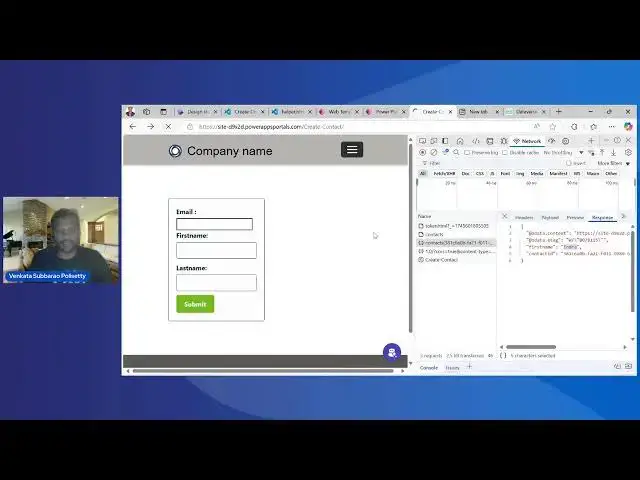
Now sixth party we have to uh do UI for
37:23
data entry that is for our uh contact uh
37:29
table So what is the thing what I'm going to do right I will be going to create three fields one is to uh enter
37:37
the email address one email address and first name and last
37:44
name and take these and one submit
37:51
button and this email address is nothing but an email
37:56
field and this is a text
38:02
field and this is uh also a text
38:08
field and this is a button Okay So on this particular click on this button I'm
38:14
going to provide all these particular uh details of the first name last name and the email address uh and it call it to
38:21
that uh API so that the record gets uh created So for that what is that I'm
38:28
going to do it is going back to here I click on this edit
38:47
code Okay So what is the thing that you have to do it is uh just I have uh for
38:55
look look and feel just I have given one uh style I have added some style sheet
39:02
here for the form how it look like and the label and for the blocks and all how
39:07
it look like that means for this look and feel just I have given the normal uh uh
39:16
some styles that I have given which is normally uh you should be knowing it The tricky
39:22
point here is so previously we have created one web template right I don't want it to simply copy and paste all
39:29
this help helper html uh this authentication uh related code every
39:36
time in my web uh page So for that what is the thing that you'll be using it is
39:41
you can use this particular liquid uh template syntax where include you can
39:48
specify this uh the web template name here the catch is you have to
39:53
specifically mention clearly whatever the name that you have given here in the
39:58
web template Okay If there are some spaces are there you have to specifically give that particular one
40:04
but that should be correct After that one just what I did just I keep kept in a form and my form and I have given the
40:10
email first name last name and submit all these all the HTML button Now this
40:16
is uh the JavaScript one So what I'm going to do it here right so just I'll give one particular demo here like
40:33
um just if I'm clicking on
40:39
submit you see that you just added a contact called uh money okay so how I
40:47
can verify whether that has been created or
40:52
not I'll go to the advanc settings Go to the contact table
41:17
You see this money contest this just now I have uh created
41:32
it Okay So just now I have created it So it got created and uh it is present in
41:39
my uh database So coming back to the code here what is
41:45
that we will be doing it is just uh we have to frame this particular record So
41:50
as it is email this is a text first name multi-line of text just I have to prepare one particular
41:58
uh um JSON object for that particular JSON object I have to provide this one
42:04
call the VBP helper function to create the record So just we have to do it is
42:09
what is the type here and the content type is application JSON URL is a API context So just I will show it here what
42:17
is that I mean to see here So if you
42:27
observe if at all I get if I was a logged in user right I can see this one
42:33
like this like in uh in normal dataw or in dynamics C implementation if you
42:39
wanted to see the any data details we have this uh API that we can see it the
42:45
total records that are present inside uh uh that particular data was in the same way we can do this one This is how we'll
42:52
see that the API way of implementation So what we have to do data we have to
42:58
give it URL data JSON.string of record success is a function So just what I'm
43:04
doing right I'm just doing it I'm calling this particular contact and then I'm providing this uh details if it is
43:11
success the entity ID I'll get that entity ID and if you go back and uh see
43:16
here
43:45
So just observe here on the console where I'm going to after creation of this particular contact just I'll be
43:56
um getting the details
44:03
this okay if you observe contact gets created and after
44:09
creation of it I got that particular ID and if you observe here go to the network and see it here on the contact
44:16
so what is the payload this is the payload which I have
44:24
given and the response just yes I got this
44:29
This is the response that I have got it This is the response I got it First name
44:34
I got it and then the contact ID So just I'm going I showed this first name using
44:40
this particular first name just I uh giving this one just added as an another
44:47
function is there So just for that function what I'm doing right just by that particular ID which I got it So I'm
44:53
just querying the database and get the details that is API contacts what is the ID this I'm selecting the first name
45:00
only if I wanted to select the last name then I can select the first name and the
45:05
last name and then just I can show it alert you just added the contact the first
45:11
name So there is an uh so here also there is we have one beautiful helper
45:18
thing that is available where we can simply uh create that one So what is that one is uh so we have this data rest
45:26
builder is present What first we have to do it is just it is an uh extension which is present for the IE and also the
45:34
chrome and Firefox So first what we have to do it
45:39
is you select your data one and gen what it will do right it will get the access
45:46
token It will ask for the
45:52
login If it gets success right then a token gets generated and my data was
45:58
rest builder will gets created So here I will see that new
46:05
request I will say that I will select the create and in this create I have
46:11
select the contact I selected the
46:28
contact Okay just I'm going to select uh
46:34
the details which I wanted to go for it
46:39
first name and last
46:48
name Okay Now so this is there important required So just so here that
46:58
means I want I want these three fields that are required which I'm going to
47:03
pass it based upon that I which particular table that I'm getting that means this all particular lines of code
47:09
that I will get it here If I go back to here and see the portal equivalent of it I will get all these details So just uh
47:16
please fill in all the work details that are present that is recordf page x all
47:23
these are details are present just simply you change these uh details and
47:28
you can also execute here as well So here
47:56
So just here I will say that
48:17
Start executing the code
48:23
Okay these are text
48:40
fields You see this one the details has been uh created So
48:46
now if you go back and uh see
48:58
here see luxman has been created Okay this is how before you can uh easily
49:06
test your code whether it is working or not by using this particular data builder So what I have done I have not
49:12
done nothing just I have configured what is the table that is present like that in the same way you can also build for
49:17
the update delete associate for all whatever the things that are present you can do it if you have wanted to go for
49:23
the C# code that you can also do it for here but as we are working and discussing on the portal just I have
49:29
given this one so this is how once you are done just you have to click on
49:39
save and then come back here and click on
49:53
sync So once uh this is done just you have to click on here and click on the
49:59
on the desktop
50:04
Okay So just before uh closing this one right I will show you one of the error
50:10
scenario where it will get hit is
50:16
so I will not include this helper class just I will save this one that
50:22
means I have not provided my uh authentication of it So now I'll go in I
50:29
will click on sync that means if there are if there is
50:34
any issue with your authentication uh token generation then we'll see it what
50:40
it is going to happen
51:02
You see this you will get this issue web API is not defined Okay you will get uh
51:09
this particular anonymous dispatch has been got it will not you will get all this one
51:16
because in create if you don't include this particular helper then here the web
51:22
API dots safe ajax you will get an one particular
51:29
error okay like this another issue that you will get it is the 401 unauthorized
51:34
one for that one for 401 unauthorized also the issue is with your uh helper
51:40
HTML that is your one your authenticated one which uh was not correctly written
51:49
here So in this way one can easily perform any operations by using web API
51:57
in the data was in power pages or
52:12
you bringing us the demo of the web API and that's what we wanted to cover
52:18
in today's session So we will be back again with the new
52:24
topic on the power pages Thank you very much for joining us today and as I said
52:29
earlier all our sessions are available on the car corner live TV and YouTube as
52:35
well So you can watch our earlier sessions and if you have any feedback or if you want us to you know do session on
52:42
a particular uh topic feel free to comment on that and let us know that and
52:47
we can do the session on the same otherwise we'll be back with the new topic uh in our next session Thank you
52:53
very much Thanks [Music]