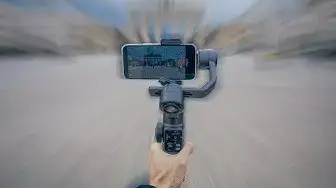

Como hacer un HYPERLAPSE con tu TELÉFONO | Grabación y Edición
May 26, 2022


▶🎵 MÚSICA QUE USO EN TODOS MIS VIDEOS: Epidemic Sound http://share.epidemicsound.com/hanns
▶ COLORIZA CON MIS PRESETS: https://bit.ly/2QSqTr0
▶ INCREIBLE LIBRERIA DE VIDEOS (B-ROLL) (2 MESES EXTRAS GRATIS): https://bit.ly/32sWDsN
En este video les muestro que fácil es hacer un hyperlapse con tu teléfono mobil. Para este video utilicé un iPhone 13 y el Zhiyun Smooth 5
Motion Blur Plug In para FInal Cut (Ryan Nagle): https://10154417130356796.sellfy.store/p/vwad/
🎥LISTA DE EQUIPOS QUE USO (Link de afiliados)👇🏻
Cámara: https://amzn.to/3KZ78Iu
Objetivo: https://amzn.to/32IKD9w
Micrófono: https://amzn.to/34lT3nE
Monitor: https://amzn.to/35CdBsV
Luz o lámpara: https://amzn.to/3Gbpq5P
C-Stand o Tipo-C: https://amzn.to/3IRo81w
ÍNDICE:
00:13 Que es un Hyperlapse
01:22 Equipos que utilizo
01:20 Configuración de la aplicación o cámara
02:00 Empezar a grabar
03:02 Edición
03:10 Velocidad
03:24 Estabilización del video
03:37 Efecto Motion Blur
04:35 Efectos de sonido
📱Sígueme en:
Instagram: https://www.instagram.com/hannstagram1
Twitter: https://twitter.com/hannsschmelzer
Facebook: https://www.facebook.com/hannstagram/
💼 Para colaboraciones y patrocinios - Business inquires and sponsorships :
[email protected]
#EpidemicSound #YouTube #videos
Show More Show Less