0:00
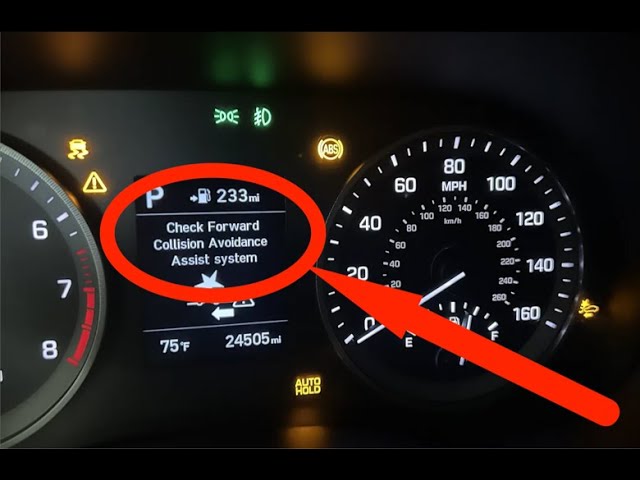
If your Tucson just popped up the
0:01
message, check forward collision
0:03
avoidance system, don't panic. This
0:06
usually isn't a mysterious electrical
0:08
failure. First, park in a safe spot and
0:10
shut the car off. Take a slow walk
0:12
around the front and look for obvious
0:14
stuff, ice, mud, road salt, or even a
0:17
plastic bag stuck in the grill where the
0:19
radar lives. The radar module is usually
0:22
mounted behind the center of the front
0:23
bumper grill and the forward camera sits
0:25
behind the windshield near the rear view
0:27
mirror. So, both spots need to be clean.
0:30
If you find dirt or bugs, wipe them away
0:32
gently with a soft cloth and mild soapy
0:34
water. Don't use aggressive scrapers or
0:36
high-pressure washers right on the
0:38
sensor. Next, check the inside of the
0:40
windshield at the top center where the
0:42
camera is mounted. If the inside glass
0:44
is greasy or there's a sun shade sticker
0:46
in the way, clean it off and make sure
0:48
the camera housing isn't loose. After
0:50
cleaning both the outside sensor area
0:52
and the inside windshield, restart the
0:54
car and give the system about a minute
0:56
to reself check. Often that clears the
0:58
warning. If the message stays, open the
1:01
vehicle settings and confirm forward
1:03
collision avoidance is enabled.
1:04
Sometimes settings get toggled or grayed
1:06
out after an error, and toggling the
1:08
feature off and back on can coax the
1:10
system back to normal. On many Tucson
1:13
models, you can reach driver assistance
1:14
from the instrument cluster or
1:16
infotainment settings and check forward
1:18
collision avoidance there. If you've
1:20
recently had bumper work, a windshield
1:22
replacement, or added aftermarket
1:24
accessories to the grill, those can
1:26
misalign or block the sensors and will
1:28
need addressing. If cleaning and
1:30
toggling don't fix it, the next step is
1:32
diagnostic. Use an OBD capable scan tool
1:36
that can read body and driver assist
1:38
modules or let a shop pull codes. The
1:40
codes will usually tell you whether a
1:42
sensor is simply blocked, misaligned, or
1:44
failing. Don't try to take the radar
1:46
module apart yourself. The owner manual
1:49
warns against disassembling the
1:50
detecting sensors. If the DTC's show
1:53
calibration or hardware issues, or the
1:56
system started after body or windshield
1:58
work, book a calibration and inspection
2:00
with an authorized dealer. These systems
2:02
require precise alignment and sometimes
2:04
a software update to work right. Dealers
2:07
have the proper tools to calibrate the
2:09
camera and radar and to update the ECU
2:11
software if needed. Quick safety notes.
2:14
Don't drive with the system disabled
2:16
expecting it to help. And don't attach
2:17
anything to the grill that sits in front
2:19
of the sensor. If you get an
2:21
intermittent message, it appears and
2:23
disappears. Document when it happens and
2:25
show that to the technician because that
2:27
pattern helps pinpoint whether it's
2:29
contamination, wiring, or a failing
2:31
sensor. If you follow these steps,
2:34
clean, check the camera, toggle the
2:36
setting, scan for codes, and get dealer
2:38
calibration when required, you'll
2:40
resolve most check forward collision
2:42
avoidance system messages without
2:44
replacing expensive parts.