Up next in 10



Pulse on C# Corner
Show More Show Less View Video Transcript
0:00
Welcome to another episode of C-sharp corner videos. In this video I will talk
0:06
about new feature called Pulse we just launched on the site. If you go to C-sharp
0:15
corner home page you will see there is a blue blinking icon called Pulse. So what
0:25
What this pulse is really all about, it's basically telling what is happening on the
0:30
website right now. So let's just click on it for a second
0:42
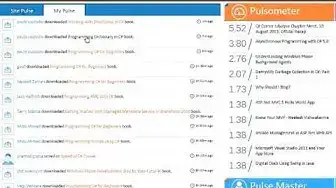
When you click on this pulse, you will go to this pulse page where you can see all the
0:48
activities happening on the website. You can see who has asked a question
0:54
You can see somebody has replied a question on the forums. If somebody has posted an interview questions, somebody has posted an article, somebody has
1:03
posted a comment on an article somebody replied a comment somebody liked a profile page somebody so all the activities happening on the website that is kind of public you will be able to see that activity right here
1:19
so if you look at this closely you can see somebody has posted comment on some article
1:26
and if you click on this hyperlink you will go to that article you can also see that somebody has
1:32
replied and you can also see this user had joined my chapter somebody user has
1:42
a register for an event and you know everything you can also see if somebody
1:49
that has downloaded a book and all that kind of stuff you will be able to see that that's site pulse there's another tab if you are logged into the site as
1:59
you can see I'm logged in right here. There's just something called my pulse tab. On this
2:05
my pulse tab it's all about you it's all about in this case it's all about me. So anything
2:12
happening related to my content What does that mean If I have a blog or I have an article or I have a forum question or I have a book uploaded anything happens related to those contents I should be able to see that here if somebody post a question on my
2:30
article or comments on my article or reply to my article I will be able to
2:36
see that there even I have posted this vote and somebody has voted on it so I
2:42
can also see that now good thing with this is all you can do is just come here
2:49
to this page and just watch this see what's happening on your content and all
2:54
you can do just manage from here obviously this is still a work in
2:59
progress we are still improving it we are adding more feet more functionality
3:03
to it but this is just a good start in the right sidebar as you can see the two
3:10
controls one is called Pulsometer and other one is called PulseMaster. So the
3:15
Pulsometer is telling us is what content is most active right now So in this number as you can see there a called pulse score This is determined by using a different really really complex algorithm so it it basically includes
3:35
number of views number of the way its comments replies on comments likes and
3:41
so many other factors before this score is really calculated so as you can see
3:45
this first C sharp corner jable per chapter meet is right now known is
3:52
highest ranking and this ranking is basically calculated within last 24 hours starting from now and then in pulse master it tells you who is the most
4:05
active user on the site within last 24 hours from right now so I do hope I do
4:12
hope really some of you user some of you guys really like this and use the
4:17
section because my plan is to you know we are still working on it there will be
4:22
more changes to that and goal is basically eventually I can come here on
4:28
the section and I can even post anything from here. So hopefully you like this functionality
#Software
#Online Communities
#People & Society
#Monitoring Software