Up next in 10



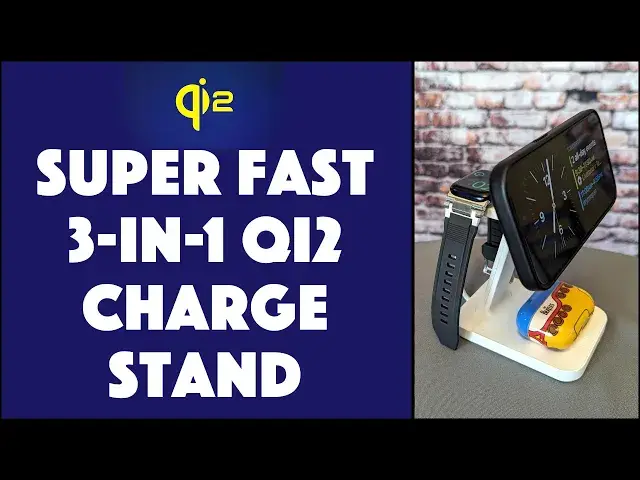
Ready to future-proof your iPhone, Apple Watch, and AirPods charging solution? Then you'll ♥️ the new Mophie Snap Plus 3-in-1 Wireless Charge Stand with Qi2 support. Qi2 gives you faster charging and will work with upcoming Android phones that support the standard too. Difference between Qi Wireless and Qi2 Wireless? 3x the charging speed, but it standardizes the magnetic charge placement that we Apple fans know as MagSafe. Review by tech expert Dave Taylor, including his iPhone 15 Pro, Apple AirPods Pro Gen 2, and Apple Watch Series 7.
Check it out at: https://amzn.to/3JO5hHm
Visit Dave's Q&A Web site at: https://www.AskDaveTaylor.com/
#mophie #qi2 #chargestand #iphonestand #qi #zagg #askdavetaylor
Show More Show Less View Video Transcript
0:00
This charge stand features Chi-2 wireless charging
0:03
Let's check it out. Dave Taylor here, and if you're like me, you've got a lot of devices
0:15
And you're constantly thinking, do they need charging? Where do I charge it
0:20
How could I charge them? Especially, how could I charge them all at the same time
0:24
Enter this. This is the Mofi Snap Plus 3 and 1. one, two, three, three and one wireless charge stand
0:34
And as you can see, it's a pretty cool looking design. It's very simple, very elegant
0:40
But what's really interesting about it is it's actually using the Chi-2 standard
0:45
So Chi-2 gives you faster charging, and it gives you the equivalent of MagSafe for non-Apple devices
0:53
Now, right now, Chi-2 is really only on the iPhones, and that's the 13-14-9
0:59
and 15 are Chi 2 compatible. Maybe the 12, you can try that
1:05
but we will eventually have that with Android phones too, because Android phones already have wireless charging
1:11
They just don't have that cool magnet that Apple includes. So this gives you Chi 2 phone charging
1:18
which is up to three times faster than an older Chi wireless charging
1:25
And it also gives you, like I said, those magnets. It specifies placement of the magnet
1:29
one of the magnets for so that you don't have to think about it
1:33
It just gets it into the right position. And on the iPhone, when you get it into the right position
1:38
it even has a special display mode. But even if that display mode doesn't work
1:43
I'm now fast charging this, and I can just pop it off, or I can put it in a different orientation
1:49
and I don't have to worry about fine-tuning it. There no like little display that I have to get like get that crosshair right in the center and you perfectly charging It just does that with the magnets Now that charging
2:02
That's great. I also happen to have Apple AirPods Pro 2. Second generation, I put them here
2:10
Do you hear that ding? They're charging at the same time. But not only that, I'll turn this sideways
2:16
Make sure that stays on. And I have an Apple Watch. And if you put your Apple watch on the back, it's also charging
2:24
But here's what's cool is that if you have a Series 7 or newer, which includes the Ultra
2:31
then it will actually do a fast charge there too. So, let's talk wattage
2:36
15 watts to the phone, maximum possible. 7.5 watts to the watch, maximum possible
2:43
And 5 watts for the AirPods, all simultaneously. How does it do that
2:48
because this, the little gizmo you plug into your power, this is a 36 watt charger
2:57
Now, I will note, it is hardwired. You cannot use this for other devices
3:02
It is hardwired. However, I'm going to take all this stuff off
3:07
On the bottom, you can unplug this. So now you have a 36 watt USBC charger
3:13
If you give this less power, it won't be able to split that out
3:18
and give that much power to each device. So obviously you want to use the charger with the stand
3:25
and then it's just super easy to just put everything on here and get it all charging all at the same time
3:32
And I like that it's easy and that it's fast, and one thing, props to Mofi, this is 50% post-consumer recycled plastics
3:41
I'm really happy to see that trend. Their box is very attractive
3:46
It's also very recyclable. That's pretty important. So that everything I can tell you Let me tell you about charging speed So I put my phone on this is an iPhone 15 Pro I put it on at 35 charge
4:01
and 30 minutes later it was a 70% charge. So that means it was charging effectively at 70% an hour
4:09
which means that if I put it on at near zero, it should get up to that 80% mark
4:15
which is really where you want to stop charging. But it should get up to that, probably
4:19
in about an hour and just a little bit. Now, worth noting is that the iPhone, like many smart devices
4:28
doesn't charge at the same speed at different levels of battery. So you can go from zero to 25 much faster than 75 to 100
4:38
And in fact, Apple now has in iOS a feature that has it basically stopped charging at 80%
4:46
And why it does that, you might have said, well, why can't I get 81%? You can if you turn it off, but leave it on because that's going to give
4:54
you a lot more longevity with the battery on your phone, and that's a good thing. So people have
5:00
had all sorts of conspiracy theories about the way Apple manages battery charging on the iPhones
5:06
They're all wrong. Apple has really thought through how to maximize your battery longevity
5:13
not just give you the fastest and greatest possible charge. So I like that too. Now
5:19
Back to the Mofi. So this is 8.5 inches high, 8.3 inches tall, 5.8 inches wide, 3.5 inches deep. I guess, no, I'm sorry, let's say that again
5:31
5.8 inches deep and 3.5 inches wide. And it is fairly heavy. It's over a pound, but that's also so it stays in place and it doesn't like tilt forward
5:43
But the phone I should note the phone charge part does actually tell So you can get that perfect angle If you like to have it really high it can do really high super easy now this is going to be great for your nightstand
5:59
it would be great for your office desk and everything you have you can just keep it all well
6:05
charged and that ultimately is the mark of success in this digital age so if you're looking
6:12
for a stand to charge your devices it's a little on the spendy
6:16
side, but it covers everything. You don't know if they'd like bring your own little charging plugs or
6:22
wires or anything. It is a self-contained unit and it does everything and it does it fast. That is pretty
6:28
sweet. Now, we should talk about the price too, of course, but before we get to the price
6:33
I'm going to ask you to subscribe to my channel. Just go click on that subscribe button. You're done
6:39
Great. Now, hit that bell icon for notifications too. And if this was a value, and I certainly
6:45
hope it was, give me a thumbs up. Appreciate that. Great. Now, let me take this off. And this is the
6:52
Mofi Snap Plus 3-1 wireless charge stand, and it is 12995 at Amazon.com. So it is a fairly expensive
7:04
solution for this problem, but this is a solution that is future-proof because it's Che2
7:10
and it can charge everything that you have, especially if you're deep in the Apple Eco
7:15
system like I am it can charge it all at once simultaneous that is a big win that's all I
7:22
got got to get everything charged up so I hope to catch you in my next video
#Gadgets & Portable Electronics